Item Authoring
Adds a touch of wimsy to your world, showing off who made an item. When a signed item breaks, the server announces it, crediting the original creator.
⬇ Download on Modrinth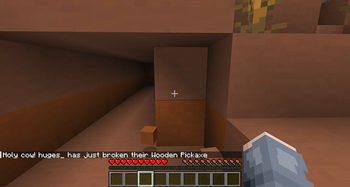
Item Authoring signs the gear you craft. Every tool, weapon, and piece of equipment you make is permanently stamped with your name and the date it was forged, shown right in the item's lore. When one of these items finally breaks, the server announces it to everyone, crediting the player who originally created it. A lightweight way to give crafted items provenance and a story on multiplayer worlds.
- Edition: Minecraft Java
- File type: .jar
- Minecraft version listed: 26.2
- How to install: Install the matching mod loader (Forge, Fabric or NeoForge) for your Minecraft version. → Download the .jar. → Put it in the .minecraft/mods folder and launch that loader profile.
- Where to get it: Opens on Modrinth — not every file is mirrored on our own servers.
Install steps are the general flow for this file type — How to install Minecraft Java mods & modpacks walks through it step by step.
- Ships as item-auth-1.0.0.jar — drop this file into the mods folder
- Download size: 31 KB
- Download link checked 27 Sept 2026 — working
These come from our own check of the pack file, not from the source page.