
Creative dimension
Java mod listed for Minecraft 1.21–26.x. Downloads from the MC Java Mods app on Android.
This datapack/mod adds the creative dimension—a parallel dimension to the overworld where you can unleash your creativity in creative mode.
I don't know my version or loader

Get now a free Minecraft server with freemchost
✔️ 24/7 hosting (All paid plans are 24/7 and also some free plans)
✔️ Full access (you have full access to your files)
✔️ 24gb RAM
✔️ Custom Jars allowed (You can upload literally every version)
✔️ Less Ads
✔️ You can renew your server at any time
⚠️Your Server expires after 48h if you don't renew it (but you can upgrade your server to a cheap paid tier (starting at 0.59€/monthly) for autorenew)
➡️ Get Started here and get 0.50€ credits free
Creative Dimension
This datapack/mod adds the creative dimension—a parallel dimension to the overworld where you can unleash your creativity in creative mode.
How to use
- Craft a Creative Core using following recipe:
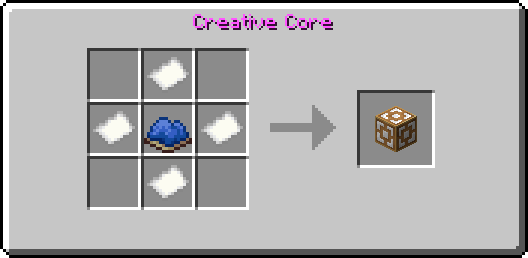
You can also run instead (does not work in 26.3) /loot give [target] loot creativedim:creative_core
- Store all your items in for example in a chest because when you leave the creative dimension your inventory will be wiped
- Holdrightclick the item for 5-10sec in the overworld (a warning will appear)
- After that you will ported into the creative dimension and your gamemode will be set to creative
- Holdrightclick the item for 5-10sec again
- You will now ported back into the overworld and your inventory will be cleared

Importan to know ⚠️
- After switching back to the overworld your inventory will be deleted to prevent cheating (to save your items store them for example in the enderchest before going to the creative dimension)
- Following items are disabled in the creative dimension to prevent cheating
- Eye of ender
- Enderchest
- This pack is only required on the server side (you need only to install it on your server or the host world)
Credits ♥️
🖌️Thanks to Foxeddev for making the cool Icon♥️
💡Big thanks to Kyoko883 for the full idea of the creative dimension ♥️
Join my Discord🎮
- to get help🛟
- report bugs🐛
- suggest something💡
- ask me other questions❓
- get the latest news about my mods / datapacks📰 You can join here: https://discord.gg/r2NkP67T9r
- Edition: Minecraft Java
- File type: .jar
- Minecraft versions listed: 1.21.4, 1.21.5, 1.21.6
- How to install: Install the matching mod loader (Forge, Fabric or NeoForge) for your Minecraft version. → Download the .jar. → Put it in the .minecraft/mods folder and launch that loader profile.
- Where to get it: Opens on Modrinth — not every file is mirrored on our own servers.
Install steps are the general flow for this file type — How to install Minecraft Java mods & modpacks walks through it step by step.
- Ships as creativedimension-1.0.jar — drop this file into the mods folder
- Download size: 158 KB
- Download link checked 28 Sept 2026 — working
These come from our own check of the pack file, not from the source page.