
Build it Yourself: Prophunt
Java data pack listed for Minecraft 1.21–26.x. Downloads from the MC Java Mods app on Android.
⬇ Download on Modrinth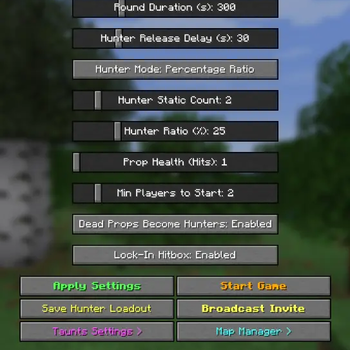
Build It Yourself: Prop Hunt
A datapack designed to remove the stress of finding the perfect Prop Hunt map for you and your friends. With Build It Yourself: Prop Hunt, you build the map yourself with built in tools that make it fast and simple to set up and start a match in minutes. Features full support for multiple maps, interactive taunts, custom loadouts, and configurable game settings.
Core Features
- Block Disguise System: Turn into any block in the game as a prop, matching the block's exact rotation.
- Interactive Taunts: Props can trigger 4 distinct taunts to earn points and climb the post-match leaderboard:
- Meow: Plays a cat meow sound to draw nearby hunters.
- Hunter Ray: Fires a visible particle beam directly toward all hunters for a second.
- Glow: Temporarily lights up your block disguise with a golden outline.
- Firework: Launches a firework rocket into the sky from your position.
- Leaderboard: Props can earn points by using taunts. The more taunts used the more points earned. Shows who was the bravest prop among them all.
- Configurable Settings: Customize match length, hunter counts, prop health, taunt cooldown, and more.
- Multi-Map Support: Create and store multiple maps, switching between them seamlessly.
- Per-Map Settings: Configuration changes save independently per map, allowing distinct playstyles for different maps.
- Custom Hunter Loadout Creator: Equip custom armor, weapons, and items in-game and save your current inventory directly as the hunter starting kit.
- Built-in Map Manager & In-Game GUI: Complete map creation, spawn marker placement, and menu navigation using Minecraft's dialog system.
Player Guide / How to Play
For Props (Hiders)
- Choosing a Disguise:
- You start with a Prop Brush in your first inventory slot.
- Right-click any block in the environment to morph into that block. You can change your disguise at any time before getting caught.
- Locking In:
- Stand completely still for 5 seconds.
- You will snap into place.
- While locked, your disguise settles seamlessly into the environment. Depending on host settings, you will either have a solid hitbox or be walkable.
- Using Taunts:
- Right-click any taunt item in your hotbar (Meow, Ray, Glow, or Firework).
- Taunts award bonus points for the final leaderboard, but expose your location to alert hunters.
For Hunters (Seekers)
- The Waiting Phase:
- Hunters are held in a waiting chamber while props scatter and hide.
- The Hunt:
- Once released, search the arena for suspicious, duplicated, or misaligned blocks.
- Listen for cat sounds, watch for firework launches, spot glowing blocks, and trace particle beams back to their source.
- Attacking:
- Strike any block you suspect of being a hidden player.
- Landing a hit triggers an impact sound, causes the prop to jump out of lock, and reduces their hit points!
Admin & Host Setup
1. Installation
- Place the
BIY Prophuntfolder into your world'sdatapacks/directory:
.minecraft/saves/<YourWorld>/datapacks/
- Enter your world (if the world is already running, leave and rejoin for it to fully load).
- If prompted by a experimental/custom confirmation message, select I Know What I'm Doing!
- A welcome confirmation message will appear in chat once loaded to show the pack is working.
2. Opening the Settings Menu
Open the host dialog at any time via:
- Pressing your Quick Actions keybind (listed in the pack's load message).
- Clicking the Prop Hunt Settings button in the Escape / Pause menu.
3. Setting Up a Map
- Open the Settings menu and choose Map Manager.
- Click + New Map, enter a name, and select Create & Select.
- Click Toggle Edit Mode to receive your 4 spawn configuration tools:
- Lobby Spawn Location: Right-click to set the post-game gathering point.
- Hunter Waiting Room Location: Right-click to set the pre-release holding chamber.
- Prop Spawn Locations: Right-click to add one or multiple spawn locations for props.
- Released Hunter Spawn Locations: Right-click to add one or multiple entry points for hunters.
- Return to the Map Manager and click Quick Save Active Map.
- Click Toggle Edit Mode to exit and clear the marker tools.
- Configure your map settings and taunt settings or just start the game to instantly start playing with default settings.
The saved map is now set as active for your next game. You can manage or swap active maps at any time via Map Manager > Select Map or List Maps in Chat.
Creating Additional Maps
To add more map, repeat the steps above with a new name, or use Save Map As... to save current marker placements under a new map name.
Settings
1. Main Settings Menu
Opened via your Quick Actions key or the Pause Menu.
| Setting | Default | What It Does |
|---|---|---|
| Round Duration (s) | 300s (5 min) | Total match time before props win by surviving. |
| Hunter Release Delay (s) | 30s | Time props have to hide before hunters leave the waiting room. |
| Hunter Static Count | 2 | Number of hunters assigned when using fixed hunter counts. |
| Hunter Ratio (%) | 25% | Percentage of players selected as hunters when using ratio scaling. |
| Prop Health (Hits) | 1 | Number of hits a prop can take before elimination. |
| Min Players to Start | 2 | Minimum players required in the lobby to launch a match. |
| Dead Props Become Hunters | Enabled | When enabled, eliminated props respawn as hunters. When disabled, they become spectators. |
| Lock-In Hitbox | Enabled | When enabled, locked props have solid physical collision. When disabled, players can pass through them. |
Action Buttons in Main Settings
- Apply Settings: Saves and applies all current changes into active map.
- Start Game: Launches the match using the current configuration.
- Save Hunter Loadout: Copies your current inventory, armor, and offhand item to use as the hunter kit.
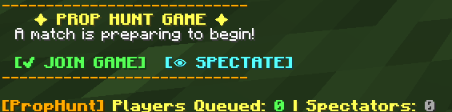
- Broadcast Invite: Posts clickable
[JOIN GAME]and[SPECTATE]links into chat. - Taunts Settings: Opens the Taunts configuration menu.
- Map Manager: Opens the Map Manager menu.
2. Taunt Settings Menu
Opened via Settings -> Taunts Settings.
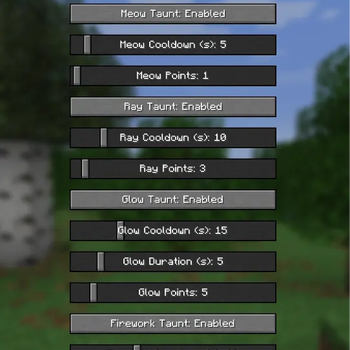
| Setting / Option | Default | What It Does |
|---|---|---|
| Taunts | Enabled | Master toggle to enable or disable all taunts globally. |
| Meow Taunt | Enabled | Enables or disables the Meow sound taunt. |
| Meow Cooldown (s) | 5s | Cooldown period before Meow can be used again. |
| Meow Points | 1 | Leaderboard points awarded when using Meow. |
| Ray Taunt | Enabled | Enables or disables the Hunter Ray beam taunt. |
| Ray Cooldown (s) | 10s | Cooldown period before Hunter Ray can be cast again. |
| Ray Points | 3 | Leaderboard points awarded when using Hunter Ray. |
| Glow Taunt | Enabled | Enables or disables the temporary Glow outline taunt. |
| Glow Cooldown (s) | 15s | Cooldown period before Glow can be used again. |
| Glow Duration (s) | 5s | Duration the glowing outline remains visible to hunters. |
| Glow Points | 5 | Leaderboard points awarded when using Glow. |
| Firework Taunt | Enabled | Enables or disables the Firework launch taunt. |
| Firework Cooldown (s) | 20s | Cooldown period before a firework can be launched again. |
| Firework Points | 4 | Leaderboard points awarded when launching a firework. |
Action Buttons in Taunt Settings
- Apply Taunts: Saves and applies updated toggles, cooldowns, and point values.
- Back to Settings: Returns to the main Prop Hunt Settings menu.
3. Map Manager Menu
Opened via Settings -> Map Manager.
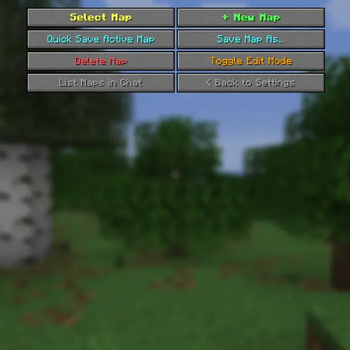
| Action / Button | What It Does |
|---|---|
| Select Map | Prompts for a saved map name to load its spawn points and set it as active. |
| + New Map | Creates a new empty map profile. |
| Quick Save Active Map | Overwrites the active map profile with all currently placed spawn markers. |
| Save Map As... | Saves currently placed markers under a new map name. |
| Delete Map | Permanently deletes a saved map profile and its spawn points. |
| Toggle Edit Mode | Toggles marker visualization and equips the 4 spawn placement tools. |
| List Maps in Chat | Prints an overview of all saved maps and the active selection to chat. |
| < Back to Settings | Returns to the main Prop Hunt Settings menu. |
Contact Me
If you encounter any bugs or have a question send me a message on discord - @notblazon
- Edition: Minecraft Java
- File type: .jar
- Minecraft versions listed: 1.21.6, 1.21.7, 1.21.8
- How to install: Install the matching mod loader (Forge, Fabric or NeoForge) for your Minecraft version. → Download the .jar. → Put it in the .minecraft/mods folder and launch that loader profile.
- Where to get it: Opens on Modrinth — not every file is mirrored on our own servers.
Install steps are the general flow for this file type — see the MC Java Mods guides for the full walkthrough.
- Downloads as BIY Prophunt.zip
- Download size: 87 KB
- Download link checked 18 Oct 2026 — working
These come from our own check of the pack file, not from the source page.