
StatoGlyph
Java mod listed for Minecraft 1.21. Downloads from the MC Java Mods app on Android.
⬇ Download on Modrinth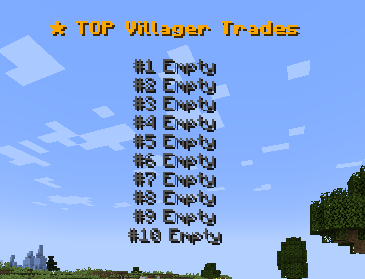
✦ StatoGlyph
Modern holographic leaderboards for Paper 1.21+
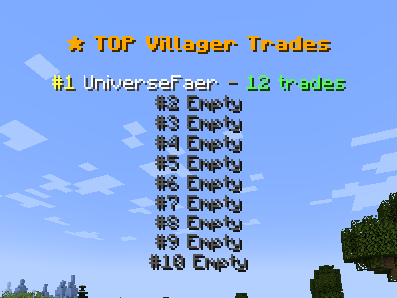
StatoGlyph turns your server statistics into clean, floating leaderboards using Minecraft's native TextDisplay entities.
Display player rankings for kills, playtime, economy, movement, villager trades, and 50+ other statistics — with complete control over how each leaderboard looks and behaves.
Lightweight • Customizable • Real-time • Paper 1.21+
✨ Highlights
🏆 Real-Time Leaderboards
Create floating rankings that automatically update as your players progress.
📊 50+ Statistics
Choose from a large collection of built-in statistics covering combat, economy, movement, activity, interactions, and more.
🎨 Fully Customizable
Make every leaderboard fit your server's style.
Customize:
- Titles
- Text formats
- Colors
- Scale
- Alignment
- Billboard mode
- Display settings
- Update intervals
💰 Economy Support
Connect your server economy with:
- Vault
- PlayerPoints
Create leaderboards for balances and other supported economy statistics.
⚡ Performance Focused
StatoGlyph uses intelligent caching and lightweight TextDisplay entities to keep its server impact low — even with multiple active leaderboards.
🔄 Live Configuration
Modify your leaderboards and reload the configuration without restarting your server.
🔌 PlaceholderAPI
Use PlaceholderAPI to integrate StatoGlyph with your existing server setup.
📊 Statistics
StatoGlyph includes 50+ built-in statistic types across multiple categories:
| Category | Examples |
|---|---|
| ⚔️ Combat | Kills and combat-related statistics |
| 💰 Economy | Balance and economy statistics |
| 🏃 Movement | Distance and movement statistics |
| ⏱️ Activity | Playtime and activity statistics |
| 🛠️ Interaction | Player interaction statistics |
| 📦 Miscellaneous | Other Minecraft statistics |
Simply select the statistic you want when creating a leaderboard.
No complicated setup required.
🚀 Quick Start
Creating a leaderboard is simple.
Stand where you want your leaderboard to appear and run:
/statop create <name> <type>
Example
/statop create richest vault_balance
Your leaderboard will be created at your current location.
📜 Commands
| Command | Description |
|---|---|
/statop create <name> <type> |
Create a new leaderboard |
/statop delete <name> |
Delete a leaderboard |
/statop move <name> |
Move a leaderboard |
/statop list |
View all active leaderboards |
/statop types |
View available statistic types |
/statop edit <name> ... |
Edit leaderboard settings |
/statop reload |
Reload all configurations |
/statop update |
Force an immediate update |
🔐 Permissions
| Permission | Access |
|---|---|
statoglyph.admin |
Full plugin access |
statoglyph.create |
Create leaderboards |
statoglyph.delete |
Delete leaderboards |
statoglyph.edit |
Edit and move leaderboards |
statoglyph.list |
View the leaderboard list |
statoglyph.reload |
Reload plugin configuration |
🔌 Integrations
StatoGlyph works with popular server plugins while remaining fully functional with vanilla Minecraft statistics.
Supported integrations
- Vault — Economy statistics
- PlayerPoints — PlayerPoints-based rankings
- PlaceholderAPI — Placeholder support
All integrations are optional.
⚙️ Configuration
Every leaderboard can have its own configuration, allowing you to create completely different displays around your server.
Configure things such as:
- 📌 Leaderboard location
- 🏷️ Title and text format
- 🎨 Colors
- 📏 Scale
- 👁️ Billboard mode
- 🔄 Update interval
- 📊 Statistic type
- 📝 Display formatting
This makes it easy to create separate leaderboards for different areas, game modes, or statistics.
⚡ Performance
StatoGlyph was designed with server performance in mind.
- Intelligent statistic caching
- Lightweight native TextDisplay entities
- Configurable update intervals
- Minimal unnecessary calculations
- Suitable for multiple active leaderboards
Your leaderboards can stay visible and up-to-date without constantly recalculating everything.
💎 Why StatoGlyph?
StatoGlyph is built for servers that want statistics to be visible, useful, and actually look good.
🏆 Powerful — 50+ built-in statistics 🎨 Beautiful — Fully customizable holographic displays ⚡ Lightweight — Caching and optimized updates 🔌 Flexible — Vault, PlayerPoints & PlaceholderAPI 🛠️ Easy — Simple commands and per-leaderboard configuration 🔄 Modern — Built around Minecraft's TextDisplay system
Turn your server statistics into something players can see.
Create. Customize. Compete.
- Edition: Minecraft Java
- File type: .jar
- Minecraft versions listed: 1.21, 1.21.1, 1.21.2
- How to install: Install the matching mod loader (Forge, Fabric or NeoForge) for your Minecraft version. → Download the .jar. → Put it in the .minecraft/mods folder and launch that loader profile.
- Where to get it: Opens on Modrinth — not every file is mirrored on our own servers.
Install steps are the general flow for this file type — How to install Minecraft Java mods & modpacks walks through it step by step.
- Ships as StatoGlyph-1.0.0.jar — drop this file into the mods folder
- Download size: 60 KB
- Download link checked 18 Oct 2026 — working
These come from our own check of the pack file, not from the source page.