
DexLeaderboard
Most leaderboard plugins pick a side. Either you get a chest GUI that looks dated on 1.21.6+, or you get a shiny dialog screen that leaves your Bedrock players and your 1.20 crowd staring at an error message.
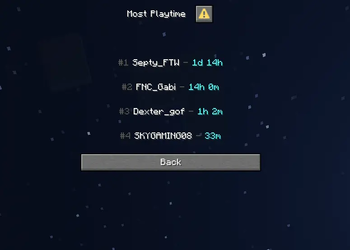
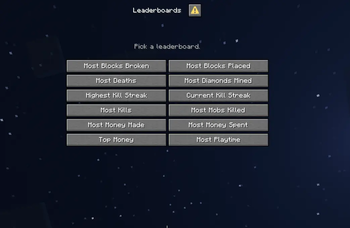
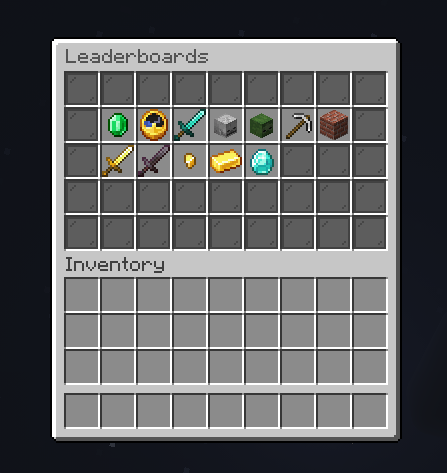
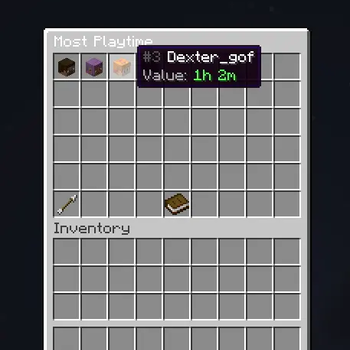
DexLeaderboard renders both, from the same config, with the same data, in the same order. A player on 1.21.7 opens /lb and gets the native dialog UI. A Bedrock player opens /lb and Geyser turns the chest menu into a native Bedrock form. Someone still on 1.20.1 through ViaVersion gets the chest GUI with player heads. Nobody sees a broken screen, and you configure it once.
Runs everywhere, one jar
| Platform | Screen |
|---|---|
| Paper / Purpur 1.21.6+ | Dialog for Java 1.21.6+, chest for the rest |
| Paper / Purpur 1.20.6 – 1.21.5 | Chest GUI |
| Spigot / CraftBukkit 1.20.6+ | Chest GUI |
| Folia | Fully supported, region schedulers used automatically |
| Bedrock (Geyser + Floodgate) | Chest GUI, rendered as a native form |
No shaded libraries, no NMS, no version specific jars. Every Paper-only call sits behind a runtime check and the Folia scheduler lives in its own class, so a Spigot server never even loads it.
Five data sources
- Vault — balances from any Vault economy, offline players included
- Statistic — any vanilla statistic: playtime, kills, deaths, mob kills, blocks mined, distance walked, anything the game tracks. Typed statistics work too, so "most diamond ore mined" is one line of config.
- Placeholder — read one PlaceholderAPI value per stored player. If a plugin exposes it, you can rank it.
- Placeholder-rank — already running ajLeaderboards? Point the board at its per-rank placeholders and keep your existing data.
- Custom — push values in from your own plugin, a Skript, or
/lb set. Event wins, kill streaks, seasonal points, whatever you run.
Built for real player counts
Statistics and balances have to be read on the server thread, so DexLeaderboard walks the player list in small batches instead of freezing the server. Finished boards are cached in memory and written to disk, so a restart shows real data immediately instead of an empty screen. Caps on player count and last-seen age keep a five year old server from scanning thousands of dead accounts every cycle.
Everything is configurable
One YAML file per board. Title, icon, slot, sort direction, top size, full size, number format (2.2T / 2,200,000 / 3d 4h), entry format, hover tooltip, click command, empty message, per-board permission. Add a board by dropping a file in the folder — no code, no restart beyond /lb reload.
Colours accept both legacy codes (&a, �fc88) and MiniMessage, and player-head glyph fonts are supported if you run a resource pack.
Commands
/lb                                  open the leaderboards
/lb <board> [page]                   open one board
/lb refresh                          rebuild every board now
/lb reload                           reload the config files
/lb set <board> <player> <value>     custom boards
/lb add <board> <player> <value>     custom boards
/lb clear <board>                    wipe a custom board
Aliases: /leaderboard, /leaderboards, /top, /baltop
Permissions: dexleaderboard.use, dexleaderboard.admin, plus optional per-board permissions.
Placeholders
%dexlb_<board>_<rank>_name%     name at that rank
%dexlb_<board>_<rank>_value%    formatted value at that rank
%dexlb_<board>_<rank>_raw%      raw value at that rank
%dexlb_<board>_rank%            the viewer's own position
%dexlb_<board>_value%           the viewer's own value
%dexlb_<board>_size%            how many players are on the board
Drop them straight into holograms, scoreboards or your chat format.
Requirements
- Java 21 (server 1.20.6 or newer)
- Optional: Vault (money boards), PlaceholderAPI (placeholder boards and the expansion), ViaVersion (old client detection), Floodgate (Bedrock detection)
Support
Docs: https://dextergof.fun Discord: https://discord.com/invite/YWHpeKCK5n
Ships with six ready-made boards: money, playtime, kills, deaths, mobs killed and diamonds mined. Install, restart, done.
- Edition: Minecraft Java
- File type: .jar
- Minecraft versions listed: 1.20, 1.20.1, 1.20.2
- How to install: Install the matching mod loader (Forge, Fabric or NeoForge) for your Minecraft version. → Download the .jar. → Put it in the .minecraft/mods folder and launch that loader profile.
- Where to get it: Opens on Modrinth — not every file is mirrored on our own servers.
Install steps are the general flow for this file type — How to install Minecraft Java mods & modpacks walks through it step by step.
- Ships as DexLeaderboard-1.1.2.jar — drop this file into the mods folder
- Download size: 78 KB
- Download link checked 28 Sept 2026 — working
These come from our own check of the pack file, not from the source page.