
DanseAvecLaStare
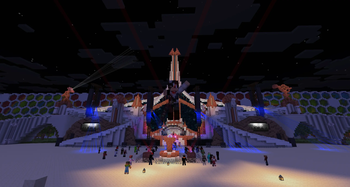
Paper 1.21.x plugin that displays animated 3D dancers on your server, powered by ModelEngine 4. Make players dance with their own skin, or place persistent static dancers (NPCs) to decorate an area, a nightclub, an event, a party...
Originally developed for the TomorrowCraft server.
⚠️ Required dependency: this plugin requires ModelEngine 4.0.9 installed on the server, as well as the resource pack generated by ModelEngine added to your own resource pack's configuration. Without ModelEngine, the plugin cannot function.
⚠️ Incompatible with shaders: models animated via ModelEngine do not display correctly (or at all) on clients using a shader pack. This is not a limitation of the plugin itself but of how ModelEngine renders models client-side.
✨ Features
- Player dance — trigger a dance animation on yourself or another player, using their real skin (fetched via the Mojang API, cached to avoid repeated calls).
- Static dancers (NPCs) — create persistent dancers, automatically saved and restored on server restart. Move, resize, rename, highlight.
- Skin cache — pre-register reusable skins under an alias, without a new call to the Mojang API each time it's applied.
- Choreographies — synchronize multiple static dancers as a group for coordinated animations.
- Playlists — schedule sequences of dance styles (looping or one-shot), applicable to a player, a dancer, or an entire group.
- In-game menus — full interface for players (styles, preview) and for staff (NPC management, playlists, choreographies, skin cache).
- Fine-grained permissions — one permission node per dance style, per feature, and per role (player / DJ / staff / admin), designed for LuckPerms.
- Performant at scale — all static dancers and choreography groups share a single global task (instead of one task per dancer): the number of scheduled tasks stays constant regardless of the number of NPCs.
🎮 Main commands
| Command | Description |
|---|---|
/danse <style> |
Start a dance with your own skin |
/danse <style> <username> |
Start a dance with another player's skin |
/danse preview <style> |
Preview a style for a few seconds |
/danse stop / /danse list |
Stop your dance / list available styles |
/danse npc spawn <id> <style> |
Create a static dancer at your position |
/danse npc list |
List active static dancers |
/danse skin save <alias> <username> |
Save a skin to cache under an alias |
/danse choreo create <groupId> <id1> [id2…] |
Synchronize a group of dancers |
/danse playlist create <id> |
Create a scheduled playlist of styles |
(Full list of commands and permissions in the documentation provided with the plugin.)
📦 Installation
- Install Paper 1.21.x and ModelEngine 4.0.9.
- Place the DanseAvecLaStare JAR in the
plugins/folder. - Start the server once to generate the configuration.
- Add your
.bbmodelmodels toplugins/ModelEngine/blueprints/, then run/meg reload. - Grab the resource pack generated by ModelEngine and add it to your own resource pack.
- Configure your dance styles in
config.yml(no recompilation needed).
⚙️ Configuration
Dance styles are freely defined in config.yml. The plugin also manages:
dance.maxConcurrent(default500) — maximum number of simultaneous player dances.skinFetcher.maxThreads/skinFetcher.timeoutSeconds— tuning for the Mojang skin fetcher pool (useful when many custom-skin dancers load at startup).
🔧 Dependencies
- ModelEngine 4.0.9 — required, not bundled with this plugin.
📜 License
Project distributed under the MIT license — free to reuse, modify, and redistribute with attribution.
- Edition: Minecraft Java
- File type: .jar
- Minecraft versions listed: 1.21, 1.21.1, 1.21.2
- How to install: Install the matching mod loader (Forge, Fabric or NeoForge) for your Minecraft version. → Download the .jar. → Put it in the .minecraft/mods folder and launch that loader profile.
- Where to get it: Opens on Modrinth — not every file is mirrored on our own servers.
Install steps are the general flow for this file type — How to install Minecraft Java mods & modpacks walks through it step by step.
- Ships as DanseAvecLaStare-2.4.0.jar — drop this file into the mods folder
- Download size: 144 KB
- Download link checked 28 Sept 2026 — working
These come from our own check of the pack file, not from the source page.