Chunk View
Bedrock add-on listed for Minecraft 1.21–26.x. Download on the author's site.
Static 3D chunk & subchunk visualizer (Java F3+G style) for Minecraft Bedrock. No cheats needed, 0 lag, fixed wireframe grid that stays locked in place…
⬇ Download on CurseForge🧊 Chunk View (F3+G Java Style)
Minecraft Bedrock 1.21.0 – 1.26.x+ | Pure Java F3+G Fidelity | Zero Lag
Ever wanted to see exact chunk boundaries in Minecraft Bedrock just like Java Edition's iconic F3+G shortcut?
Chunk View is a lightweight, ultra-optimized, and faithful addon that projects a fixed 3D holographic wireframe around the player, mapping chunks (16×16) and subchunks (16×16×16) in real time.
Whether you are building mob farms, aligning redstone contraptions, planning spawn chunks, or mining along chunk borders, Chunk View gives you pixel-perfect boundary precision without game-breaking clutter.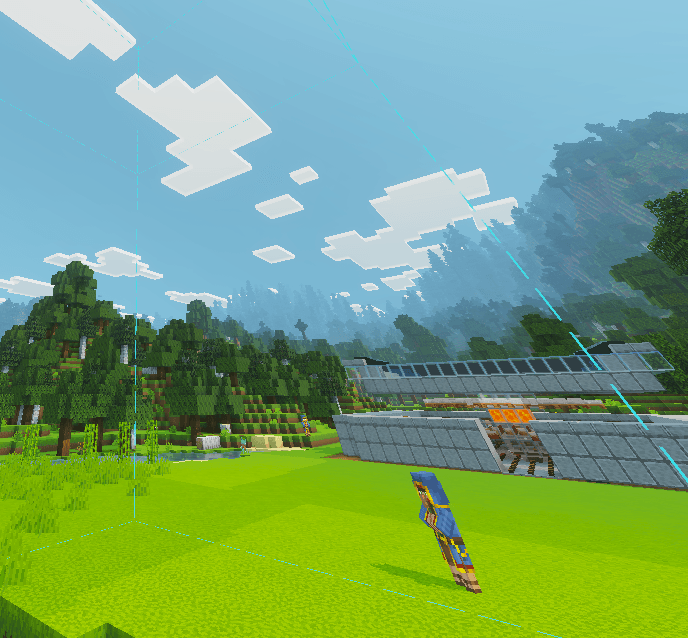
🌟 Key Features
- 📐 Static Java F3+G Wireframe: Horizontal boundary rings are locked to fixed world coordinates (heights at multiples of 16: Y = …, -64, -48, …, 0, 16, 32, 64…). The grid stays 100% static in the world and does NOT slide up or down when jumping, climbing, flying, or swimming.
- 🔓 Works Without Cheats: Fully usable in pure Survival worlds without enabling cheats (
cheatsRequired: false). - ⚡ 0 Lag & Ultra-Optimized: Custom lightweight particle rendering designed for smooth gameplay with zero FPS drop or frame pacing issues.
- 🔲 OFF by Default & Persistent State: New worlds start with the grid turned off. It only activates when you trigger it and remembers your preferences between sessions.
- 🎮 Versatile Activation: Toggle instantly via slash commands, script event, or keybind macro.
- 🌐 Multi-Language Support: In-game descriptions and action bar notifications in English (
en_US), Spanish (es_ES/es_MX), Portuguese (pt_BR), and Russian (ru_RU).
🎮 How to Toggle & Commands
| Method | Activation | Description |
|---|---|---|
| Slash Command | /chunkview:view or /chunkview:toggle |
Instant toggle without requiring cheats enabled. |
| Script Event | /scriptevent chunkview:toggle |
Universal script event trigger (macro / command blocks). |
| Keybind Macro | Bind Alt + G in Settings |
1-touch toggle just like Java Edition F3+G! |
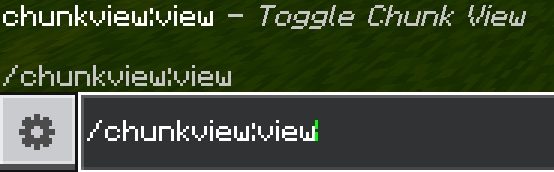
⌨️ Setting up the Alt + G Macro (Windows Bedrock):
- Go to Settings > Keyboard & Mouse.
- Bind
"G"(or your preferred macro key) to the command:/chunkview:view
- Done! Now you can toggle chunk borders on and off with a single keypress, exactly like Java Edition!
📦 Installation Instructions
- Download the official
Chunk_View_v1.0.0.mcaddonfrom the Files tab. - Double-click the file to automatically import both the Behavior Pack and Resource Pack into Minecraft.
- Edit your world settings:
- In Behavior Packs, activate Chunk View.
- The Resource Pack will automatically link and activate.
- Enter your world and enjoy! (No experimental toggles needed).
📜 Terms of Use & Licensing
- ✅ Allowed: Playing in singleplayer worlds, multiplayer servers, and Realms.
- ✅ Allowed: Featuring this addon in YouTube, TikTok, and Twitch videos/streams (crediting Ebone16 is appreciated!).
- ✅ Allowed: Including this addon in public Bedrock modpacks with proper attribution.
- ❌ Prohibited: Re-uploading this addon to other distribution platforms or monetized link shorteners.
Developed with care by Ebone16 | Discord: Ebone_16
- Edition: Minecraft Bedrock
- File type: .mcpack or .mcaddon
- Minecraft versions listed: 1.21, 26.40, 26.50
- How to install: Download the .mcpack or .mcaddon file. → Open it — Minecraft imports it. → In your world: Behavior Packs → Available → Activate, then the same under Resource Packs.
- Where to get it: Opens on CurseForge — not every file is mirrored on our own servers.
Install steps are the general flow for this file type — How to install Minecraft Bedrock addons & mods walks through it step by step.
Chunk View is a free Minecraft Bedrock addon. Compatible with Minecraft 1.21, 26.40, 26.50. Downloaded 379 times (via CurseForge). Download it and open it directly in the game.