
AddonsBedrock
Echo Compass
A survival-safe utility addon that lets you safely teleport back to your personalized bed spawn after a 3-second countdown.
⬇ Download on CurseForge
❗This addon does NOT require any experimental toggles!❗
Ever get lost tens of thousands of blocks away from home and wish you could just snap your fingers to get back to base?
The Echo Compass provides survival players with a reliable, balanced, one-way fast-travel tool back to their home base. It is the perfect addition for long-distance explorers, miners, and adventurers who want a quick way to escape danger and secure their loot without breaking the vanilla survival experience.
✨ Key Features
- Home Teleportation: Hold and use the compass to safely return to your last slept-in bed.
- 3-Second Countdown: Includes a brief warmup timer, balancing the gameplay so you can't instantly "combat-log" out of danger.
- Anti-Strand Safety Lock: Unlike other teleportation mods that dump you at the world's original spawn point if something goes wrong, this addon includes a strict safety check. If you do not have a valid, personal bed spawn registered, the compass will refuse to activate.
- Infinite Utility: Features no durability limits and no cooldowns between uses—it is always ready when you need it.
🔨 Crafting Recipe & Requirements
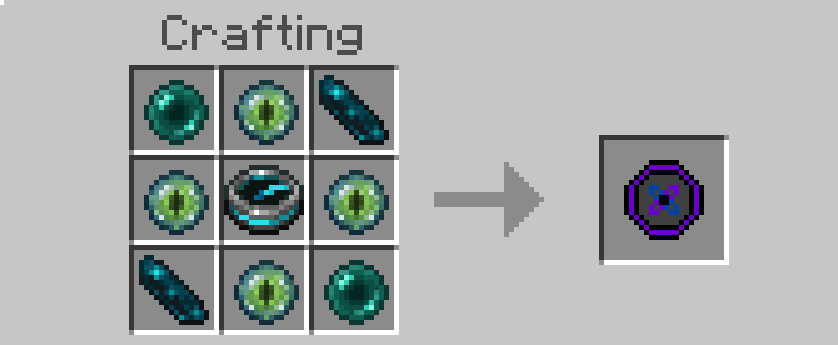
To keep survival gameplay fair and rewarding, the Echo Compass is a high-tier, end game item. You will need to explore both the Nether/Strongholds and brave the Ancient Cities to craft it:
- 🟢 4x Eye of Ender
- 🔵 2x Echo Shards
- 🟣 2x Ender Pearls
- 🧭 1x Recovery Compass You can also find the recipe in the gallery tab!
📖 How to Use
- Craft the Echo Compass using a crafting table.
- Use the interact button on mobile (LT on Xbox/L2 on Playstation) with the item to trigger the 3-second particle countdown. ⚠️Make sure to keep the item in your hand during the countdown, if you swap items it will cancel the countdown!⚠️
- Keep the item in your hand until the countdown finishes to safely arrive back at your bed!
Quick facts
- Edition: Minecraft Bedrock
- File type: .mcpack or .mcaddon
- Minecraft versions listed: 1.20.40, 1.21.30, 1.21.50
- How to install: Download the .mcpack or .mcaddon file. → Open it — Minecraft imports it. → In your world: Behavior Packs → Available → Activate, then the same under Resource Packs.
- Where to get it: Opens on CurseForge — not every file is mirrored on our own servers.
Install steps are the general flow for this file type — How to install Minecraft Bedrock addons & mods walks through it step by step.
Verified by MCModsHub
- Pack type: .mcaddon — behaviour and resource pack in one file
- Download size: 5 KB
- Download link checked 29 Sept 2026 — working
These come from our own check of the pack file, not from the source page.