Meme phone
Bedrock add-on listed for Minecraft 26.x. Download on the author's site.
⬇ Download on CurseForgeMeme Phone
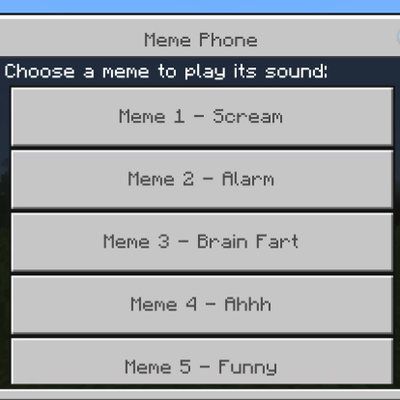
Carry a phone in your pocket that plays meme sounds on demand. Hold the Meme Phone, use it, and pick a meme from the menu.
Features
A handheld Meme Phone item with a custom icon
Use the item to open a menu with 10 meme sounds
Tap a meme and the sound plays right away
Every player automatically gets one Meme Phone the first time they join a world
No duplicates: rejoining or respawning never gives you another one
If your inventory is full, the phone drops at your feet
How to use
Hold the Meme Phone.
Use the item (right-click on PC, tap and hold on mobile).
Choose a meme from the list.
Requirements
Minecraft Bedrock Edition 1.21.0 or newer
Turn on Beta APIs in the world's Experimental settings. Without it the menu won't open.
Activate both packs (Behavior Pack and Resource Pack) in your world.
Installation
Open the .mcaddon file with Minecraft, then create or edit a world and add both packs.
Troubleshooting
Menu doesn't open: check that Beta APIs is enabled.
Didn't get a phone: find it in the Creative inventory under Equipment, or give it with /give @s tankibidi:meme_phone.
Updating from an older version: remove the old packs from the world first.
Credits
Made by tankibidi.
Sound clips are from popular internet memes; contact me for removal
- Edition: Minecraft Bedrock
- File type: .mcpack or .mcaddon
- Minecraft versions listed: 26.20, 26.30, 26.40
- How to install: Download the .mcpack or .mcaddon file. → Open it — Minecraft imports it. → In your world: Behavior Packs → Available → Activate, then the same under Resource Packs.
- Where to get it: Opens on CurseForge — not every file is mirrored on our own servers.
Install steps are the general flow for this file type — How to install Minecraft Bedrock addons & mods walks through it step by step.
Meme phone is a free Minecraft Bedrock addon. Compatible with Minecraft 26.20, 26.30, 26.40, 26.50. Downloaded 75 times (via CurseForge). Download it and open it directly in the game.