
ModsJava
MoonBreak
I don't know my version or loader
Open the Minecraft launcher and look at the profile you play on — it names both, like fabric-loader-1.21.4. The version also shows in the bottom-right corner of the game's main menu.
No loader in the profile name? Then it's plain Minecraft, and these mods won't run — you need Fabric or NeoForge installed first.
MoonBreak is an easy-to-use, high-performance and lightweight Custom Tool and Block API
(Big Thanks to Bisai for the Logo ♥️)
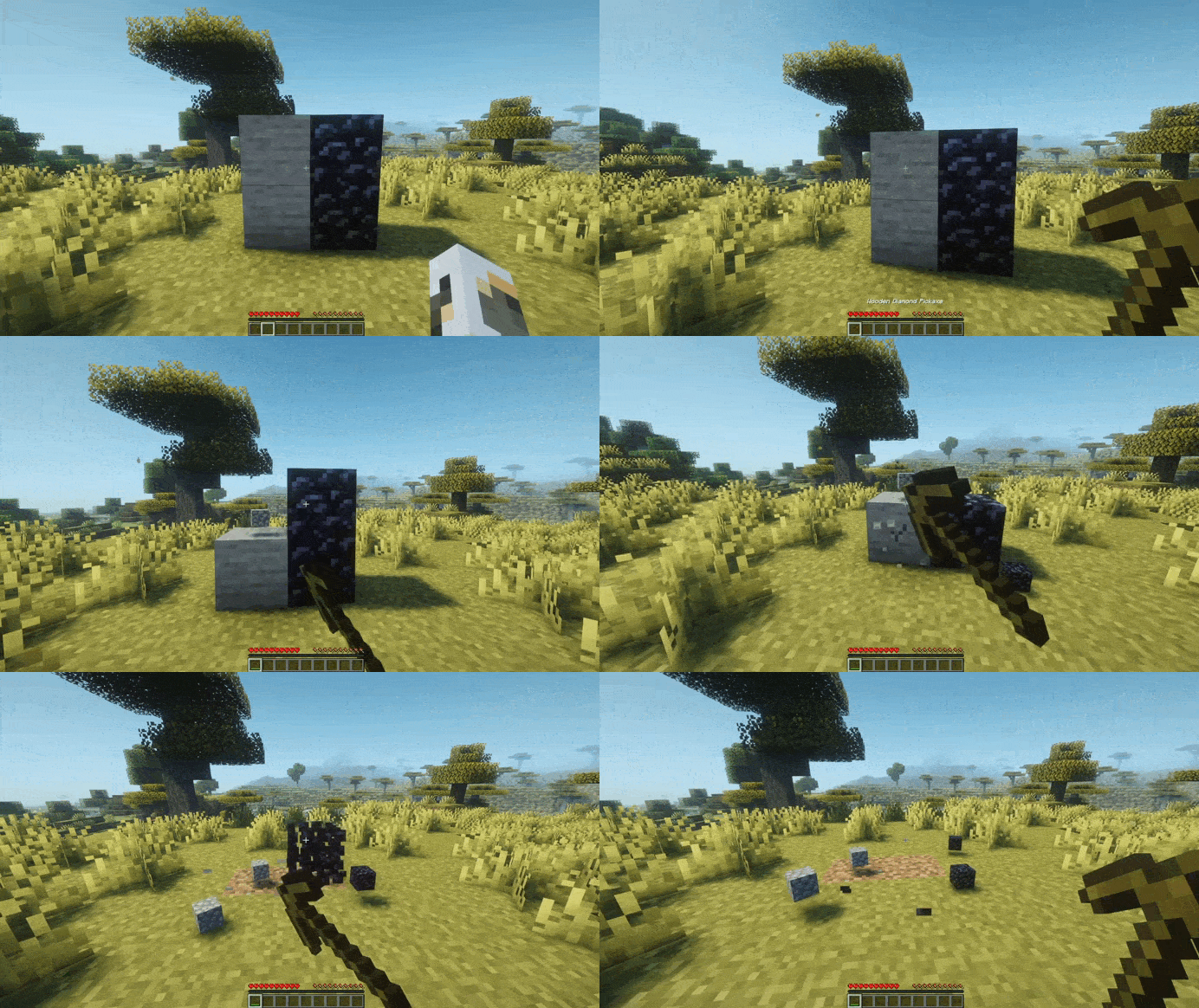
Feature Overview
- Complete vanilla-like Breaking Simulation
- Custom Blocks with their own Hardness values
- Custom Tools with own speeds, durability & more
- Event Hook Callback Integration for Custom Tools
- Ability to disable vanilla Behaviors for specific Tools
- Incredibly lightweight (<100kB)
- Low impact on server resources
Getting Started
Creating a Custom Tool
(Mining Speed is not limited to vanilla values)
CustomToolType HAMMER = CustomToolType.builder()
        .name(Component.text("Hammer"))
        .material(Material.IRON_PICKAXE)
        .speed(CustomToolType.MiningSpeed.GOLD)
        .maxDurability(1000)
        .affectedByWrongTool(true)
        .affectedUnderwater(true)
        .affectedByFloating(false)
        .build();

private void init() {
    BuiltinRegistries.TOOL_TYPE.register(Key.key("example:hammer"), HAMMER);
}
Obtaining the itemstack is as simple as:
CustomTool tool = CustomTool.of(HAMMER);
ItemStack toolItem = tool.itemStack();
Creating a Custom Block
(Block Hardness is not limited to vanilla values)
CustomBlockType LIGHT_OBSIDIAN = CustomBlockType.of(Material.OBSIDIAN, Material.STONE); // Copies the Hardness of Stone (=1.5). Not limited to vanilla values

private void init() {
    BuiltinRegistries.BLOCK_TYPE.register(Key.key("example:light_obsidian"), LIGHT_OBSIDIAN);
}
Placing the block is as simple as:
CustomBlockManager.manager().place(yourLocation, LIGHT_OBSIDIAN);
Gradle/Maven Integration
Gradle
Kotlin
repositories {
    maven("https://lunaa.dev/repository/maven")
}

dependencies {
    compileOnly("dev.lunaa.moonbreak:moonbreak-api:1.2.1")
}
Groovy
repositories {
    maven {
        url = 'https://lunaa.dev/repository/maven'
    }
}

dependencies {
    compileOnly 'dev.lunaa.moonbreak:moonbreak-api:1.2.1'
}
Maven
<repositories>
    <repository>
        <id>lunaa-dev-repo</id>
        <url>https://lunaa.dev/repository/maven</url>
    </repository>
</repositories>
<dependencies>
    <dependency>
        <groupId>dev.lunaa.moonbreak</groupId>
        <artifactId>moonbreak-api</artifactId>
        <version>1.2.1</version>
        <scope>provided</scope>
    </dependency>
</dependencies>
Quick facts
- Edition: Minecraft Java
- File type: .jar
- Minecraft versions listed: 26.1, 26.1.1, 26.1.2
- How to install: Install the matching mod loader (Forge, Fabric or NeoForge) for your Minecraft version. → Download the .jar. → Put it in the .minecraft/mods folder and launch that loader profile.
- Where to get it: Opens on Modrinth — not every file is mirrored on our own servers.
Install steps are the general flow for this file type — How to install Minecraft Java mods & modpacks walks through it step by step.
Verified by MCModsHub
- Ships as moonbreak-1.2.1.jar — drop this file into the mods folder
- Download size: 81 KB
- Download link checked 1 Oct 2026 — working
These come from our own check of the pack file, not from the source page.