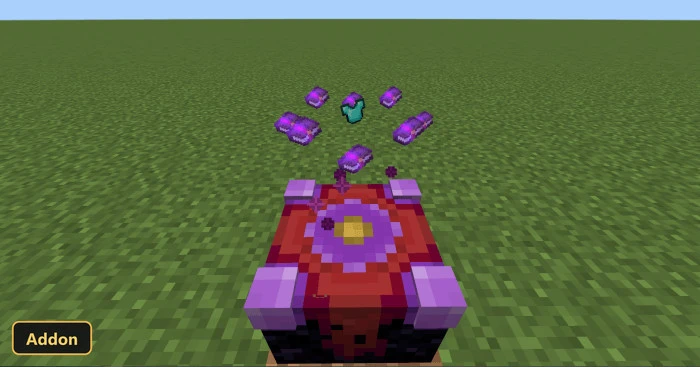
Disenchanter Table (26+, 1.21) – MCPE/Bedrock Addon
Bedrock add-on listed for Minecraft 1.20–1.21 (behavior + resource pack). File opened and checked on 1 Oct 2026; installs from the MC Bedrock Mods app on Android.
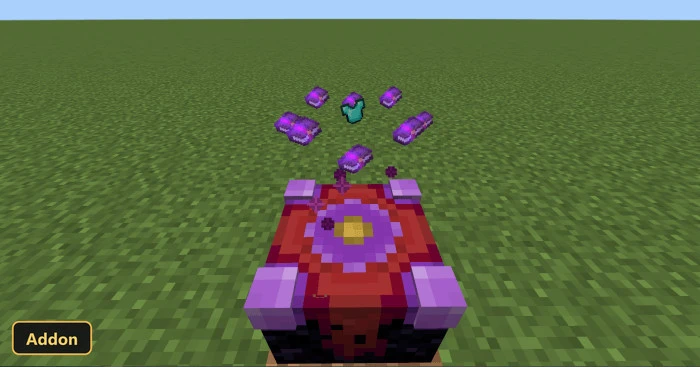
⬇ DownloadUnwanted enchantments get a way out with the Disenchanter Table, which adds a Disenchanter Table block for removing or retrieving enchantments from items. It works on bows, crossbows, shields and tridents, as well as other enchanted gear and books.
To disenchant, players put the enchanted item or book in the central slot, add regular books around it, one per slot, and place an amethyst shard in the bottom right slot. The add-on adjusts the interface for both mobile and PC so the table’s layout fits, which on mobile includes moving the hotbar to the left side of the screen. Experimental Features must be enabled, because it uses scripting APIs.
Requirements:
- MCPE/Bedrock 1.21 – 26.20
all 7 versions26.20, 26.10, 26.0, 1.21.130, 1.21.120, 1.21.100, 1.21
- Turn on Experimental Features — this addon uses scripting APIs
Features:
- Despawn
- Disenchanting Table
- Slot
- Bow Item
- Crossbow Item
- Shield Item
- Trident Item
- Disenchanting Table Block
- Edition: Minecraft Bedrock
- File type: .mcpack or .mcaddon
- Minecraft version listed: 1.21
- How to install: Download the .mcpack or .mcaddon file. → Open it — Minecraft imports it. → In your world: Behavior Packs → Available → Activate, then the same under Resource Packs.
- Where to get it: In MCModsHub, or directly above on this page.
Install steps are the general flow for this file type — How to install Minecraft Bedrock addons & mods walks through it step by step.
- Pack type: .mcaddon — behaviour and resource pack in one file
- Manifest requires Minecraft 1.20.80 or newer
- Complete pack — everything it depends on is inside the file
- Download link checked 1 Oct 2026 — working
- Mirrored on our own servers — the download does not depend on the original host
These come from our own check of the pack file, not from the source page.