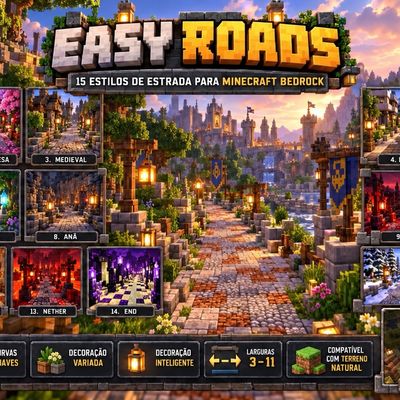
Easy Roads
Bedrock add-on listed for Minecraft 26.x. File opened and checked on 7 Oct 2026; installs from the MC Bedrock Mods app on Android.
Easy Roads automatically creates roads in Minecraft Bedrock, with 15 styles, smooth curves, adjustable widths, themed decoration, and terrain adaptation…
⬇ Download on CurseForgeThe author built this one for Minecraft 26.50. On other versions it may install and then do nothing.
Easy Roads is a Minecraft Bedrock addon designed to make road and pathway construction automatic, fast, and visually appealing.
With the Road Builder, players can create paths simply by walking across the terrain. The system follows the player’s route, creates smooth curves, and adapts the road to natural changes in elevation.
The addon includes 15 different road styles, each with its own materials, details, and decorations:
- Viking
- Japanese
- Medieval
- Modern
- Rural
- Roman
- Elven
- Dwarven
- Dark
- Harbor
- Snowy Nordic
- Desert
- Nether
- End
- Royal
Each style has a unique visual identity, with different flooring, borders, lighting, and decorative elements.
Players can also choose different road widths and adjust the style depending on the type of build or the region of the world.
The terrain system was designed to make roads look more natural, including height transitions with slabs to smooth out one-block slopes and descents.
Main features:
- 15 road styles
- Automatic road construction while walking
- Smooth curves
- Terrain adaptation
- Ramps and slab transitions
- Adjustable road widths
- Themed decorations
- Different materials for each style
- Ideal for villages, cities, castles, bases, harbors, and adventure maps
- Dedicated item for controlling road construction
The goal of Easy Roads is to let players create detailed and consistent roads without having to place every block manually, while preserving the natural appearance of the world and saving a significant amount of time.
- Edition: Minecraft Bedrock
- File type: .mcpack or .mcaddon
- Minecraft version listed: 26.50
- How to install: Download the .mcpack or .mcaddon file. → Open it — Minecraft imports it. → In your world: Behavior Packs → Available → Activate, then the same under Resource Packs.
- Where to get it: Opens on CurseForge — not every file is mirrored on our own servers.
Install steps are the general flow for this file type — How to install Minecraft Bedrock addons & mods walks through it step by step.
- Pack type: .mcaddon — behaviour and resource pack in one file
- Download size: 311 KB
- Download link checked 7 Oct 2026 — working
These come from our own check of the pack file, not from the source page.