
ModsJava
DialogEngine
Java mod listed for Minecraft 1.21–26.x. File opened and checked on 16 Nov 2026; downloads from the MC Java Mods app on Android.
⬇ Download on Hangar
**Spigot, Paper and Folia 1.21.7 and newer** · Players on 1.21.6+ · Optional resource pack · No client mods
[**Documentation**](https://resourcepack.ai/docs/dialog-engine) · [**Discord**](https://resourcepack.ai/discord) · [**Source code**](https://github.com/resourcepack-ai/dialog-engine)
## What is it?
Since 1.21.6 a server can open a **real menu** on a player: a screen the game itself draws, with text, items, text boxes, dropdowns, switches, sliders and buttons. Not a chest wearing a picture, and not chat.
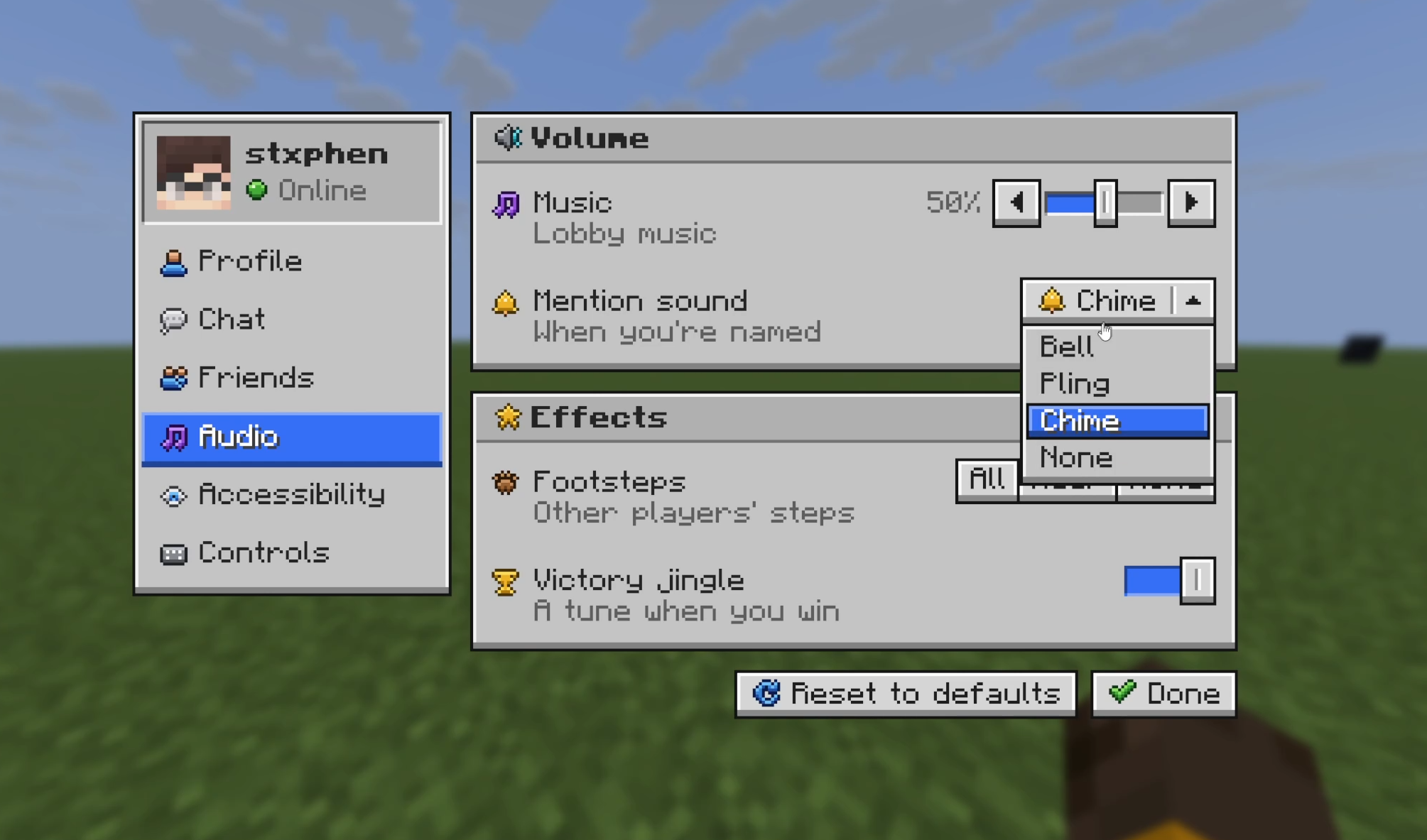
Dialog Engine lets you build those menus in YAML, and lets every other plugin build on them. Write a dialog, give it a command, and players open it. Nothing to install on the client, and no resource pack unless you want drawn dialogs like the one above.
## What a dialog can do
- ✔ **Inputs**: text boxes and text areas, dropdowns, switches and sliders, with what the player entered available to every action as `{placeholders}`.
- ✔ **Checks**: required fields, minimum lengths and patterns. A failed check shows the dialog again with the player's words still in it and your message on top.
- ✔ **Actions**: run commands as the player or console, send messages, titles and sounds, open another dialog carrying the values over, go back, refresh, turn pages, set values, wait, and stop on a condition.
- ✔ **Conditions**: show a line, an input or a button only when `{warnings} >= 3 && perm:staff.mod`.
- ✔ **Lists and pages**: a button per online player, per warp, per anything, paged with Next and Previous.
- ✔ **Player heads and items** drawn in the dialog, with their tooltips.
- ✔ **Dialogs about somebody**: `args: [target]` makes `/punish Steve` open a dialog about Steve.
- ✔ **PlaceholderAPI** everywhere, if you have it.
- ✔ **Safe by design**: every button is bound on the server to the screen the player saw. Nothing a player can type in chat presses one, and anything a player typed is shown as text, never as colours or clicks.
## A dialog
```yaml
warps:
command: warps
title: "Warps"
columns: 2
lists:
places:
- { id: spawn, name: "Spawn" }
- { id: arena, name: "Arena" }
buttons:
- for-each: places
label: "{row.name}"
actions:
- "[player] warp {row.id}"
- "[sound] entity.enderman.teleport"
- "[close]"
exit:
label: "Close"
```
`/warps`, and there it is. Three examples come with the plugin: a welcome screen, a settings page with every kind of input, and a paged list of online players.
## For developers
Ship your dialogs in your plugin's folder so server owners can edit them, and hand them to the engine in one line. Add your own actions, placeholders and lists. Hear every open and every click as an event.
```java
DialogEngineAPI dialogs = DialogEngine.api();
dialogs.registerFolder(this, "myplugin", new File(getDataFolder(), "dialogs"));
dialogs.registerAction(this, "myplugin:give", (ctx, arg) -> { /* ... */ });
dialogs.registerPlaceholders(this, "myplugin_", (viewer, ctx, key) -> /* ... */ null);
dialogs.registerList(this, "myplugin_quests", (viewer, ctx) -> /* rows */ List.of());
dialogs.open(player, "myplugin:menu", Map.of("coins", "120"));
```
Events: `DialogOpenEvent`, `DialogClickEvent` (with the button, the inputs, the settings and the actions about to run, all changeable, for YAML and drawn dialogs alike), `DialogCloseEvent` (and why it closed: Escape, a button, another dialog, a chest, leaving), `DialogSettingChangeEvent`, `DialogSlotMoveEvent`, `DialogInputErrorEvent` and `DialogEngineReloadEvent`.
## Drawn dialogs: design your own screens
Plain YAML dialogs use the game's own buttons and boxes. When you want a screen that looks like your server, with cards, sidebars, icons, switches, sliders, dropdowns that open, progress bars and players' heads, draw it.
`/de edit shop` opens the **full dialog editor at resourcepack.ai**, free and with **no account**. You get a link in chat; design the screen, press **Send to server**, and it lands in `plugins/DialogEngine/drawn/` and opens with `/de open` or its own command. The link works once and lasts three hours.
- **Saved as YAML.** Each drawn dialog is a readable `dialog.yml`. Edit it by hand and run `/de reload`: Studio redraws it (this needs the internet).
- **Its buttons run Dialog Engine actions**, the same as a YAML button: `[console] give {player} diamond; [message] Enjoy!`
- **Clicks sound like the game's own buttons.**
- **A small resource pack draws them.** The plugin builds it, puts it on our free pack host and sends it to players as they join, beside any pack your server already sends. Nothing to open or set up; you can still serve it yourself (`pack.host: serve`) or host it anywhere (`/de pack` writes it out).
## Making dialogs with AI
Most people will have an AI write their dialogs, so the plugin ships a guide written for one. After the first start it is in `plugins/DialogEngine/AI-GUIDE.md`: the whole format, the rules that catch the usual mistakes, and how to test.
1. Give your AI agent (Claude Code, Cursor, Codex) your server folder, or paste the guide into ChatGPT or Claude.
2. Ask for the screen you want: "a /rules dialog with an Accept button that runs /spawn", "a shop for my three kits".
3. It writes a `.yml` into `plugins/DialogEngine/dialogs/`. Run `/de reload`: anything wrong is reported with the file and the line, so paste that back if it needs another go.
## Commands
| Command | What it does | Permission |
|---|---|---|
| /de list | Every dialog, with its command | dialogengine.list |
| /de open <id> [player] [key=value] | Open one on yourself, or on somebody with dialogengine.open.others | dialogengine.open |
| /de info <id> | What a dialog is made of | dialogengine.info |
| /de edit <id> | Draw one in the browser, or make a new one | dialogengine.edit |
| /de pack | Write the drawn dialogs' resource pack to a file | dialogengine.pack |
| /de reload | Read everything again, and say what is wrong | dialogengine.reload |
Every node is op-only by default, and dialogengine.admin grants them all.
## Installing
1. Drop `DialogEngine.jar` into `plugins/` on a Spigot, Paper or Folia 1.21.7+ server and start it.
2. Your dialogs go in `plugins/DialogEngine/dialogs/`. Every folder is a namespace; the examples are in `examples/`.
3. `/de reload` after an edit.
## What it connects to
- **Usage count.** Every 30 seconds the plugin sends resourcepack.ai a random id that it made up the first time it started, how many players are online (a single number), and the names of any installed plugins that depend on Dialog Engine, so we know how many servers and players use it. It is anonymous: no address, server name, version, player names or UUIDs, or content. Turn it off with `telemetry: false`.
- **Update check.** It asks SpigotMC which version of Dialog Engine is current and tells the console and ops when there is a newer one. Turn it off with `update-check: false`.
- **Browser editing** only connects when you run `/de edit`, and only sends the one dialog you named.
## Support
Ask on [Discord](https://resourcepack.ai/discord) or open an issue on [GitHub](https://github.com/resourcepack-ai/dialog-engine/issues). Please don't post bugs in the reviews; we can't reply there, and we would rather fix it.
Dialog Engine is free software under the GPL-3.0 licence. The source is on [GitHub](https://github.com/resourcepack-ai/dialog-engine), and contributions are welcome.
## Made by ResourcePack AI
Dialog Engine comes from [resourcepack.ai](https://resourcepack.ai), a web editor for resource packs.Quick facts
- Edition: Minecraft Java
- File type: .jar
- Minecraft versions listed: 1.21.10, 1.21.11, 1.21.7
- How to install: Install the matching mod loader (Forge, Fabric or NeoForge) for your Minecraft version. → Download the .jar. → Put it in the .minecraft/mods folder and launch that loader profile.
- Where to get it: Opens on Hangar — not every file is mirrored on our own servers.
Install steps are the general flow for this file type — How to install Minecraft Java mods & modpacks walks through it step by step.
DialogEngine is a free Minecraft Java mod. Compatible with Minecraft 1.21.10, 1.21.11, 1.21.7, 1.21.8 and newer. Downloaded 93 times (via Hangar). Download it and open it directly in the game.