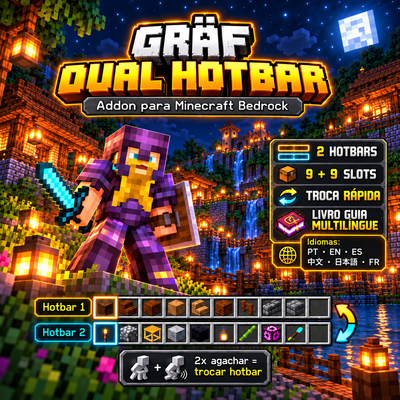
Gräf Dual Hotbar
Bedrock add-on listed for Minecraft 1.21–26.x (behavior + resource pack). File opened and checked on 9 Oct 2026; installs from the MC Bedrock Mods app on Android.
Gräf Dual Hotbar adds 2 sets of 9 slots to the hotbar. Switch between them with 2 quick crouches, without changing the game interface. Includes a…
⬇ Download on CurseForgeThe author built this one for Minecraft 26.50. On other versions it may install and then do nothing.
GRÄF DUAL HOTBAR – Double Your Quick Access!
Two hotbars. 18 quick-access slots. One simple control!
Gräf Dual Hotbar is a lightweight Minecraft Bedrock Edition add-on that allows players to switch between two independent hotbars, each containing 9 item slots.
Instead of constantly opening your inventory to change tools, weapons, food, or building materials, you can quickly switch between two different sets of items by pressing the crouch button twice.
The add-on preserves Minecraft’s original interface while making inventory management faster, easier, and more convenient.
MAIN FEATURES
1. Two Independent Hotbars
Gräf Dual Hotbar introduces a second set of 9 hotbar slots.
- Hotbar 1: Your original 9 Minecraft hotbar slots.
- Hotbar 2: An additional set of 9 quick-access slots.
- Switch between both hotbars whenever needed.
- Each hotbar maintains its own items.
- The second hotbar starts empty and can be organized independently.
- Only one hotbar is displayed at a time.
This gives players access to 18 hotbar positions across two switchable sets without modifying the original inventory interface.
2. Simple Double-Crouch Controls
Switching between hotbars is quick and intuitive.
How to switch:
- Press the crouch/sneak button twice quickly.
- The add-on detects the double input.
- Your currently active hotbar is replaced by the other set of 9 slots.
- Repeat the action to return to your previous hotbar.
The double-crouch detection uses a short input window of approximately 1.2 seconds.
No additional on-screen buttons or complicated menus are required.
3. Preserve Your Items
The add-on is designed to preserve complete Minecraft item data when switching hotbars.
This includes important item properties such as:
- Item types and quantities.
- Durability.
- Enchantments.
- Custom item names.
- Supported item data and properties.
Each hotbar retains its own set of items, allowing players to organize equipment without manually moving everything between inventory slots.
4. Original Minecraft Interface
Gräf Dual Hotbar maintains the familiar Minecraft Bedrock appearance.
The add-on does not replace or redesign:
- The original hotbar interface.
- The inventory screen.
- Armor slots.
- The off-hand slot.
- Existing inventory menus.
- The game’s HUD.
Instead, the add-on works through a scripted hotbar-switching system.
Players continue using Minecraft’s familiar interface while gaining a second quick-access item set.
5. Perfect for Survival Gameplay
Organize equipment for different activities.
Example – Combat Hotbar:
- Sword.
- Bow.
- Shield-related supplies.
- Food.
- Potions.
- Emergency equipment.
Example – Building and Mining Hotbar:
- Pickaxe.
- Axe.
- Shovel.
- Building blocks.
- Torches.
- Other construction materials.
Switch between your combat equipment and building tools without repeatedly rearranging your hotbar.
This is especially useful during mining, exploration, construction, and survival adventures.
6. Useful for Creative Mode
Creative players can organize different building materials into separate hotbars.
For example:
Hotbar 1: Stone, wood, bricks, and structural blocks.
Hotbar 2: Glass, lighting, decorative blocks, and landscaping materials.
Switch between material groups to simplify large construction projects.
7. Mobile-Friendly Controls
Gräf Dual Hotbar is designed with Minecraft Bedrock players in mind.
The add-on includes double-sneak input detection and a touch-friendly fallback mechanism.
Players can switch hotbars using the existing crouch control without installing additional interface buttons.
8. Multilingual In-Game Guide
The add-on includes a written Minecraft guide explaining how to use its features.
The guide supports six languages:
- English
- Portuguese
- Spanish
- French
- Japanese
- Chinese (Mandarin)
Each player receives the guide once per world.
If the player’s inventory is full, the guide can be dropped nearby for collection.
This helps new players understand how to activate and use the second hotbar.
9. Lightweight Behavior Pack
Gräf Dual Hotbar uses a Behavior Pack with Minecraft Bedrock scripting functionality.
It does not require custom HUD textures or a Resource Pack.
The system focuses on hotbar management rather than replacing the game’s inventory mechanics.
HOW DOES THIS ADD-ON CHANGE GAMEPLAY?
Normally, Minecraft Bedrock Edition provides one hotbar with 9 quickly accessible item slots.
When players need different tools or materials, they must open their inventory and manually rearrange items.
Gräf Dual Hotbar improves this experience by allowing players to maintain two different hotbar configurations.
For example, a player exploring a cave can keep weapons, food, and survival equipment in the first hotbar while storing mining tools and building materials in the second.
With two quick crouch inputs, the player can switch between these configurations.
This reduces repetitive inventory management and makes switching between activities more convenient.
Important: The add-on does not expand the standard inventory screen. It provides a second switchable hotbar set while keeping the original Minecraft interface.
INSTALLATION INSTRUCTIONS
- Download the Gräf Dual Hotbar .mcaddon file.
- Open the downloaded file with Minecraft Bedrock Edition.
- Wait for Minecraft to import the add-on.
- Open your world settings.
- Navigate to Behavior Packs.
- Activate Gräf Dual Hotbar.
- Enter your world.
- Follow the included guide to learn the controls.
HOW TO USE
Step 1: Place your preferred items in the original hotbar.
Step 2: Press the crouch button twice quickly.
Step 3: The second hotbar becomes active.
Step 4: Organize your second set of 9 items.
Step 5: Double-crouch again whenever you want to switch between the two hotbars.
WHY CHOOSE GRÄF DUAL HOTBAR?
- 18 quick-access item positions across two hotbars.
- Fast switching with double-crouch controls.
- No additional interface buttons.
- Preserves the original Minecraft inventory appearance.
- Maintains item properties when switching.
- Useful for Survival and Creative Mode.
- Mobile-friendly interaction.
- Multilingual instruction manual.
- Lightweight Behavior Pack implementation.
FINAL WORDS
Gräf Dual Hotbar was created to make Minecraft Bedrock inventory management more practical without changing the familiar gameplay experience.
Whether you’re fighting monsters, mining underground, exploring new biomes, or building enormous structures, having two separate hotbars allows you to keep essential equipment organized and accessible.
Spend less time rearranging your inventory and more time enjoying Minecraft!
GRÄF DUAL HOTBAR – Two Hotbars, One Adventure!
- Edition: Minecraft Bedrock
- File type: .mcpack or .mcaddon
- Minecraft version listed: 26.50
- How to install: Download the .mcpack or .mcaddon file. → Open it — Minecraft imports it. → In your world: Behavior Packs → Available → Activate, then the same under Resource Packs.
- Where to get it: Opens on CurseForge — not every file is mirrored on our own servers.
Install steps are the general flow for this file type — How to install Minecraft Bedrock addons & mods walks through it step by step.
- Pack type: .mcaddon — behaviour and resource pack in one file
- Manifest requires Minecraft 1.21.80 or newer
- Complete pack — everything it depends on is inside the file
- Download size: 6.8 MB
- Download link checked 9 Oct 2026 — working
These come from our own check of the pack file, not from the source page.