Back Chest
Bedrock add-on listed for Minecraft 1.21–26.x (behavior + resource pack). File opened and checked on 10 Oct 2026; installs from the MC Bedrock Mods app on Android.
⬇ Download on CurseForgeA chest you wear on your back. 27 slots, up to 72 with 5 upgrades, plus a portable crafting table and furnace.
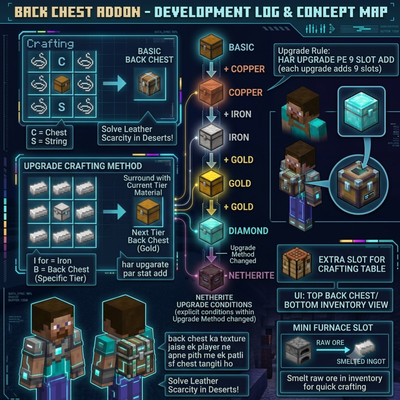
Description: In deserts and other places where leather is hard to find, you still have to carry a lot of stuff. Back Chest is a backpack-style chest made from string and a chest, so you do not need leather. It has 27 slots like a normal chest, and every upgrade adds 9 more slots, up to 72. The latch on the chest changes color to show its level.
Features:
Craft it with 6 string and 1 chest (no leather needed)
Worn on your back like a thin chest, in the chest armor slot (like an Elytra)
Instant chest menu with an X button, plus a full chest screen (Back Chest on top, your inventory below)
Starts with 27 slots, every upgrade adds 9 more, up to 72 slots
5 upgrade levels: Copper (36), Iron (45), Gold (54), Diamond (63), Netherite (72)
Latch color changes with the level: white, orange, gray, yellow, cyan, dark
Upgrading keeps all your items
Only you can open your own Back Chest
Open it while wearing it, no need to hold it (double-tap sneak)
Deposit everything from your inventory with one tap
Portable crafting table and portable furnace (smelts raw ores, sand and cobblestone from your inventory)
Crafting:
Back Chest: S_S / SCS / S_S (S = string, C = chest, middle top and bottom slots stay empty)
Upgrade: MMM / MBM / MMM with B = the Back Chest of the level below, M = copper ingot, iron ingot, gold ingot, diamond or netherite ingot (in that order)
How to use:
Craft a Back Chest (see Crafting above).
Wear it: put the Back Chest in your chest armor slot to see it on your back.
Open it without holding it: double-tap sneak while standing still and looking forward. The Back Chest menu opens instantly. Tap an item to take it out. Tap Deposit items to store things. Press the X to close.
Want the full chest screen with your inventory below? Tap Open full chest screen in the menu, then tap the chest that appears in front of you.
Crafting table: double-tap sneak while looking up. A crafting table appears for 45 seconds.
Furnace: put raw ore and coal or charcoal in your inventory, then double-tap sneak while looking straight down. Ores turn into ingots right away.
Holding the Back Chest in your hand also works: tap = full chest screen, sneak + tap = crafting table, look down + tap = furnace.
Backup: type !chest, !craft or !smelt in chat.
Upgrade: craft the next level with the old Back Chest in the middle. Your stored items move to the bigger chest.
- Edition: Minecraft Bedrock
- File type: .mcpack or .mcaddon
- Minecraft versions listed: 1.21.111, 1.21.114, 1.21.120
- How to install: Download the .mcpack or .mcaddon file. → Open it — Minecraft imports it. → In your world: Behavior Packs → Available → Activate, then the same under Resource Packs.
- Where to get it: Opens on CurseForge — not every file is mirrored on our own servers.
Install steps are the general flow for this file type — How to install Minecraft Bedrock addons & mods walks through it step by step.
- Pack type: .mcaddon — behaviour and resource pack in one file
- Manifest requires Minecraft 1.26.0 or newer
- Complete pack — everything it depends on is inside the file
- Download size: 334 KB
- Download link checked 10 Oct 2026 — working
These come from our own check of the pack file, not from the source page.