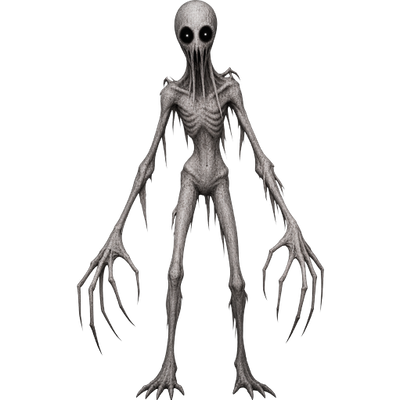
Stalker 3D – Horror Mob
Bedrock add-on listed for Minecraft 1.21–26.x (behavior + resource pack). File opened and checked on 13 Oct 2026; installs from the MC Bedrock Mods app on Android.
A tall clawed horror mob that hunts you. Appears on a timer, only one at a time, runs faster than you, breaks blocks, leaps, teleports and shows its…
⬇ Download on CurseForgeThe author built this one for Minecraft 26.50. On other versions it may install and then do nothing.
# Stalker 3D – Horror Mob for Minecraft Bedrock
A tall grey creature with long claws and empty black eyes. It doesn't wander. It hunts you.
Features
- Custom 3D model with its own animations: idle, walk, run and attack
- Appears on its own after a random delay (10–39 seconds), 22–32 blocks away from the player
- Only one Stalker exists at a time
- Disappears after 46 seconds, then the timer starts again
- If the player dies, the Stalker vanishes and the timer restarts
- Runs slightly faster than the player
- A distance counter above the hotbar shows how many blocks away it is
- Custom voice lines and a separate hit sound
Abilities
- Breaks blocks in its way and tears through shelters
- Knocks out the block under you if you stand on a pillar
- Leaps at you and up to higher ground
- Teleports closer if you run too far away
- Darkness effect when it is near
- Blindness and slowness after a hit
Installation
1. Download `Stalker3D.mcaddon` and open it with Minecraft.
2. When creating or editing a world, enable BOTH packs: Stalker 3D (BP) and Stalker 3D (RP).
3. If the Stalker doesn't appear or there is no text above the hotbar, enable experimental features (Beta APIs) in the world settings.
4. To summon it manually, use the spawn egg or the command `/summon stalker3d:stalker`.
Configuration
Abilities and timings can be changed in `scripts/main.js` inside the behavior pack.
Platform
Minecraft Bedrock Edition (mobile, Windows 10/11, consoles)
- Edition: Minecraft Bedrock
- File type: .mcpack or .mcaddon
- Minecraft version listed: 26.50
- How to install: Download the .mcpack or .mcaddon file. → Open it — Minecraft imports it. → In your world: Behavior Packs → Available → Activate, then the same under Resource Packs.
- Where to get it: Opens on CurseForge — not every file is mirrored on our own servers.
Install steps are the general flow for this file type — How to install Minecraft Bedrock addons & mods walks through it step by step.
- Pack type: .mcaddon — behaviour and resource pack in one file
- Manifest requires Minecraft 1.21.0 or newer
- Complete pack — everything it depends on is inside the file
- Download size: 376 KB
- Download link checked 13 Oct 2026 — working
These come from our own check of the pack file, not from the source page.