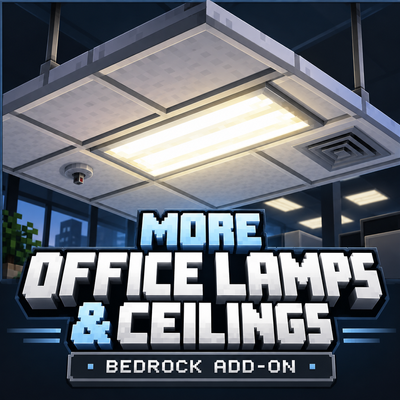
Francania001 ´s office lamps and ceilings
Bedrock add-on listed for Minecraft 26.x (behavior + resource pack). Installs from the MC Bedrock Mods app on Android.
More Office Lamps & Ceilings is a Minecraft Bedrock Edition add-on that introduces additional lighting fixtures, ceiling blocks, and ventilation blocks…
⬇ Download on CurseForgeThe author built this one for Minecraft 26.50. On other versions it may install and then do nothing.
More Office Lamps & Ceilings is a Minecraft Bedrock Edition add-on that introduces additional lighting fixtures, ceiling blocks, and ventilation blocks for modern and industrial construction.
The add-on is designed for players who want to create more detailed interiors, particularly offices, commercial buildings, laboratories, hospitals, schools, and industrial facilities.
It provides a selection of building blocks based on real-world office lighting and suspended ceiling systems. These blocks can be combined to create consistent ceiling designs without relying on complicated building techniques or alternative blocks.
Features
Version alpha 1.0.0 introduces five custom blocks:
-
Fluorescent Light Fixture 1: A lighting block designed to represent a conventional fluorescent office light. Emits light at level 15.
-
Fluorescent Light 2: An alternative fluorescent lighting design that emits light at level 11.
-
Office Ceiling 1: A ceiling block intended for office and commercial interiors.
-
Office Ceiling 2: A second ceiling design that provides additional options for interior construction.
-
Vent: A ventilation block suitable for ceiling installations and industrial detailing.
All five blocks use custom textures and are available in the Construction section of the Creative inventory.
Building Applications
The add-on is suitable for various modern building projects, including office complexes, research facilities, underground laboratories, schools, hospitals, shopping centers, and other commercial or industrial environments.
The fluorescent lighting blocks provide functional illumination, while the ceiling and ventilation blocks allow players to construct more detailed interior spaces.
The blocks are designed to work together, making it possible to create consistent ceiling layouts using matching decorative elements.
Installation
-
Download the
.mcaddonfile. -
Open the file using Minecraft Bedrock Edition.
-
Allow Minecraft to import the add-on.
-
Open the settings of an existing world or create a new world.
-
Activate both the Behavior Pack and Resource Pack.
-
Enter the world and locate the new blocks in the Creative inventory under Construction.
Compatibility
Edition: Minecraft Bedrock Edition
Add-on version:alpha 1.0.0
Minimum engine version specified in the pack: 1.26.10
Included packs: Behavior Pack and Resource Pack
Custom blocks: 5
The add-on is intended for Minecraft Bedrock Edition and is not compatible with Minecraft Java Edition.
Additional Information
This is the initial release of More Office Lamps & Ceilings. It focuses on providing a small selection of practical building blocks for modern architectural projects.
The add-on does not replace existing Minecraft blocks. Instead, it expands the available construction options with additional ceiling, ventilation, and fluorescent lighting designs.
Version alpha 1.0.0 — Initial Release
- Edition: Minecraft Bedrock
- File type: .mcpack or .mcaddon
- Minecraft version listed: 26.50
- How to install: Download the .mcpack or .mcaddon file. → Open it — Minecraft imports it. → In your world: Behavior Packs → Available → Activate, then the same under Resource Packs.
- Where to get it: Opens on CurseForge — not every file is mirrored on our own servers.
Install steps are the general flow for this file type — How to install Minecraft Bedrock addons & mods walks through it step by step.
- Pack type: .mcaddon — behaviour and resource pack in one file
- Manifest requires Minecraft 1.26.10 or newer
- Complete pack — everything it depends on is inside the file
- Download size: 365 KB
- Download link checked 13 Oct 2026 — working
These come from our own check of the pack file, not from the source page.