
Create: Recipe Compatibility
Bedrock add-on listed for Minecraft 26.x. Download on the author's site.
⬇ Download on CurseForge
A Create (Bedrock) extension that automatically registers recipes from other addons so they work with Create’s machines.
Encased Fan — Smoking
When items (on the ground or on conveyors) pass through a smoking airflow, this addon detects Smoker recipes from other addons and registers them for the Encased Fan.
Encased Fan — Blasting
When items pass through a blasting airflow, the addon detects recipes from the blast furnace and the normal furnace and registers them for the Encased Fan.
- Blast furnace is checked first, if it succeeds, that result is registered immediately;
- Otherwise the Furnace result is used when it differs from the Smoker (smoker recipes are ignored)
Once a recipe is found, it is saved in the world and does not need to be discovered again.
Fan airflow stops at solid blocks, so items past a wall are not scanned.
Blocked list: only items that already have smoking/blasting recipes in Create itself are skipped. Vanilla and Create items can still get new recipes from other addons.
Mechanical Crafter
Registers crafting recipes from other addons into the Mechanical Crafter.
Supported layouts: 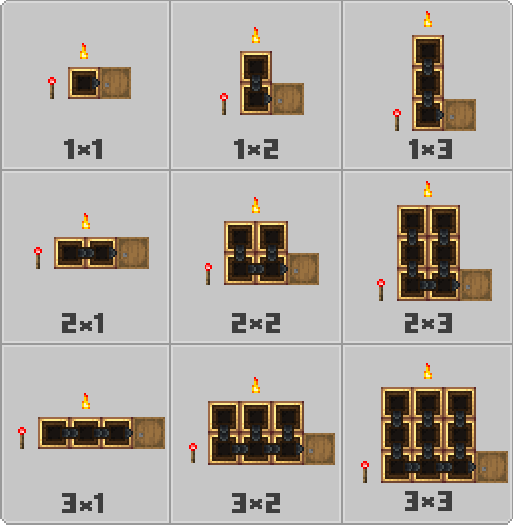
Put the items on a valid grid, then pulse redstone to register.
Commands
Clear cache (operator only, cheats required):
/crc:cleancache + one of:
• failS — Temporary smoking fail list
• failB — Temporary blasting fail list
• fail — Both fail lists
• successS — Saved smoking recipes
• successB — Saved blasting recipes
• successC — Saved Mechanical Crafter recipes
• all — Everything
Keep fail cache (operator only, no cheats needed):
/crc:keepfails_on · /crc:keepfails_off
By default, temporary fail lists reset when you rejoin the world. Turn on to keep them between sessions. New worlds start with this off.
Requirements
- Minecraft Bedrock 1.21+
Inspired by:
- Iron Furnaces (DustVeyn)
- Simple Storage (Purplebyte_)
- Edition: Minecraft Bedrock
- File type: .mcpack or .mcaddon
- Minecraft version listed: 26.50
- How to install: Download the .mcpack or .mcaddon file. → Open it — Minecraft imports it. → In your world: Behavior Packs → Available → Activate, then the same under Resource Packs.
- Where to get it: Opens on CurseForge — not every file is mirrored on our own servers.
Install steps are the general flow for this file type — How to install Minecraft Bedrock addons & mods walks through it step by step.
Create: Recipe Compatibility is a free Minecraft Bedrock addon. Compatible with Minecraft 26.50. Downloaded 410 times (via CurseForge). Download it and open it directly in the game.