EuForia MobCollector
Bedrock add-on listed for Minecraft 26.x (behavior + resource pack). File opened and checked on 13 Oct 2026; installs from the MC Bedrock Mods app on Android.
⬇ Download on CurseForgeThe author built this one for Minecraft 26.0–26.50. On other versions it may install and then do nothing.
Catch mobs. Keep them. Let them back out. That is the whole mod.
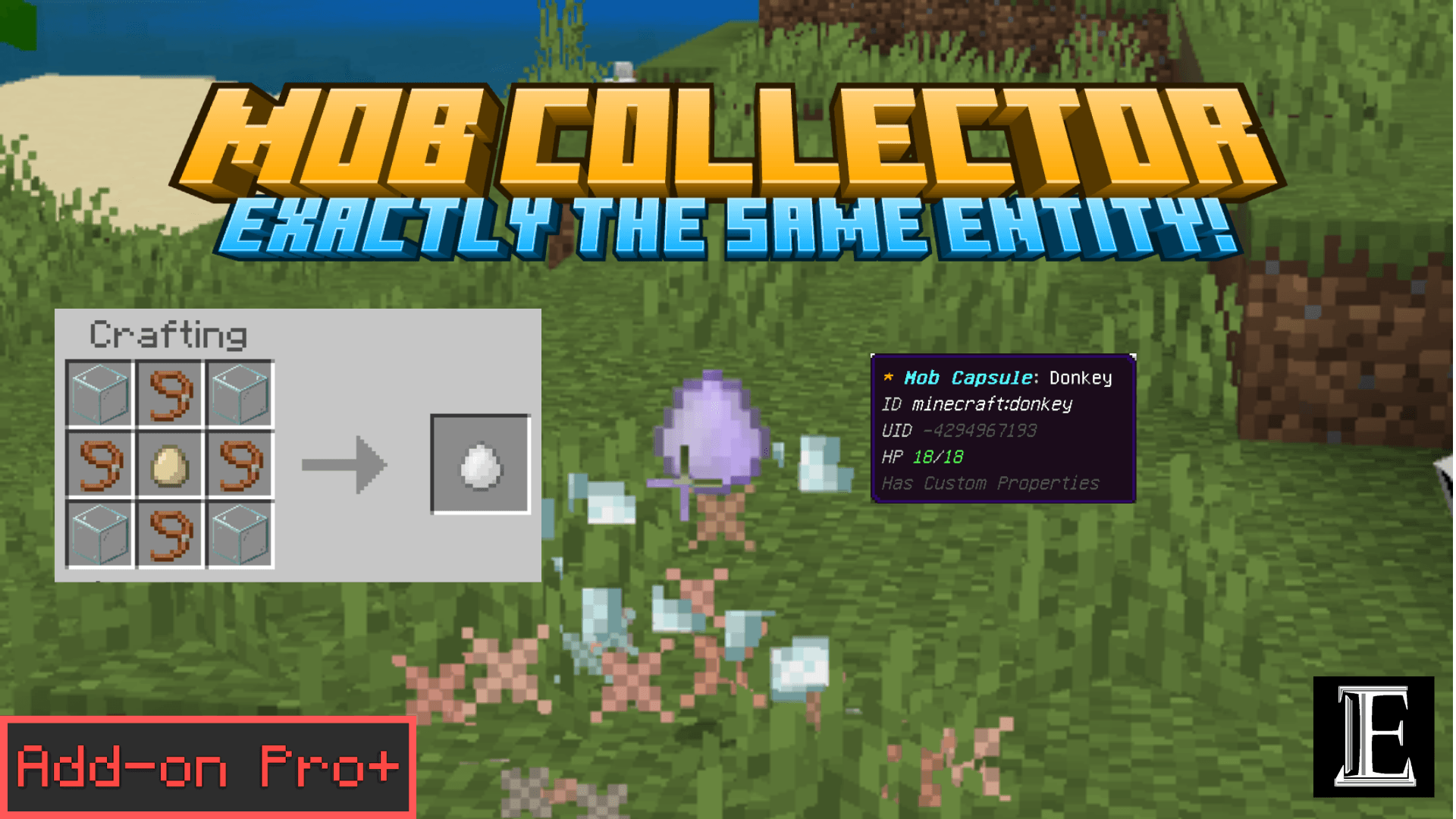
Mob Collector is an item (4 glass + 4 lead + 1 egg). Throw it at a mob and the mob becomes a Mob Capsule item. Right-click a block with the capsule and the mob is back, everything intact. One command — /euforia:mobcollector — opens your catch history. No cheats, no experimental toggles.
How? Catching saves the mob itself into a hidden world structure — the actual entity, with its tame, trades, effects, and everything it carries. Releasing places that structure back, so what walks out is the same mob that walked in, not a fresh copy. (If the vault is ever missing, a data backup restores it as close as the engine allows.)
✅ Achievement-Friendly — product_type: addon
🌐 euforiaproject.com | 💬 Join our Discord
How it works
- Craft a Mob Collector: glass corners, lead edges, egg center.
- Right-click to throw the jar itself. Direct hit = caught (1 collector per throw). Misses land back as items you can pick up.
- Sneak + right-click captures precisely. Swinging or Q-dropping works up close.
- The capsule drops where the mob stood. Hover it: entity id, unique id, name, health.
- Right-click a block with the capsule → confirm → the mob is back.
What it remembers
Health, name, effects, all 7 equipment slots (with enchantments, lore, durability), full inventory including chest slots, saddle and chest state, tame + owner, leash holder, ridden mount, baby/adult, fire, rotation, tags, writable stats. Same-world releases restore the full actor verbatim; anything that will not fit drops at your feet instead of vanishing.
Read this first (short)
- One mob per capsule. That is the point — they trade like items.
- Crowded spots refuse. Bystanders too close = "too crowded" message. This is what makes duplication impossible.
- Bosses blocked by default (wither, warden). Operators get a Settings button to open any type except players and items. The ender dragon can never be captured — the engine forbids releasing it.
- Failed captures cost nothing. The jar drops back at the spot.
Who it is for
- Pet lovers — bring the wolf, cat, horse, or parrot along, zero fear.
- Breeders & traders — move chested donkeys, named stock, and villagers intact.
- Explorers — pocket the axolotl, frog, or sniffer and bring it home.
- Admins — no duplication vectors, operator capture policy included.
- Friends — capsules trade like items. Share your best catches.
Technology
| Component | Technology |
|---|---|
| Runtime | @minecraft/server 2.10.0 (stable) |
| UI | @minecraft/server-ui 2.2.0 (stable) |
| Throw | Engine minecraft:throwable, custom bolt, snowball physics |
| Storage | World structures + sharded item data, verified both directions |
One form chain per player, solitude scan before every capture, atomic same-tick capture and release. That is the whole safety story.
Installation
- Download the Behavior Pack
.mcpackand the Resource Pack.mcpackfrom euforiaproject.com. - Open each file — Minecraft imports them automatically.
- World Settings → Add-Ons → activate EuForia Bedrock MobCollector [BP] (Resource Pack self-activates).
- Craft, throw, catch.
Developed by EuForia Project
EuForia Bedrock MobCollector is built and maintained by the EuForia Project team — an experimental developer team; who dreams of providing products that everyone around the world uses! Every product we ship targets the stable Scripting API so your addons survive Minecraft updates without rewrites.
🌐 Website & Full Documentation: euforiaproject.com
Feedback & Community
💬 Join our Discord: euforiaproject.com/discord
License
Creative Commons Attribution-NonCommercial 4.0 International (CC BY-NC 4.0)
What you can do:
- Use this addon in your own worlds, servers, and content
- Modify, remix, and build upon it for personal or community projects
- Share it with friends, communities, and players
What you cannot do:
- Sell it, bundle it in paid products, or use it for commercial monetization
- Re-upload it as-is (direct rehost) on CurseForge, MCPEDL, or any other platform — substantial modification and added value are required before redistribution
Attribution policy: By downloading and using EuForia Bedrock PlayerTrade, you are automatically considered to have given appropriate credit. You do not need to write out attribution text or include a credit line — using the addon is credit enough.
Full license terms: creativecommons.org/licenses/by-nc/4.0/
"Take care and keep what you love."
— The EuForia Team
Minecraft Bedrock 1.26.0+ · Stable API · Native Feel · No Experiments · Achievement Friendly · All Platforms | euforiaproject.com
- Edition: Minecraft Bedrock
- File type: .mcpack or .mcaddon
- Minecraft versions listed: 26.0.02, 26.0, 26.3
- How to install: Download the .mcpack or .mcaddon file. → Open it — Minecraft imports it. → In your world: Behavior Packs → Available → Activate, then the same under Resource Packs.
- Where to get it: Opens on CurseForge — not every file is mirrored on our own servers.
Install steps are the general flow for this file type — How to install Minecraft Bedrock addons & mods walks through it step by step.
- Pack type: .mcaddon — behaviour and resource pack in one file
- Manifest requires Minecraft 1.26.0 or newer
- Complete pack — everything it depends on is inside the file
- Download size: 71 KB
- Download link checked 13 Oct 2026 — working
These come from our own check of the pack file, not from the source page.