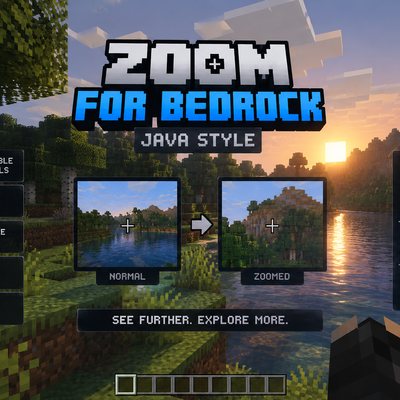
Zoom For Bedrock By NexTorh
Bedrock add-on listed for Minecraft 26.x (behavior + resource pack). Installs from the MC Bedrock Mods app on Android.
🔎 Zoom For Bedrock adds Java-style zoom to Bedrock. Includes Press/Hold mode, mobile button, key selector, adjustable intensity, and settings menu. 📱⌨️…
⬇ Download on CurseForgeZoom For Bedrock - Java Style
Bring the Java Edition zoom experience to Minecraft Bedrock Edition with Zoom For Bedrock, an addon designed to give you more control over your vision and make exploring, building, and playing easier.
This addon adds a configurable zoom system inspired by Minecraft Java Edition, allowing you to magnify your view whenever you need to see distant structures, inspect the environment, or improve your gameplay experience.
Features
Configurable Zoom Levels
Choose between four zoom intensities to match your preferences:
- Soft Zoom - 45 FOV
- Medium Zoom - 35 FOV
- Java Style - 25 FOV
- Strong Zoom - 18 FOV
Custom Zoom Controls
Choose between two operating modes:
- Toggle Mode: Press once to activate the zoom and press again to return to normal vision.
- Hold Mode: Keep the assigned control pressed to zoom in and release it to return to normal vision.
Adjustable Normal FOV
Customize your normal field of view with options ranging from 50 to 100 FOV, including the recommended default of 70.
Customizable Controls
Choose your preferred key from the available keyboard letters and configure your controls to suit your playstyle.
In-Game Configuration Menu
Open the zoom settings menu to change the zoom intensity, normal FOV, control settings, operating mode, or disable the zoom system whenever you need.
How to Use
1. Install the addon and activate its Behavior Pack and Resource Pack in your world.
2. Enter your world and open the zoom configuration menu using the addon's command.
3. Select your preferred zoom level and operating mode.
4. Configure the Sneak control in your Minecraft settings if you want to use a different keyboard key.
5. Enjoy a more flexible viewing experience in Minecraft Bedrock Edition.
Compatibility
Designed for Minecraft Bedrock Edition. Check the addon requirements and your game version before installation.
Zoom For Bedrock is designed to provide a practical, configurable zoom experience inspired by Java Edition while keeping the controls simple and accessible.
Creador By NexTorth
- Edition: Minecraft Bedrock
- File type: .mcpack or .mcaddon
- Minecraft versions listed: 26.3, 26.10, 26.11
- How to install: Download the .mcpack or .mcaddon file. → Open it — Minecraft imports it. → In your world: Behavior Packs → Available → Activate, then the same under Resource Packs.
- Where to get it: Opens on CurseForge — not every file is mirrored on our own servers.
Install steps are the general flow for this file type — How to install Minecraft Bedrock addons & mods walks through it step by step.
- Pack type: .mcaddon — behaviour and resource pack in one file
- Manifest requires Minecraft 1.26.0 or newer
- Complete pack — everything it depends on is inside the file
- Download size: 152 KB
- Download link checked 13 Oct 2026 — working
These come from our own check of the pack file, not from the source page.