
Unipose
Java mod listed for Minecraft 26.x. Downloads from the MC Java Mods app on Android.
⬇ Download on Modrinth
Unipose
Linux unicode composition in minecraft
This works on any OS, not just Linux
What ?
So you know how you can do ctrl+shift+u in Linux to specify a UTF hex code ? Very fun for troling the hell out of your programming buddies if you've memorized the lookalikesː
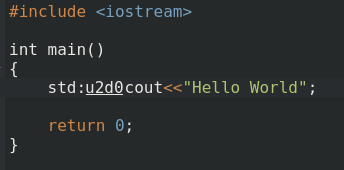
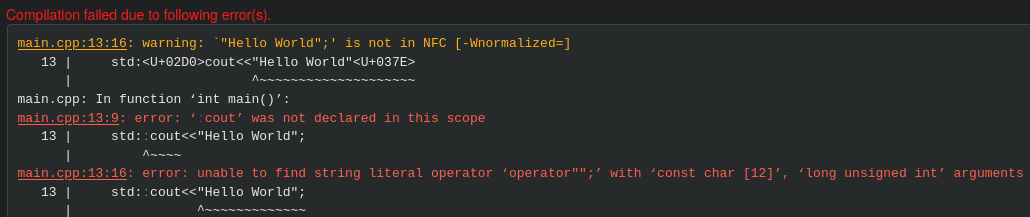
I actually replaced two symbols with lookalikes, not just the colon. Pretty effective innit ?
Anyways, some people actually find this useful since they can type characters that aren't on AltGr without changing keyboard layouts. For some reason though this just doesn't work in minecraft, so I've implemented it into minecraft itself.

Yes, this means that you can use Linux unicode composition in Minecraft on WindowsOS and MacOS, although this is ultimately useless in Windows as the numpad thing apparently works.
I'll add more features, like a preview and config if this mod gets any traction. Should be simple to keep updated so I'll do my best with that.
License
Unipose: Unicode Composition in Minecraft
Copyright (C) 2026  AeshKai

This program is free software; you can redistribute it and/or
modify it under the terms of the GNU General Public License
as published by the Free Software Foundation; version 2 of the
License.

This program is distributed in the hope that it will be useful,
but WITHOUT ANY WARRANTY; without even the implied warranty of
MERCHANTABILITY or FITNESS FOR A PARTICULAR PURPOSE.  See the
GNU General Public License for more details.

You should have received a copy of the GNU General Public License
along with this program; if not, see
<https://www.gnu.org/licenses/>.
- Edition: Minecraft Java
- File type: .jar
- Minecraft version listed: 26.3
- How to install: Install the matching mod loader (Forge, Fabric or NeoForge) for your Minecraft version. → Download the .jar. → Put it in the .minecraft/mods folder and launch that loader profile.
- Where to get it: Opens on Modrinth — not every file is mirrored on our own servers.
Install steps are the general flow for this file type — How to install Minecraft Java mods & modpacks walks through it step by step.
- Ships as unipose-1.0.1.jar — drop this file into the mods folder
- Download size: 13 KB
- Download link checked 15 Oct 2026 — working
These come from our own check of the pack file, not from the source page.