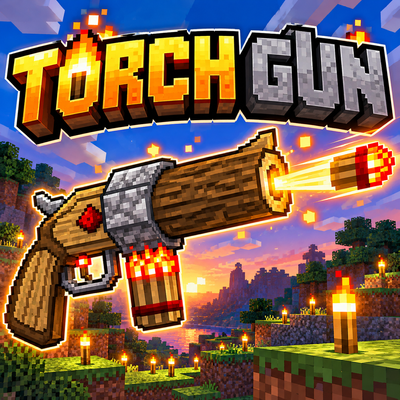
Torch Gun
Bedrock add-on listed for Minecraft 1.21–26.x (behavior + resource pack). File opened and checked on 15 Oct 2026; installs from the MC Bedrock Mods app on Android.
Shoot torches from a customizable Torch Gun, featuring disposable, repairable, and Infinity variants for easier exploration and lighting.
⬇ Download on CurseForgeThe author built this one for Minecraft 26.50. On other versions it may install and then do nothing.
🔥 Torch Gun
English
Light up the darkness from a distance!
Torch Gun is a Minecraft Bedrock Edition add-on that lets you fire torches toward distant blocks and automatically place them where normal torches can be placed.
It is designed as a survival-friendly utility for caves, mining, exploration, building, and nighttime adventures.
Instead of walking into a dark or dangerous area just to place a torch, aim your Torch Gun and light it up from a distance!
✨ Features
- Shoot torches over long distances.
- Projectile range is designed to feel similar to a fully charged bow.
- Places normal Minecraft torches on valid surfaces.
- Supports normal floor and wall torch placement.
- Placed torches can be broken and collected as normal torches.
- Includes five different Torch Gun variants.
- Includes a dedicated Torch Gun Craftsman villager.
- Includes a custom workstation and spawn egg.
- Includes an in-game guide book.
- English and Japanese guide information included.
- Custom first-person and third-person held models.
- Designed for survival gameplay.
- Works without experimental or beta API features.
- Vibrant Visuals is not required.
🔫 Torch Gun Variants
Torch Gun 64
A disposable Torch Gun with 64 shots.
- Does not require torches in your inventory.
- No magazine is required.
- Automatically breaks after 64 shots.
- Cannot be crafted.
- Available only from the Torch Gun Craftsman.
Trade Price:
16 Emeralds
Torch Gun 128
A disposable Torch Gun with 128 shots.
- Does not require torches in your inventory.
- No magazine is required.
- Automatically breaks after 128 shots.
- Cannot be crafted.
- Available only from the Torch Gun Craftsman.
Trade Price:
32 Emeralds
Torch Gun 256
A disposable Torch Gun with 256 shots.
- Does not require torches in your inventory.
- No magazine is required.
- Automatically breaks after 256 shots.
- Cannot be crafted.
- Available only from the Torch Gun Craftsman.
Trade Price:
64 Emeralds
♾️ Infinity Torch Gun
The Infinity Torch Gun works similarly to an Infinity bow.
- Requires at least one normal torch in your inventory.
- The torch is not consumed when firing.
- Cannot fire if you have no torches.
- Has its own durability.
- Cannot be enchanted.
- Cannot be crafted.
- Available only from the Torch Gun Craftsman.
Repair System
The Infinity Torch Gun can be completely repaired using:
1 Diamond
Each repair restores it to full durability.
However, it can only be repaired four times.
After reaching its repair limit and wearing out again, the Torch Gun will permanently break.
Trade Price:
64 Emeralds + 1 Iron Block
🔧 Mending Torch Gun
A reusable Torch Gun designed for normal survival resource management.
- Requires normal torches in your inventory.
- Consumes one torch per shot.
- Comes with Mending.
- Comes with Unbreaking III.
- Additional enchantments cannot be added.
- Cannot be crafted.
- Available only from the Torch Gun Craftsman.
Trade Price:
64 Emeralds + 1 Iron Block
🕯️ Torch Placement
When a projectile hits a location where a normal Minecraft torch can be placed:
Shot → Valid surface → Normal torch is placed
The placed torch behaves like a normal Minecraft torch and can be broken and collected.
Torch Gun follows normal Minecraft-style placement as closely as possible.
For example:
- Valid block tops → standing torch
- Valid block sides → wall torch
- Snow layers and other supported surfaces are handled where normal torch placement is possible
Torch Gun does not add upside-down ceiling torches or other non-standard torch placements.
📦 Failed Placement
Different Torch Guns handle failed placement differently.
Disposable Torch Guns
If a torch cannot be placed, a normal torch item may be dropped.
Mending Torch Gun
One torch is consumed when firing.
If the projectile hits a block where placement is not possible, the consumed torch may be dropped as a normal item.
Infinity Torch Gun
The Infinity Torch Gun does not create a dropped torch when placement fails.
This prevents unlimited torch duplication.
No unnecessary placement-failure message is displayed.
👨🔧 Torch Gun Craftsman
A dedicated Torch Gun Craftsman villager has been added.
This villager sells all Torch Gun variants.
Torch Guns cannot be crafted and are obtained through trading.
The add-on also includes:
- A dedicated Torch Gun workstation
- A Torch Gun Craftsman spawn egg
📖 Guide Book
When a player enters the world for the first time, a Torch Gun guide book is provided.
The guide explains:
- How to use Torch Gun
- The differences between each variant
- Torch requirements
- Infinity Torch Gun repair rules
- Torch Gun Craftsman
- Workstation
- Spawn egg
- Trading
Japanese and English information are included.
The guide is only given once per player and will not be repeatedly added every time the player joins.
🌎 Survival Friendly
Torch Gun is designed to make lighting more convenient without completely removing survival resource management.
It can be useful for:
- Cave exploration
- Mining
- Ravines
- Large underground areas
- Night exploration
- Large builds
- Lighting dangerous areas from a safer distance
The disposable Torch Guns provide simple limited-use tools, while the Mending and Infinity variants offer more advanced options.
🎨 Graphics
Torch Gun is designed to work with the standard Minecraft Bedrock graphics experience.
Vibrant Visuals is not required.
The add-on does not require Vibrant Visuals-specific PBR textures or graphics features.
Whether Vibrant Visuals is enabled or disabled is controlled by the player's own Minecraft graphics settings.
📥 Installation
- Download the
.mcaddonfile. - Open the file with Minecraft Bedrock Edition.
- Wait for the Behavior Pack and Resource Pack to import.
- Activate the required packs in your world.
- Enter the world.
- Check the guide book and start using Torch Gun!
For important existing survival worlds, making a backup before installing or updating any add-on is recommended.
✅ Compatibility
Designed for:
- Minecraft Bedrock Edition
- Survival worlds
- Creative testing
- New worlds
- Existing survival worlds
No experimental or beta API features are intended to be required.
日本語
🔥 Torch Gun
遠くから松明を撃って、暗闇を照らそう!
Torch Gun は、離れた場所へ松明を発射して設置できる Minecraft Bedrock Edition 用アドオンです。
洞窟探索、採掘、建築、夜間の冒険などで、危険な場所へ近づく前に遠くから明かりを設置できます。
通常のMinecraftで松明を置ける場所に向かってTorch Gunを撃つと、自動的に通常の松明が設置されます。
✨ 主な特徴
- 遠距離から松明を発射できます。
- 最大まで引いた弓に近い感覚の射程を持ちます。
- 通常のMinecraftの松明を設置します。
- 床と壁への通常の松明設置に対応します。
- 設置した松明は壊して普通の松明として回収できます。
- 5種類のTorch Gunを追加します。
- Torch Gun専用の職人村人を追加します。
- 専用作業台を追加します。
- 専用スポーンエッグを追加します。
- ゲーム内解説本を追加します。
- 日本語・英語に対応しています。
- 一人称・三人称用の専用手持ちモデルがあります。
- サバイバルでの使用を想定しています。
- ベータAPIや実験的APIを必要としない構成です。
- Vibrant Visualsは必須ではありません。
🔫 Torch Gunの種類
Torch Gun 64
64回使用できる使い捨てTorch Gunです。
- インベントリに松明を持っている必要はありません。
- マガジンは不要です。
- 64回使用すると壊れます。
- クラフトできません。
- Torch Gun職人からのみ購入できます。
取引価格:
エメラルド16個
Torch Gun 128
128回使用できる使い捨てTorch Gunです。
- インベントリに松明を持っている必要はありません。
- マガジンは不要です。
- 128回使用すると壊れます。
- クラフトできません。
- Torch Gun職人からのみ購入できます。
取引価格:
エメラルド32個
Torch Gun 256
256回使用できる使い捨てTorch Gunです。
- インベントリに松明を持っている必要はありません。
- マガジンは不要です。
- 256回使用すると壊れます。
- クラフトできません。
- Torch Gun職人からのみ購入できます。
取引価格:
エメラルド64個
♾️ Infinity Torch Gun
無限弓に近い仕組みを持つTorch Gunです。
- インベントリに普通の松明を最低1本持っている必要があります。
- 発射しても松明は消費されません。
- 松明を1本も持っていない場合は発射できません。
- Torch Gun本体には耐久値があります。
- エンチャントできません。
- クラフトできません。
- Torch Gun職人からのみ購入できます。
修理システム
Infinity Torch Gunは、
ダイヤモンド1個
を使用することで耐久値を完全回復できます。
ただし修理できるのは最大4回までです。
4回修理した後、再び耐久値を使い切ると完全に壊れます。
取引価格:
エメラルド64個 + 鉄ブロック1個
🔧 修繕付きTorch Gun
通常のサバイバル向けの再使用可能なTorch Gunです。
- インベントリに普通の松明が必要です。
- 1発撃つごとに松明を1本消費します。
- 最初から修繕が付いています。
- 最初から耐久力IIIが付いています。
- 追加のエンチャントはできません。
- クラフトできません。
- Torch Gun職人からのみ購入できます。
取引価格:
エメラルド64個 + 鉄ブロック1個
🕯️ 松明の設置
通常のMinecraftで松明を設置できる場所に命中すると、
発射 → 設置可能な場所に命中 → 通常の松明を設置
という動作になります。
設置された松明は普通のMinecraftの松明として扱われ、壊せば通常の松明アイテムとして回収できます。
できる限りMinecraft本来の松明設置ルールに近い動作になるよう設計しています。
例:
- 設置可能なブロック上面 → 通常の松明
- 設置可能なブロック側面 → 壁付き松明
- 雪など、通常の松明を設置可能な対応面にも設置
Minecraft本来には存在しない、天井への逆さ松明などは追加していません。
📦 松明を設置できなかった場合
Torch Gunの種類によって処理が異なります。
使い捨てTorch Gun
設置できない場所に命中した場合、通常の松明アイテムとしてドロップすることがあります。
修繕付きTorch Gun
発射時に松明を1本消費します。
ブロックに命中したものの松明を設置できなかった場合、消費した松明が通常のアイテムとしてドロップします。
Infinity Torch Gun
Infinity Torch Gunでは、設置に失敗しても松明アイテムは生成されません。
これは松明を無限に増殖できてしまうことを防止するためです。
設置失敗時に不要なメッセージは表示されません。
👨🔧 Torch Gun職人
Torch Gunを販売する専用のTorch Gun職人を追加しています。
すべてのTorch Gunは、この職人との取引から入手できます。
Torch Gun自体はクラフトできません。
さらに以下も追加されています。
- Torch Gun職人専用作業台
- Torch Gun職人のスポーンエッグ
📖 解説本
プレイヤーが初めてワールドに入った際、Torch Gunの解説本が配布されます。
解説本では、
- Torch Gunの使い方
- 各Torch Gunの違い
- 必要な松明
- Infinity Torch Gunの修理方法
- Torch Gun職人
- 専用作業台
- スポーンエッグ
- 取引
などを説明しています。
日本語と英語の情報を収録しています。
プレイヤーごとに初回のみ配布され、ログインするたびに本が増えることはありません。
🌎 サバイバル向け
Torch Gunは、サバイバルの資源管理を完全になくすのではなく、松明設置を便利にする道具として設計しています。
特に、
- 洞窟探索
- 採掘
- 渓谷
- 巨大洞窟
- 夜間探索
- 大型建築
- 危険な場所への遠距離照明
などで便利に使えます。
使い捨てタイプは手軽に使用でき、修繕付きやInfinityタイプではより長期的な運用が可能です。
🎨 グラフィックについて
Torch Gunは、通常のMinecraft Bedrockのグラフィック環境を基準として制作しています。
Vibrant Visualsは必須ではありません。
Vibrant Visuals専用PBRテクスチャなどを必要とするアドオンではありません。
Vibrant Visualsを使用するかどうかは、各プレイヤーのMinecraft側のグラフィック設定に任せています。
📥 インストール方法
.mcaddonファイルをダウンロードします。- Minecraft Bedrock Editionでファイルを開きます。
- Behavior PackとResource Packのインポート完了を待ちます。
- 使用するワールドで必要なパックを有効にします。
- ワールドへ入ります。
- 解説本を確認してTorch Gunをお楽しみください。
大切な既存のサバイバルワールドへ導入する場合は、アドオンの導入・更新前にバックアップを作成することをおすすめします。
✅ 対応環境
以下での使用を想定しています。
- Minecraft Bedrock Edition
- サバイバルワールド
- クリエイティブでのテスト
- 新規ワールド
- 既存のサバイバルワールド
ベータAPIや実験的APIを必要としない構成を目指しています。
Thank you for downloading Torch Gun!
Torch Gunをお楽しみください!
- Edition: Minecraft Bedrock
- File type: .mcpack or .mcaddon
- Minecraft version listed: 26.50
- How to install: Download the .mcpack or .mcaddon file. → Open it — Minecraft imports it. → In your world: Behavior Packs → Available → Activate, then the same under Resource Packs.
- Where to get it: Opens on CurseForge — not every file is mirrored on our own servers.
Install steps are the general flow for this file type — How to install Minecraft Bedrock addons & mods walks through it step by step.
- Pack type: .mcaddon — behaviour and resource pack in one file
- Manifest requires Minecraft 1.21.90 or newer
- Complete pack — everything it depends on is inside the file
- Download size: 76 KB
- Download link checked 15 Oct 2026 — working
These come from our own check of the pack file, not from the source page.