
ModsJava
True Toolbelt
Java mod listed for Minecraft 1.21. Downloads from the MC Java Mods app on Android.
⬇ Download on Modrinth


- A clean, lightweight toolbelt that keeps your hotbar clutter-free without forcing you into clunky backpack menus.
- Carry your pickaxe, axe, shovel, and hoe all in a single hotbar slot that seamlessly adapts to whatever block you're looking at.
Features
- All Your Tools in One Slot:
- Your active tool sits directly in your hotbar, so mining speed, weapon damage, enchantments, and durability work 100% like vanilla.
- Smart Auto-Switching:
- Look at stone, and your pickaxe is in your hand. Look at wood, and your axe is ready. Look at dirt, and your shovel takes over. No scrolling needed.
- Manual Cycling (When You Want Control):
- Prefer manual control? Press R while holding your tool to cycle through your stowed tools on the fly.
- Press Shift + R anytime while hovering on the belt hotbar slot to toggle between Auto-Switch and Manual mode.
- Integrated Inventory Drawer:
- Equip your belt in your inventory, and a small toggle button lets you unfold your 4 tool slots (Pickaxe, Axe, Shovel, Hoe) whenever you want to add or swap tools. Close it to keep your screen clean.
- Put It Anywhere on Your Hotbar:
- Use the slider below your hotbar in your inventory to choose which slot your toolbelt uses. You can also swap it with other hotbar items simply by picking them up and clicking your belt slot.
- Lava & Drop Protection:
- Pressing Q is blocked while holding your tool so you never accidentally toss an enchanted pickaxe into lava. Press Ctrl + Q when you actually want to drop it.
Controls
| Key | Action |
|---|---|
| R | Cycle to the next stored tool (Manual Mode) |
| Shift + R | Toggle between Auto-Switch and Manual mode |
| Ctrl + Q | Drop the active tool into the world |
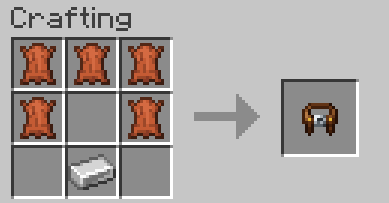
Crafting Recipe
Crafted with 5 Leather and 1 Iron Ingot:
How to Install
- Install NeoForge for Minecraft 1.21.1.
- Drop
truetoolbelt-0.1.0-alpha.jarinto your.minecraft/modsfolder. - Launch the game
Modpacks & Permissions
You are completely free to include True Toolbelt in any modpack on CurseForge and Modrinth.
Quick facts
- Edition: Minecraft Java
- File type: .jar
- Minecraft version listed: 1.21.1
- How to install: Install the matching mod loader (Forge, Fabric or NeoForge) for your Minecraft version. → Download the .jar. → Put it in the .minecraft/mods folder and launch that loader profile.
- Where to get it: Opens on Modrinth — not every file is mirrored on our own servers.
Install steps are the general flow for this file type — How to install Minecraft Java mods & modpacks walks through it step by step.
File checked by MCModsHub
- Ships as truetoolbelt-1.0.2.jar — drop this file into the mods folder
- Download size: 90 KB
- Download link checked 16 Oct 2026 — working
These come from our own check of the pack file, not from the source page.