
Skin Manager
Java mod listed for Minecraft 1.21. Downloads from the MC Java Mods app on Android.
An in-game skin management mod that allows players to save, switch, and synchronize skins from Mojang, Ely․by, or direct URLs without restarting the game.
⬇ Download on Modrinth


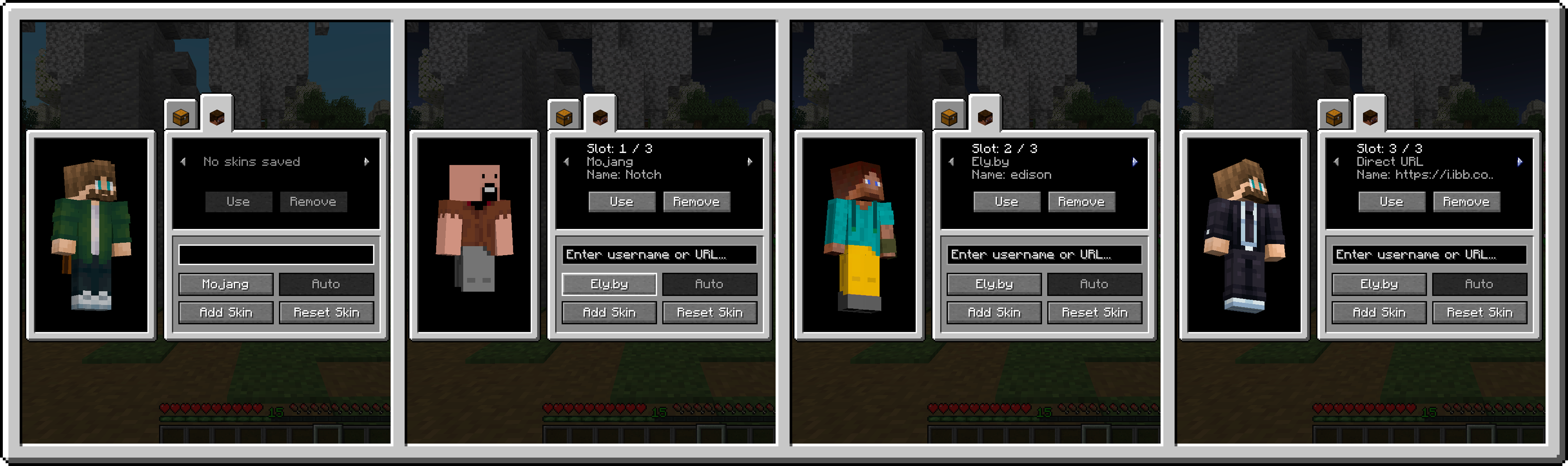
SkinManager is a utility mod for Minecraft that enables players to manage and change their character skins directly inside the game. It provides an in-game interface integrated into the player inventory, persistent skin storage, and server-side synchronization so that changes are visible to other players in multiplayer.
Features
- Inventory Integration: Adds a tab directly inside the player inventory to open the skin management interface.
- Skin Library: Allows storing up to 15 skins per player. The library is saved to player data on the server and persists across reconnects and respawns.
- Supported Skin Sources:
- Mojang: Fetches skins by official Minecraft username. Player model type (Classic/Wide or Slim) is detected automatically.
- Ely.by: Fetches skins by Ely.by username with automatic model detection.
- Direct URL: Loads skins from any direct .png link, with manual selection between Wide (Steve) and Slim (Alex) models.
- Live 3D Preview: Displays a rotatable 3D model preview of the selected skin before applying it.
- Multiplayer Synchronization: Synchronizes skin changes across all players on the server in real time.
- Legacy Skin Support: Automatically converts legacy 64x32 skin textures to the modern 64x64 format.
- Asynchronous Loading: Skin textures download in the background without causing client stutter or freezing.
- Edition: Minecraft Java
- File type: .jar
- Minecraft version listed: 1.21.1
- How to install: Install the matching mod loader (Forge, Fabric or NeoForge) for your Minecraft version. → Download the .jar. → Put it in the .minecraft/mods folder and launch that loader profile.
- Where to get it: Opens on Modrinth — not every file is mirrored on our own servers.
Install steps are the general flow for this file type — How to install Minecraft Java mods & modpacks walks through it step by step.
- Ships as skinmanager-fabric-1.0.0.jar — drop this file into the mods folder
- Download size: 63 KB
- Download link checked 16 Oct 2026 — working
These come from our own check of the pack file, not from the source page.