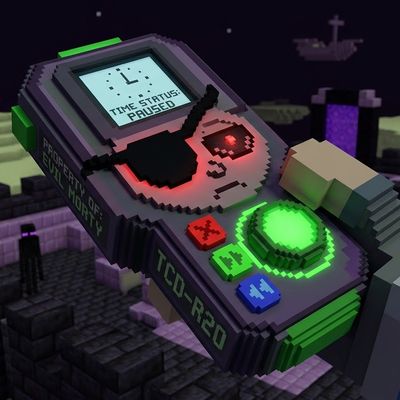
Time controller Evil morty
Bedrock add-on listed for Minecraft 26.x. Installs from the MC Bedrock Mods app on Android.
⬇ Download on CurseForgeThe author built this one for Minecraft 26.50. On other versions it may install and then do nothing.
Texto Español
El controlador de Tiempo de evil Morty para Minecraft Bedrock! Este addon implementara a tu mundo el controlador de tiempo de evil morty, Este control Tiene lamposibilidad de detener el Tiempo y detener a los mobs alrededor tuyo este durara 30 segundos Tiene un menu en el cual se pueden subir los segundos de parar el tiempo con 5 bloques de oro y ajustes para saber que quieres detener Este addon no requiere experimentos y no quita logros Este control se craftea con un Bloque de redstone en el centro y 8 lingotes de oro alrededor. Si te gusta Rick y Morty este addon es para ti
English Text
The Evil Morty Time Controller for Minecraft Bedrock! This add-on will implement the Evil Morty time controller into your world. This controller has the ability to stop time and freeze mobs around you for 30 seconds. It has a menu where you can increase the duration of the time freeze with 5 gold blocks and adjust settings to specify what you want to freeze. This add-on requires no experiments and does not remove achievements. This controller is crafted with a redstone block in the center and 8 gold ingots around it.If You Like Rick and Morty This addon Its for you
- Edition: Minecraft Bedrock
- File type: .mcpack or .mcaddon
- Minecraft version listed: 26.50
- How to install: Download the .mcpack or .mcaddon file. → Open it — Minecraft imports it. → In your world: Behavior Packs → Available → Activate, then the same under Resource Packs.
- Where to get it: Opens on CurseForge — not every file is mirrored on our own servers.
Install steps are the general flow for this file type — How to install Minecraft Bedrock addons & mods walks through it step by step.
- Pack type: .mcaddon — behaviour and resource pack in one file
- Download size: 183 KB
- Download link checked 17 Oct 2026 — working
These come from our own check of the pack file, not from the source page.