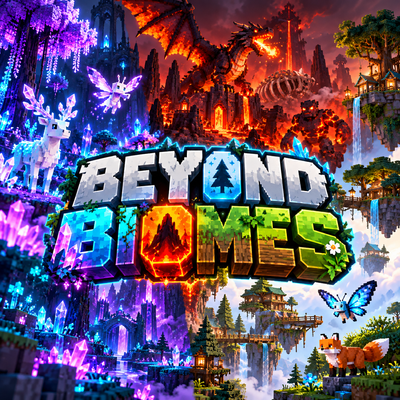
Beyond Biomes
Bedrock add-on listed for Minecraft 1.21–26.x (behavior + resource pack). File opened and checked on 17 Oct 2026; installs from the MC Bedrock Mods app on Android.
Beyond Biomes adds 3 new biomes with unique blocks, mobs, structures, loot and items. Explore magical forests, volcanic valleys and peaceful highlands…
⬇ Download on CurseForge
Beyond Biomes 🌲💎🐉
Expand your Minecraft Bedrock world with Beyond Biomes, an adventure-focused add-on that adds three new themed biomes, each with its own blocks, mobs, structures, items, atmosphere, and exploration content.
The add-on includes both the Behavior Pack and Resource Pack in one .mcaddon file and also comes with the Explorer’s Journal, an in-game guide that helps you discover everything the add-on has to offer.
💎 Crystal Bloom Forest
A glowing magical forest filled with crystals, colorful plants, and mysterious creatures.
Discover:
- Giant crystals
- Bloom trees
- Glowing mushrooms and flowers
- Crystal ponds
- Geodes and crystal caves
- Crystal Sanctuary
- Crystal monoliths
- Clearings and crystal spires
Creatures include the Crystal Deer, flying Bloom Sprite, and Crystal Guardian.
🔥 Ashen Dragon Valley
A dangerous volcanic landscape covered in ash, lava, burnt trees, vents, and the remains of ancient dragons.
Explore structures such as:
- Forgotten Dragon Temple
- Ash Watchtowers
- Ash Vault
- Dragon skeletons
Creatures include the Ash Crawler, Magma Brute, and the flying Ember Drake, which can shoot fireballs.
🌲 Mystic Skywood Highlands
A peaceful mountain region filled with forests, meadows, ponds, waterfalls, bridges, and massive ancient trees.
The highlight is the Skywood Village, which has three different layouts. Each layout also has a variant containing a secret treasure room hidden beneath the fountain.
You can also discover:
- Giant trees
- Ancient trees
- Stone arches
- Wooden bridges
- Waterfall rocks
- Ponds
Creatures include the Highland Fox, flying Sky Butterfly, and Forest Protector.
📖 Explorer’s Journal
Craft the Explorer’s Journal using:
Book + Compass + Emerald
The recipe is shapeless.
Right-click the Journal to open an in-game guide containing pages for:
- Every biome
- Skywood Village
- Crafting
- Objectives
- Biome Finder
- Structure Showcase
The objectives system includes goals such as discovering biomes, defeating bosses, and collecting important items.
The Biome Finder can show the coordinates, distance, and direction of the nearest biome and can also teleport you there.
The Showcase page can build any structure from the add-on directly in front of you, making it useful for exploring the content or taking screenshots.
🧱 Lots of New Content
Beyond Biomes includes:
- 77 new blocks
- 20 new items
- 9 custom mobs
- 57 crafting recipes
- 36 loot tables
- 76 hand-built structure files
- 101 world-generation features
- 6 structure types for natural generation
All textures, models, and animations are included.
The blocks include three complete wood sets with logs, planks, stairs, slabs, fences, gates, doors, and trapdoors, along with crystal blocks, ash blocks, stone blocks, dragon bone blocks, plants, flowers, and lanterns.
⚔️ New Items
Some of the new items include:
- Crystal Blade
- Dragonfire Sword
- Crystal Shard
- Crystal Core
- Ash Fragment
- Magma Crystal
- Dragon Scale
- Mystic Seeds
- Explorer’s Journal
All 57 crafting recipes are obtainable in Survival.
The Crystal Blade and Dragonfire Sword also have their own abilities.
🌱 Extra Features
- Bone meal works on the new saplings
- Slabs can merge into double slabs
- Axes can strip the new logs
- Built with performance in mind
- No tick-heavy scripts
⚠️ Honest Notes
Terrain shape: Minecraft add-ons cannot fully change the shape of terrain. The new biomes replace parts of vanilla forests, mountains, and meadows and change the surface, plants, colors, fog, mobs, and structures, but the hills themselves still use vanilla terrain shapes.
New chunks only: The new biomes and structures only generate in newly created chunks. For the best experience, use a new world with both packs enabled.
Not fully tested in-game yet: The add-on passes automatic checks, but the natural generation of some structures still needs in-game confirmation. Every structure can still be built using the Showcase page inside the Explorer’s Journal.
Other notes:
- Stairs currently use straight pieces only and do not have corner shapes
- Mobs do not have custom sounds
- Skywood Village residents are vanilla villagers
📥 Installation
- Download the
.mcaddonfile - Open it with Minecraft
- Enable both the Behavior Pack and Resource Pack
- Create a new world for proper biome and structure generation
- Start exploring
Explore magical crystal forests, survive volcanic dragon valleys, discover peaceful highland villages, collect new loot, fight new creatures, and uncover everything hidden inside Beyond Biomes. 🌲💎🔥🐉
- Edition: Minecraft Bedrock
- File type: .mcpack or .mcaddon
- Minecraft versions listed: 1.21.122, 1.21.121, 1.21.123
- How to install: Download the .mcpack or .mcaddon file. → Open it — Minecraft imports it. → In your world: Behavior Packs → Available → Activate, then the same under Resource Packs.
- Where to get it: Opens on CurseForge — not every file is mirrored on our own servers.
Install steps are the general flow for this file type — How to install Minecraft Bedrock addons & mods walks through it step by step.
- Pack type: .mcaddon — behaviour and resource pack in one file
- Manifest requires Minecraft 1.26.50 or newer
- Complete pack — everything it depends on is inside the file
- Download size: 580 KB
- Download link checked 17 Oct 2026 — working
These come from our own check of the pack file, not from the source page.