Combat Blocking
Bedrock add-on listed for Minecraft 26.x (behavior + resource pack). File opened and checked on 17 Oct 2026; installs from the MC Bedrock Mods app on Android.
Block attacks with your weapon: a strong guard that weakens over time, reflects melee hits at full strength, and can be broken by pickaxes.
⬇ Download on CurseForge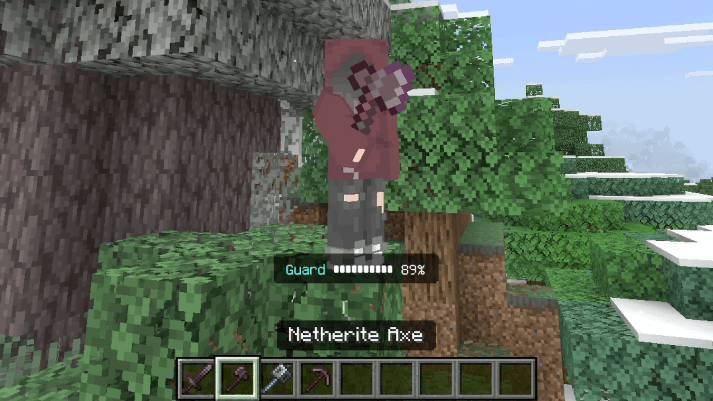
Block attacks with your weapon! Hold right-click with a sword, axe, mace or pickaxe to raise your guard and cut incoming damage.
## How It Works
- **Hold right-click** with a sword, axe, mace or pickaxe to block.
- Your guard starts at **90% damage reduction** for 2 seconds, then slowly drops to 20% the longer you hold it.
- **Perfect guard:** while your guard is at full 90%, melee attackers take **half their hit back** (a 10-damage hit sends 5 back).
- A **guard meter** above your hotbar shows how strong your block is.
- Your weapon moves into a blocking pose, so other players can see you're guarding.
## Balance
- You **can't attack** while blocking.
- Short **0.5 second cooldown** after lowering your guard, so you can't spam it.
- Getting hit by a **pickaxe breaks your guard** for 5 seconds, like an axe against a shield.
## Axe Players
Right-clicking with an axe blocks. To strip logs or scrape copper, **crouch + right-click**.
## Mobile & Tablet
Hold the screen to block, or **double-tap crouch** to turn blocking on and off.
## Requirements
- Minecraft Bedrock 1.26.10 or newer
- Turn on **both** packs (Behavior + Resource) in your world
## Compatibility
This addon changes the player's files to add the blocking pose. It may not work with other addons that also change the player, like custom player animations or player models.
## Feedback
Found a bug or have a balance idea? Leave a comment!
Credits
Created by Roaround.
- Edition: Minecraft Bedrock
- File type: .mcpack or .mcaddon
- Minecraft versions listed: 26.20, 26.30, 26.40
- How to install: Download the .mcpack or .mcaddon file. → Open it — Minecraft imports it. → In your world: Behavior Packs → Available → Activate, then the same under Resource Packs.
- Where to get it: Opens on CurseForge — not every file is mirrored on our own servers.
Install steps are the general flow for this file type — How to install Minecraft Bedrock addons & mods walks through it step by step.
- Pack type: .mcaddon — behaviour and resource pack in one file
- Manifest requires Minecraft 1.26.10 or newer
- Complete pack — everything it depends on is inside the file
- Download size: 13 KB
- Download link checked 18 Oct 2026 — working
These come from our own check of the pack file, not from the source page.