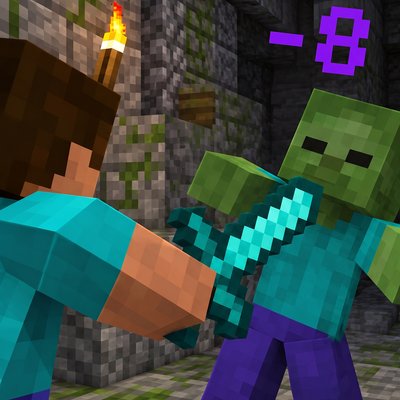
Damage Indicator GT
Bedrock add-on listed for Minecraft 26.x (behavior + resource pack). File opened and checked on 17 Oct 2026; installs from the MC Bedrock Mods app on Android.
⬇ Download on CurseForgeThe author built this one for Minecraft 26.50. On other versions it may install and then do nothing.
Damage Indicator GT highly customizable 3D floating damage particles directly to Minecraft Bedrock Edition. See every hit you land in real time with smooth animations, vibrant color palettes, and smart entity positioning that never clutters your screen. No experimental features, achievements fully intact.
IMPORTANT NOTE - Please ensure this add-on is placed as high as possible in your behavior pack load order to prevent conflicts or errors.
| No Experimental Features | Achievements Friendly | Multiplayer Ready |
|---|---|---|
| 3D Particle Digits | Dynamic Animations | Full Visual Customization |
FEATURES
3D Floating Damage Numbers — Every time you attack an entity or shoot a projectile, damage numbers emerge directly from the impact point, facing your camera clearly in true 3D space.
Smart Surface Positioning — Numbers never get buried or hidden inside large mobs. For colossal targets like the Ender Dragon, Warden, Ghast, Iron Golem, or Ravager, particles automatically spawn right on their outer surface facing you for crystal-clear readability.
Three Dynamic Animation Modes — Choose how damage moves in combat to match your personal playstyle:
- Float: Smooth, upward-drifting numbers for a classic RPG feel.
- Pop: Bouncy, expanding digits that give immediate impact feedback on each strike.
- Arc: Projectile-style arcing numbers that bounce outward to the side, preventing multiple consecutive hits from overlapping.
16 Vibrant Color Schemes — Customize your damage numbers with 16 distinct color choices:
- Red, Orange, Yellow, Lime, Green, Cyan, Light Blue, Blue, Purple, Magenta, Pink, White, Gray, Black, Brown, and an animated Rainbow cycle that shifts spectrum hues in real time across the digits.
Flexible Number Formatting — Choose between Decimal (e.g., 12.5) for exact combat testing or Integer (e.g., 13) for simplified, clean display. For massive modded damage, values automatically abbreviate cleanly into readable benchmarks (1K, 1M, 1B).
Custom Opacity & Thresholds — Adjust particle transparency anywhere between 10% and 100% to blend subtlety with combat visibility. Set a Minimum Damage Threshold slider to ignore low-level tick damage like fire burns, poison, or wither effects if you only want to see weapon hits.
Target Filters — Control exactly where damage indicators appear. Independent toggles allow you to enable or disable damage numbers for:
- Monsters & Hostiles
- Players (PvP)
- Passive Animals & Ambient Mobs
UNIFIED GT SETTINGS MENU
Damage Indicator GT integrates natively into the decentralized GT Settings menu ecosystem:
- Type
/pmenuor!pmenuin chat to open your personal settings panel and configure your damage colors, animations, opacity, and filters on the fly
COMPATIBILITY
- No Experimental Toggles Required — Play with confidence without risking world corruption or future update breaks.
- Achievements Friendly — Achievements and trophies remain 100% earnable in survival worlds.
- Multiplayer & Realms Ready — Optimized tick handling ensures smooth performance on servers, Realms, and local split-screen co-op.
REQUIREMENTS
- Minecraft Bedrock Edition: Version 1.26.50+
Made by REX1858
- Edition: Minecraft Bedrock
- File type: .mcpack or .mcaddon
- Minecraft version listed: 26.50
- How to install: Download the .mcpack or .mcaddon file. → Open it — Minecraft imports it. → In your world: Behavior Packs → Available → Activate, then the same under Resource Packs.
- Where to get it: Opens on CurseForge — not every file is mirrored on our own servers.
Install steps are the general flow for this file type — How to install Minecraft Bedrock addons & mods walks through it step by step.
- Pack type: .mcaddon — behaviour and resource pack in one file
- Manifest requires Minecraft 1.26.40 or newer
- Complete pack — everything it depends on is inside the file
- Download size: 1.1 MB
- Download link checked 18 Oct 2026 — working
These come from our own check of the pack file, not from the source page.