
World Presets
Java mod listed for Minecraft 1.20. Downloads from the MC Java Mods app on Android.
The World Presets mod allows defining world presets; templates that modpack authors can make to replace standard world creation.
⬇ Download on ModrinthAbout
The World Presets mod allows defining world presets, which are templates that modpack authors can make to replace standard world creation. These can be as simple as pre-filled world settings, or as complicated as placing structures, spawning in alternate spawn dimensions, or loading an entire pre-made world. After presets are defined, they will appear in a new tab on the Create World screen.
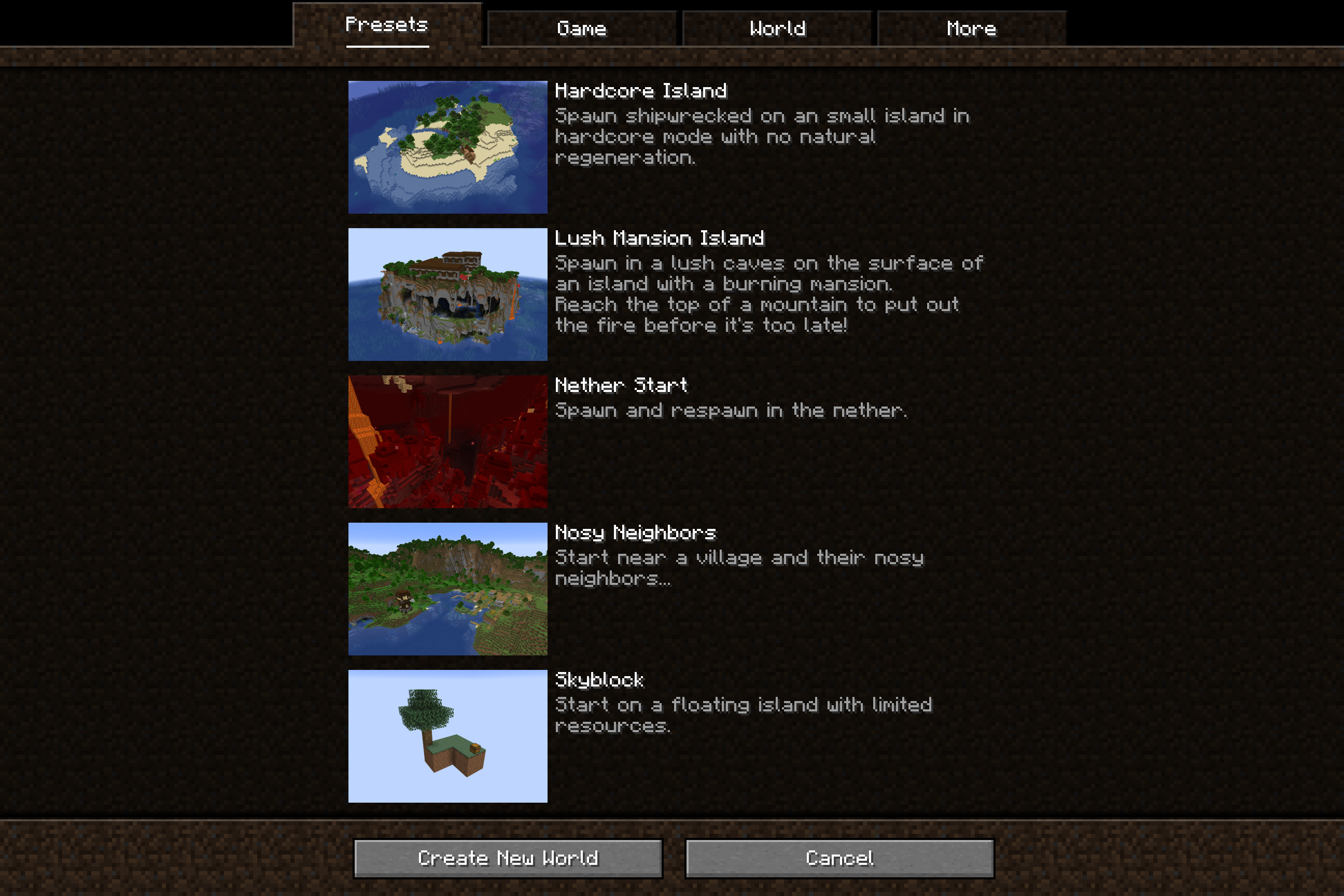
This mod is intended to be played as part of a modpack, it will not change anything until a modpack author configures world presets.
Features
Basic World Settings: Presets can pre-fill most world creation settings, including the world's name, gamemode, difficulty, seed, cheats, and world type.
Default Gamerules: Presets can define the default gamerules for the world.
Spawn Location: Presets can relocate the world spawn location to different coordinates. These can set to an exact coordinate or an offset from spawn, and can be set to run different versions of vanilla's spawn location finder to place the player.
Spawn Dimension: Presets can relocate the world spawn to another dimension. By default, players will respawn in this dimension after death as well, with their spawn dimension relocating whenever their spawnpoint is set in a new dimension. The respawn behavior can be configured in more detail if needed.
Starting Structures: Presets can spawn structures as the world is created, any data-defined structure is valid. The placement will attempt to run through the full vanilla structure generation process including proper registration, terrain adaptation, and jigsaw placement.
Bundled Worlds: Presets can include an entire pre-generated world to copy into the player's saves folder. Any world setting changes on the world creation menu like the world name, gamemode, or difficulty are applied onto the existing world.
Documentation
Documentation on how to make presets can be found on the wiki.
Suggestions
You can reach me with suggestions or bug reports by making an issue on the GitHub page. If preferred, I will respond to any messages in the Discord server for my current modpack, Desolate Planet. Feel free to reach out to me there as well.


- Edition: Minecraft Java
- File type: .jar
- Minecraft versions listed: 1.20.1, 1.20.2, 1.20.3
- How to install: Install the matching mod loader (Forge, Fabric or NeoForge) for your Minecraft version. → Download the .jar. → Put it in the .minecraft/mods folder and launch that loader profile.
- Where to get it: Opens on Modrinth — not every file is mirrored on our own servers.
Install steps are the general flow for this file type — How to install Minecraft Java mods & modpacks walks through it step by step.
- Ships as worldpresets-1.0.0.jar — drop this file into the mods folder
- Download size: 557 KB
- Download link checked 19 Oct 2026 — working
These come from our own check of the pack file, not from the source page.