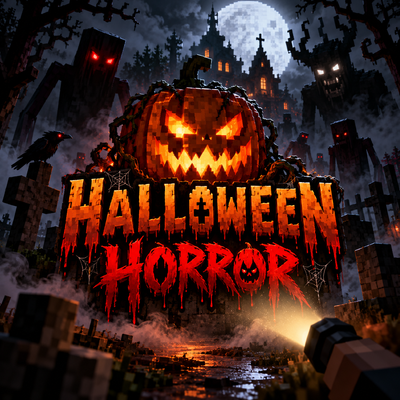
Horror Halloween
Bedrock add-on listed for Minecraft 1.21–26.x (behavior + resource pack). File opened and checked on 19 Oct 2026; installs from the MC Bedrock Mods app on Android.
Halloween Horror adds a permanent 3D flashlight, 9 terrifying creatures, haunted cabins and graveyards, 79 custom sounds, scary events, and the Halloween…
⬇ Download on CurseForge
Halloween Horror 🎃🔦
THE DARKNESS IS WATCHING.
Halloween Horror transforms Minecraft Bedrock into a much darker survival experience filled with disturbing creatures, unpredictable encounters, haunted structures, creepy sounds, and a flashlight that can become your most important tool. The add-on includes nine custom horror entities, including The Halloween King boss, haunted cabins and graveyards, a horror event director, 79 custom-created sounds, and an in-game settings system
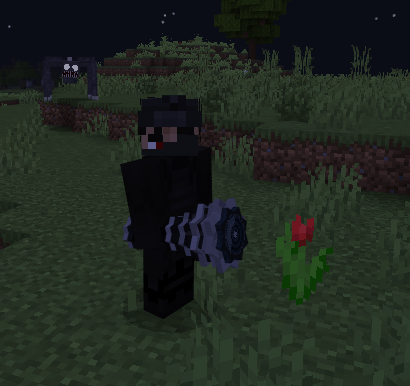
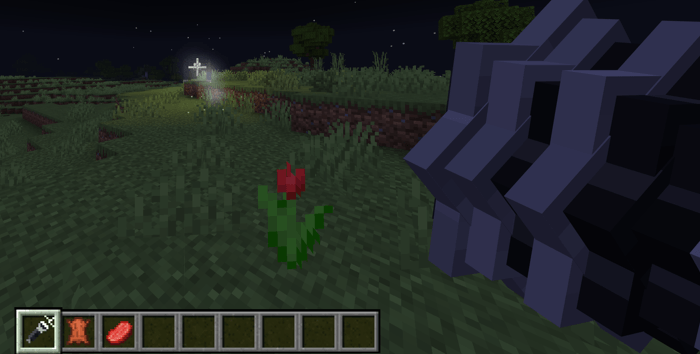
🔦 Survivor's Flashlight
Every player automatically receives the Survivor's Flashlight. If it disappears from your inventory, the add-on gives it back, including after death, respawning, dimension changes, or /clear. Each multiplayer player gets their own flashlight.
Use the flashlight to illuminate the darkness and defend yourself against many of the creatures.
- Use / Right-click: turn the flashlight on or off
- Sneak + Use: open the settings menu
- Unlimited use — no batteries required
- Custom 3D model with glowing lens
- Particle-based beam and temporary invisible light blocks
- Creatures can react differently when caught in the beam
👁️ Nine Horror Creatures
The darkness is populated by custom entities with their own models, textures, animations, behaviors, loot, and reactions to light.
Smiling Horror
A towering creature with extremely long arms, black eyes, and a huge smile. It may watch from a distance before slowly approaching — or suddenly sprint toward you when you look away. Keep the flashlight on its face long enough and it may flee.
Crawling Nightmare
A fast creature that moves on all fours and can leap toward the player. Light forces it to retreat temporarily, but it may return even more aggressively.T
Weeping Ghost
A floating, semi-transparent ghost. You may hear it crying somewhere in the darkness before the crying suddenly stops. Shortly afterwards, the hunt begins. Sustained flashlight exposure can drive it away.
Window Watcher
A harmless black figure with bright eyes that simply watches you. It can appear near haunted cabins or between distant trees and disappears when approached, stared at, or illuminated.
Faceless Stalker
A tall faceless figure that only moves while nobody is looking at it. Keep it in sight — and use your flashlight carefully.
Cursed Doll
A cracked porcelain doll carrying a knife. It can remain dormant inside haunted cabins until you get too close. The flashlight can freeze it temporarily, but it eventually becomes immune for a short time.
Shadow Beast
A fast four-legged monster with red eyes, horns, spikes, and fangs. Light can scare it away, but sometimes it hides just outside the beam before attacking again.
Pumpkin Reaper
A powerful pumpkin-headed creature carrying a scythe. It appears during special Harvest Nights and cannot simply be stopped by the flashlight — light only slows it temporarily.
The Halloween King 👑
The main boss: a gigantic skeletal king with a pumpkin crown, glowing heart, cloak, and lantern staff.
👑 The Halloween King Boss Fight
The Halloween King has multiple phases and uses the flashlight as part of the fight mechanics.
During the battle he can:
- Perform a powerful Ground Slam
- Summon Cursed Dolls
- Create a Shadow Veil that absorbs damage
- Teleport behind the player
- Summon Shadow Beasts during the final phase
Shining your flashlight into his face can interrupt certain attacks. During the Shadow Veil phase, sustained light can burn away the shield and expose his glowing heart, causing attacks to deal double damage for a short time. Light alone cannot defeat him.
🌑 Horror Events
The add-on contains a director system that creates rare encounters in dark places such as nighttime areas, caves, forests, and buildings. The frequency depends on your selected intensity. I Made project with AI.
Possible events include:
- A creature appearing behind you
- Footsteps directly behind you — with nothing there when you turn around
- A Smiling Horror appearing at the edge of your vision
- A distant Window Watcher between the trees
- A Weeping Ghost heard before it is seen
- Long periods of complete silence followed by something appearing behind you
- Creatures returning after the flashlight made you think you were safe
- Haunted cabin encounters with the Cursed Doll
🎧 79 Custom Horror Sounds
Halloween Horror includes 79 completely synthesized custom sounds.
These include:
- Distant screams
- Breathing
- Footsteps
- Branches breaking
- Whispers
- Crying
- Distorted laughter
- Growls
- Scratching
- Knocking
- Metallic noises
- Wind
- Heartbeats
- Creature voices
- Boss sounds
- Flashlight sounds
When a creature gets close, your heartbeat becomes faster. Very close encounters can also cause a small camera shake.
🏚️ Haunted Structures
While exploring, the add-on can create horror-themed structures on suitable natural terrain.
Haunted Cabin
Includes broken windows, cobwebs, furniture, skulls, supplies, a loot chest, and a sleeping Cursed Doll. Window Watchers may appear outside during the night.
Graveyard
A fenced graveyard with gravestones, vegetation, and a dead tree. A Weeping Ghost can appear there at night.
The system checks the terrain before building and avoids locations containing player-made blocks.
🎃 Special Nights
Special events can make certain nights much more dangerous.
- Harvest Night: occurs every seventh night and can summon the Pumpkin Reaper.
- Halloween Night: can awaken The Halloween King when King Events are enabled.
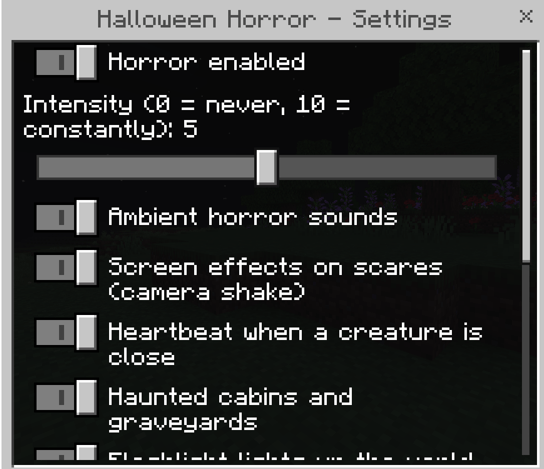
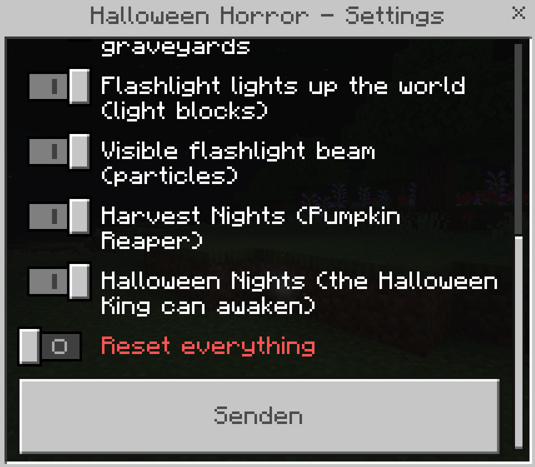
⚙️ Customizable Settings
Sneak + Use the flashlight to open the settings menu.
You can configure:
- Horror intensity from 0–10
- Ambient sounds
- Camera shake/scares
- Heartbeat effects
- Haunted structures
- Beam lighting
- Beam particles
- Special nights
- Halloween King events
- Enable or disable the add-on
📦 Installation
Halloween Horror contains both a Behavior Pack and a Resource Pack. No experimental features are listed as required, and all visible in-game names, menus, messages, and death messages are in English.
- Open the
.mcaddonfile with Minecraft. - Activate the Halloween Horror Behavior Pack.
- Activate the Halloween Horror Resource Pack.
- Enter the world.
- Your Survivor's Flashlight should be provided automatically.
⚠️ Current Testing Status
The add-on has undergone offline validation of JSON, JavaScript, Bedrock component definitions, item/block IDs, API usage, and a simulated Script API test suite covering the flashlight, lighting, creatures, boss phases, events, structures, and commands. However, it has not yet been extensively tested inside the real game.
Some parts may therefore still need in-game balancing or visual adjustment, including flashlight positioning, beam appearance, creature animations, sound balance, structures, and combat values. Bedrock also does not provide a true dynamic spotlight, so the flashlight uses particles and temporary light blocks to simulate the effect.
Turn off the lights, grab your flashlight, and survive Halloween Horror. 🎃🔦
- Edition: Minecraft Bedrock
- File type: .mcpack or .mcaddon
- Minecraft versions listed: 26.0.02, 26.0, 26.3
- How to install: Download the .mcpack or .mcaddon file. → Open it — Minecraft imports it. → In your world: Behavior Packs → Available → Activate, then the same under Resource Packs.
- Where to get it: Opens on CurseForge — not every file is mirrored on our own servers.
Install steps are the general flow for this file type — How to install Minecraft Bedrock addons & mods walks through it step by step.
- Pack type: .mcaddon — behaviour and resource pack in one file
- Manifest requires Minecraft 1.21.100 or newer
- Complete pack — everything it depends on is inside the file
- Download size: 12.1 MB
- Download link checked 19 Oct 2026 — working
These come from our own check of the pack file, not from the source page.