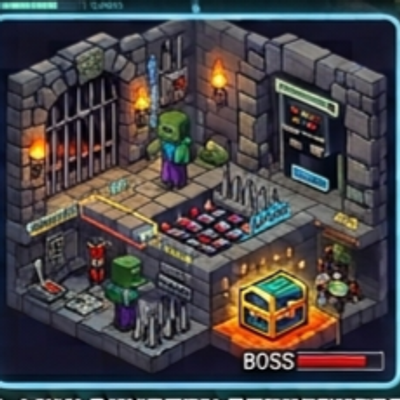
Mini Dungeon Structures
Bedrock add-on listed for Minecraft 1.20–26.x (behavior + resource pack). File opened and checked on 19 Oct 2026; installs from the MC Bedrock Mods app on Android.
⬇ Download on CurseForgeRead a dungeon scroll and a full dungeon appears in front of you. Fight through the rooms, avoid the traps and defeat the boss to open the best chest. Features: 3 themes: Stone, Lava and Ice Boss room, three side rooms and an entrance corridor 6 chests with random loot (the boss chest has the best) Traps: cobwebs, lava pits, powder snow Themed mobs and a stronger boss (Dungeon Lord, Magma Warden, Frost Warden) Warning: The dungeon replaces blocks in a 25x25 area, so use it away from your builds. Dungeons are created by scrolls, not generated naturally. Crafting: 8 paper + stone bricks / lava bucket / packed ice. How to install: Download the .mcaddon file and tap it. Minecraft opens and imports it automatically. Create a new world (or edit an old one) and open Add-Ons. Turn ON the Behavior Pack of the addon (and the Resource Pack too, if the addon has one). If something does not work, turn on Beta APIs under Experiments, then check Settings > Creator > Content Log. How to use: Craft a scroll (see Crafting above). Stand on flat ground, far from your builds. Remember: the dungeon appears just south of you and its entrance faces north, toward you. Hold the scroll and tap. The scroll is used up and the dungeon appears. Walk in, defeat the mobs, avoid the traps, beat the boss and open the chests.
- Edition: Minecraft Bedrock
- File type: .mcpack or .mcaddon
- Minecraft versions listed: 1.20.40, 1.21.30, 1.21.50
- How to install: Download the .mcpack or .mcaddon file. → Open it — Minecraft imports it. → In your world: Behavior Packs → Available → Activate, then the same under Resource Packs.
- Where to get it: Opens on CurseForge — not every file is mirrored on our own servers.
Install steps are the general flow for this file type — How to install Minecraft Bedrock addons & mods walks through it step by step.
- Pack type: .mcaddon — behaviour and resource pack in one file
- Manifest requires Minecraft 1.26.0 or newer
- Complete pack — everything it depends on is inside the file
- Download size: 282 KB
- Download link checked 19 Oct 2026 — working
These come from our own check of the pack file, not from the source page.