Tree Feller & Vein Miner
Bedrock add-on listed for Minecraft 1.21–26.x (behavior + resource pack). File opened and checked on 20 Oct 2026; installs from the MC Bedrock Mods app on Android.
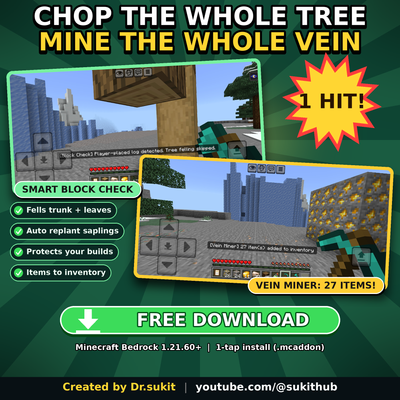
Chop a whole tree with leaves in one hit, auto-replant saplings, and mine entire ore veins. Smart block check protects your builds. Items go straight to…
⬇ Download on CurseForgeTree Feller & Vein Miner
Chop the whole tree. Mine the whole vein. One hit.
FEATURES
Tree Feller
- Break one log and the entire tree comes down: trunk and leaves.
- Works with big trees too (jungle, dark oak, spruce and more).
- Items are collected straight into your inventory.
Auto Replant
- If you have a matching sapling in your inventory (including ones that just dropped from the leaves), it is planted automatically on the soil where the tree stood.
Smart Block Check
- Logs placed by players are NOT felled as a whole tree. Your houses and wood builds stay safe.
- Only naturally generated trees, or trees grown from saplings, are felled.
- Natural logs with no tree around them (like village pillars) are not felled.
- Player-placed leaves are left alone.
- The game tells you what was detected, for example: "[Block Check] Player-placed log detected. Tree felling skipped."
Vein Miner
- Mine one ore and the whole connected vein breaks with it.
- Works on natural ores and ores placed by players.
- Storage blocks such as coal blocks are never vein-mined.
- Respects pickaxe tiers: if your pickaxe is too weak, the ore breaks normally.
Inventory Handling
- Everything you mine or chop goes directly into your inventory.
- If your inventory is full, the leftover items drop on the ground and you get a message.
Welcome Screen & Credit Book
- A welcome menu appears when you join the world.
- You get a Credit Book (use it to see the credits).
DETAILS
- Tools lose durability per log or ore broken. Unbreaking is supported.
- If a tool does not have enough durability, the add-on falls back to normal breaking.
- Silk Touch tools and Creative mode use normal vanilla breaking.
- Fortune does not apply to felled or vein-mined blocks.
INSTALLATION
1. Download the file.
2. If it is a .zip, rename it to .mcaddon.
3. Open it with Minecraft (it imports automatically).
4. Create or edit a world, and activate both the Behavior Pack and the Resource Pack.
5. Join the world and start chopping!
COMPATIBILITY
- Minecraft Bedrock Edition 1.21.60 or newer.
- Tested on version 1.26.52.
CREDITS & LICENSE
Created by Dr.sukit
YouTube: https://www.youtube.com/@sukithub
License: Creative Commons Attribution-NonCommercial-ShareAlike 4.0
- You may share this add-on if you give clear credit to Dr.sukit and link to the original page.
- Commercial use is not allowed.
- If you modify it, you must share your version under the same license.
- Edition: Minecraft Bedrock
- File type: .mcpack or .mcaddon
- Minecraft versions listed: 26.40, 26.50
- How to install: Download the .mcpack or .mcaddon file. → Open it — Minecraft imports it. → In your world: Behavior Packs → Available → Activate, then the same under Resource Packs.
- Where to get it: Opens on CurseForge — not every file is mirrored on our own servers.
Install steps are the general flow for this file type — How to install Minecraft Bedrock addons & mods walks through it step by step.
- Pack type: .mcaddon — behaviour and resource pack in one file
- Manifest requires Minecraft 1.21.60 or newer
- Complete pack — everything it depends on is inside the file
- Download size: 7 KB
- Download link checked 21 Oct 2026 — working
These come from our own check of the pack file, not from the source page.