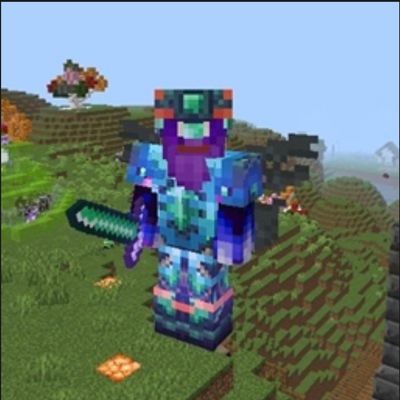
Lu’s Emerald Arsenal V1.2
Bedrock add-on listed for Minecraft 26.x. File opened and checked on 21 Oct 2026; installs from the MC Bedrock Mods app on Android.
Lus Emerald Arsenal adds powerful emerald armor, tools, and weapons to Minecraft Bedrock! This fix improves the emerald shovel and hoe for a better…
⬇ Download on CurseForgeThe author built this one for Minecraft 26.50. On other versions it may install and then do nothing.
Lus Emerald Arsenal - V1.2
Upgrade your Minecraft experience with Lus Emerald Arsenal, an add-on that brings a powerful emerald-themed collection of armor, weapons, and tools to your world!
This version includes fixes for the emerald pickaxe, axe, shovel and hoe, helping improve the functionality of these tools while keeping the original emerald-themed arsenal intact.
✨ Features
- 💎 Emerald Armor – A full set of emerald-themed armor.
- ⚔️ Emerald Weapons – Take on your enemies with emerald-powered equipment.
- ⛏️ Emerald Tools – Includes the sword, pickaxe, axe, shovel, and hoe.
- 🔱 Emerald Spear – Add another weapon to your arsenal.
- 🛠️ Pickaxe, Axe, Shovel & Hoe Fixes – Improvements focused on fixing issues with the emerald shovel and hoe.
- 🎨 Custom Textures – Unique emerald designs for your equipment.
- 📦 Behavior & Resource Packs – Includes the files needed for the add-on’s gameplay features and visuals.
📥 Installation
- Download the .mcaddon file.
- Open it with Minecraft Bedrock Edition.
- Wait for both packs to import successfully.
- Activate the Behavior Pack and Resource Pack in your world’s settings.
- Follow any additional in-game instructions if required.
⚙️ Compatibility
- Game: Minecraft Bedrock Edition
- Minimum version listed in the pack: 1.21.0
- Pack type: Add-on (Behavior Pack + Resource Pack)
Enjoy the Lus Emerald Arsenal, and have fun exploring Minecraft with your emerald equipment!
Please report any bugs or compatibility issues so they can be investigated and fixed in future updates.
- Edition: Minecraft Bedrock
- File type: .mcpack or .mcaddon
- Minecraft version listed: 26.50
- How to install: Download the .mcpack or .mcaddon file. → Open it — Minecraft imports it. → In your world: Behavior Packs → Available → Activate, then the same under Resource Packs.
- Where to get it: Opens on CurseForge — not every file is mirrored on our own servers.
Install steps are the general flow for this file type — How to install Minecraft Bedrock addons & mods walks through it step by step.
- Pack type: .mcaddon — behaviour and resource pack in one file
- Download size: 309 KB
- Download link checked 21 Oct 2026 — working
These come from our own check of the pack file, not from the source page.