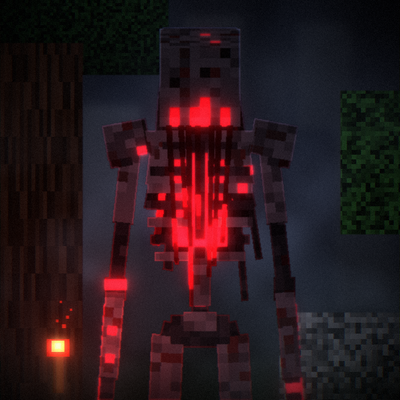
The Aberration BE
Bedrock add-on listed for Minecraft 26.x. Download on the author's site.
⬇ Download on CurseForgeThe Aberration – A Minecraft Horror Addon
Something is hunting you. Something that should not exist.
The Aberration is a terrifying horror addon that introduces a giant, intelligent monster that turns your Minecraft world into a nightmare. Encounter it in dark forests, underground caves, and near your home. You may hear its footsteps before you ever see it, but once it finds you, escaping will not be easy.
👁️ Features
- A Giant Nightmare: Face a towering creature approximately 6 blocks tall.
- Relentless Hunter: It hunts players and can target other monsters and villagers.
- Breaks Into Your Home: It can smash through doors to reach its targets.
- Creepy Atmosphere: Its appearance can trigger a terrifying red sky.
- Dynamic AI: It can chase, attack, climb, and use different movement behaviors.
- A Living World: Villages are no longer safe when the Aberration appears.
- Daily Evolution: The monster grows stronger as the days pass.
- Terrifying Sounds: Hear eerie voices, heavy footsteps, and frightening sound effects.
- Unpredictable Encounters: It can disappear after killing its victim, leaving you wondering when it will return.
☠️ Survive If You Can
Explore carefully, protect your home, and never assume you are alone. The Aberration is not an ordinary Minecraft mob. It is a nightmare waiting for the perfect moment to strike.
Will you survive the hunt, or will your world become its territory?
Install The Aberration and experience Minecraft horror like never before.
- Edition: Minecraft Bedrock
- File type: .mcpack or .mcaddon
- Minecraft versions listed: 26.40, 26.50
- How to install: Download the .mcpack or .mcaddon file. → Open it — Minecraft imports it. → In your world: Behavior Packs → Available → Activate, then the same under Resource Packs.
- Where to get it: Opens on CurseForge — not every file is mirrored on our own servers.
Install steps are the general flow for this file type — How to install Minecraft Bedrock addons & mods walks through it step by step.
The Aberration BE is a free Minecraft Bedrock addon. Compatible with Minecraft 26.40, 26.50. Downloaded 78 times (via CurseForge). Download it and open it directly in the game.