
ModsJava
TgRelay
Java mod listed for Minecraft 1.21. Downloads from the MC Java Mods app on Android.

**TgRelay** is a Paper plugin that connects Minecraft chat to Telegram — a group, a channel or a private chat — without leaking a network socket every second. It was written for [Losos World](https://map.losos.world/), a survival server running since 2014, after the classic TelegramChat plugin pushed the machine into "No buffer space available" with thousands of leaked connections.
If your server needs Minecraft chat in Telegram (and Telegram messages in Minecraft), this is the drop-in replacement that will not take the box down after a week.
## Why another Telegram bridge?
The old [TelegramChat](https://github.com/mastercake10/TelegramChat) plugin (1.0.21, December 2022; [SpigotMC page](https://www.spigotmc.org/resources/telegramchat.16576/)) calls `getUpdates` in a tight loop and leaves every socket behind: about **2.3 new connections per second**, several thousand per hour. Windows eventually runs out of ephemeral ports and *everything else* starts failing — Bedrock players get dropped, RCON stalls, plugins lose access to Mojang.
TgRelay does it properly:
- **Long polling** — a single `getUpdates?timeout=25` request stays open, so one cycle costs one connection instead of hundreds.
- **One shared `java.net.http.HttpClient`** with a bounded pool: connections are reused and closed on shutdown.
- **Outbound queue with a rate limit** — a chatty server cannot flood Telegram and get the bot throttled.
- **Backoff on errors** instead of a retry storm; the update offset survives restarts, so old messages are never replayed into the game.
- **Several servers on one bot** — a hub/spoke bridge, so a survival world and a creative server report into the same chat, each line prefixed with its server name.
- **No third-party libraries** — only the JDK and the Paper API.
## Features
- Minecraft → Telegram: chat, join, quit, deaths and advancements (each event can be disabled).
- Telegram → Minecraft: messages are printed with `tellraw`, so they keep colours and are never attributed to a player.
- Groups, channels and private chats; one bot can post to many destinations.
- `%player%`, `%message%`, `%sender%`, `%server%` placeholders in every format string.
- English, Russian and Chinese locale files, overridable without a rebuild.
- `/tgrelay status` shows chats, queue, offset and the moderation route; `/tgrelay reload` re-reads the config.
## Several servers, one Telegram chat
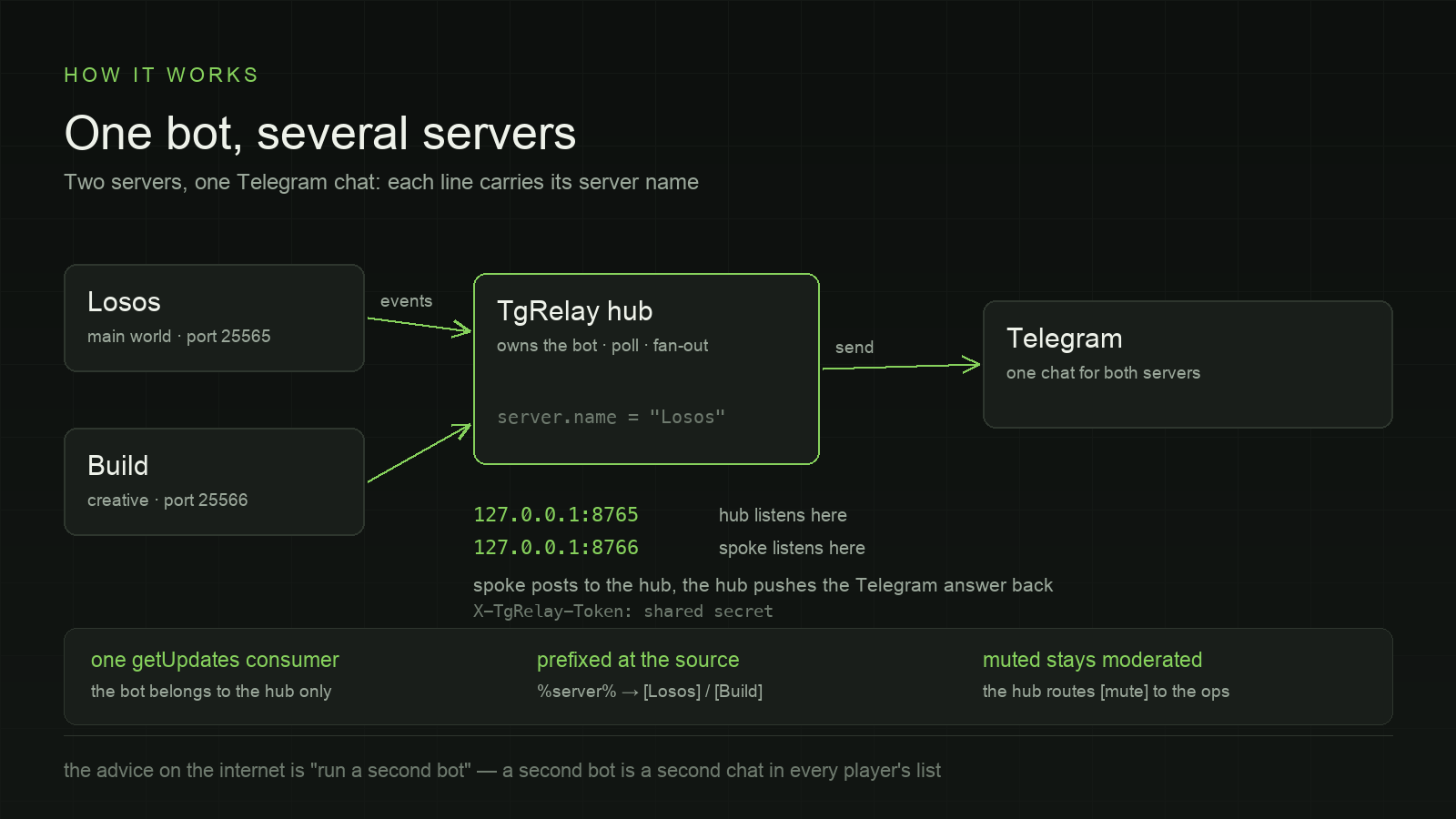
Telegram gives a bot exactly **one** `getUpdates` reader, so installing the plugin on a second server with the same token does not work: the two pollers steal updates from each other and one server's chat randomly disappears. The usual advice is "run a second bot" — which is a second chat in every player's list.
TgRelay makes one server the **hub** instead. It owns the bot; every other server is a **spoke** that talks to it over loopback HTTP with a shared secret:
```yaml
# hub — the server that owns the bot
server: { name: "Losos" }
relay:
mode: hub
token: "a-long-random-string"
bind: "127.0.0.1:8765"
spokes: ["http://127.0.0.1:8766"]
format:
from-minecraft: "[%server%] %player%: %message%"
```
```yaml
# spoke — any other server, same token
server: { name: "Build" }
relay:
mode: spoke
token: "a-long-random-string"
bind: "127.0.0.1:8766"
hub: "http://127.0.0.1:8765"
```
One chat gets both worlds, and every line says where it came from:
```
[Losos] Steve: hi there
[Build] Alex: testing the roof
```
- The bot belongs to the hub only; a spoke needs no token of its own, so there is nothing to leak and nothing to duplicate.
- Requests carry the shared secret in `X-TgRelay-Token`; the listener binds to loopback unless you change `relay.bind`.
- Muted players are still routed to the moderation channel by the hub, so `/tgrelay off` behaves the same on every server.
- A spoke retries three times before giving up and logs the loss; a dead spoke is reported by the hub once per five minutes.
With no `relay` and `server` sections the plugin runs exactly like a single-server install — the feature is opt-in.
## Privacy: let players mute themselves
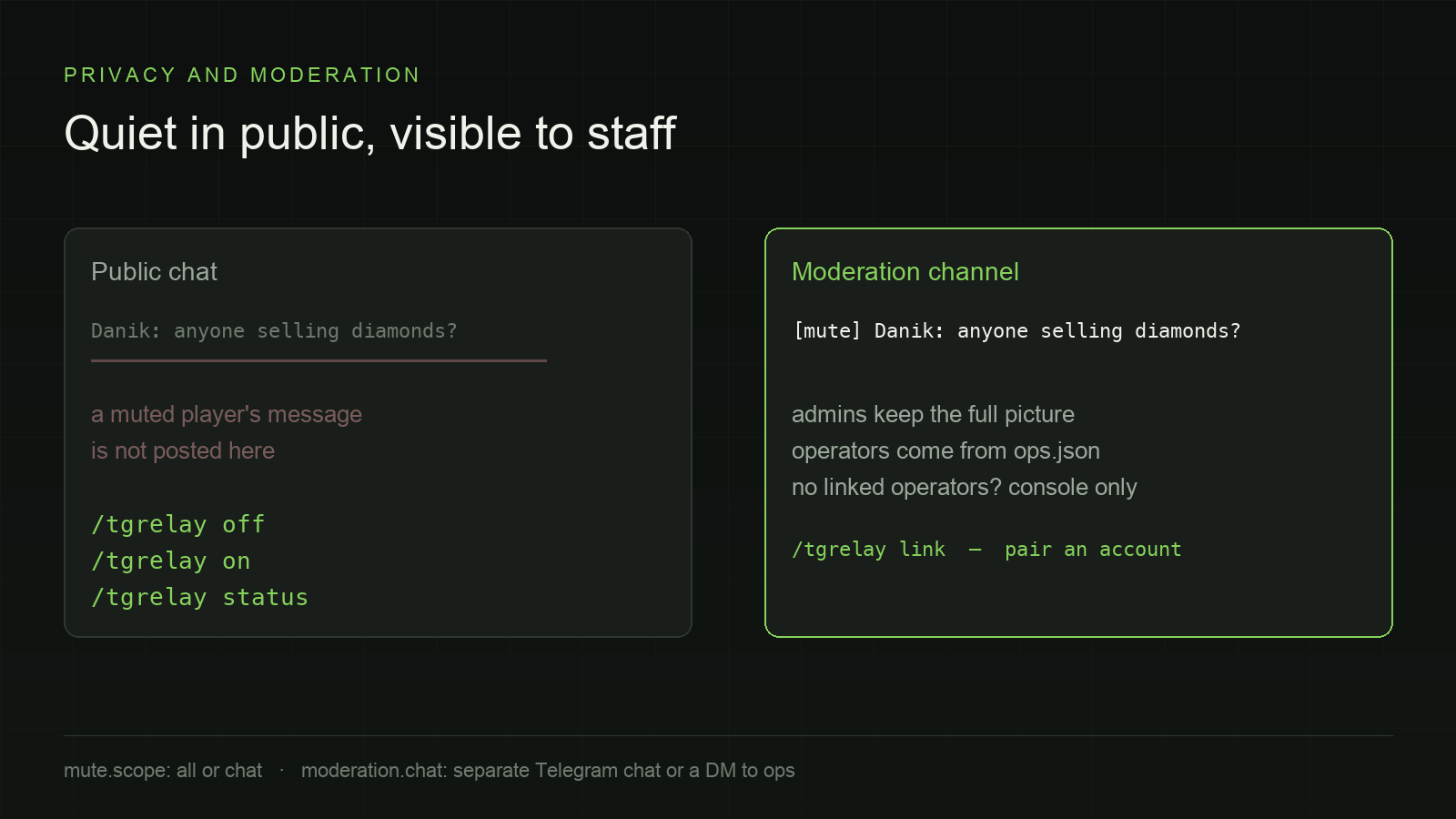
A player can keep their own messages out of the public chats:
- `/tgrelay off` — the player's messages stop going to `bot.chats`;
- `/tgrelay on` — back to normal;
- `/tgrelay status` — what their current state is.
Muted messages are **not deleted**. They are forwarded to a moderation channel with a `[mute]` prefix, so admins keep the full picture while everyone else sees nothing:
1. `moderation.chat` — a separate Telegram chat the players are not in (simplest: add the bot there, paste the id, done);
2. otherwise a DM to every **operator** with a linked account — operators come from `ops.json`, so there is no second list to maintain;
3. otherwise the server console, so nothing disappears silently.
Linking is a one-time code (`/tgrelay link`), because Telegram knows user ids while Minecraft knows nicknames — a stranger cannot claim somebody else's account by typing a nickname.
## Install
1. Drop `TgRelay.jar` into `plugins/`.
2. Start the server once, then edit `plugins/TgRelay/config.yml`:
```yaml
bot:
token: "123456:AA..." # from @BotFather
chats:
- 123456789 # a DM with the bot
- -1001234567890 # a group the bot is a member of
```
3. Run `/tgrelay reload`.
For a group, add the bot to the group first — otherwise Telegram answers `chat not found`, which is exactly the failure that made the old plugin spin.
## Commands and permissions
| Command | Who | What |
|---|---|---|
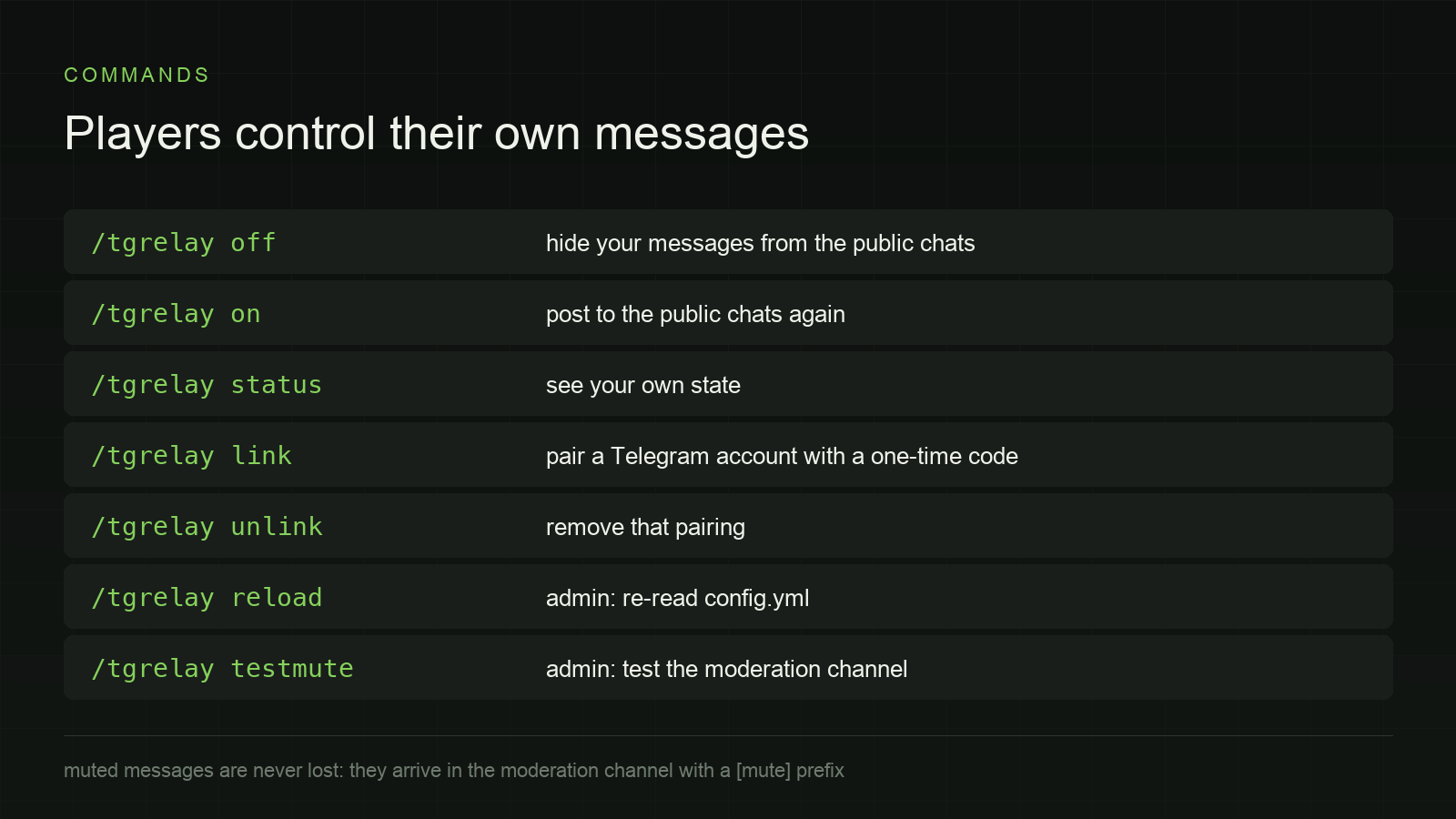
| `/tgrelay off` / `on` | players | hide or restore your own messages |
| `/tgrelay link` / `unlink` | players | pair or unpair a Telegram account |
| `/tgrelay status` | players and admins | your state; admins also see the relay counters |
| `/tgrelay reload` | `tgrelay.admin` | re-read `config.yml` |
| `/tgrelay testmute` | `tgrelay.admin` | send a test message through the moderation route |
## Compatibility
- **Paper** and forks that keep the Paper API (Purpur, and similar) — the plugin uses `AsyncChatEvent`.
- **Java 21+**, tested on Paper 1.21 and on a live server with Geyser, ViaVersion and Floodgate installed.
- Can run side by side with TelegramChat, but only one plugin may hold a bot token at a time: Telegram allows a single `getUpdates` consumer per bot.
## Open to ideas
This plugin is maintained in the open and it is shaped by the people who run it. If something is missing — a different relay target, per-world filters, a web dashboard, a locale you need — open an issue or a pull request on [GitHub](https://github.com/deepy6073/TgRelay). Bug reports with a log excerpt are especially welcome.
## Where it runs
TgRelay powers the Telegram bridge of **Losos World** — a survival server that has been running since 2014 without a single wipe, without private zones and without donations.
- Server address: `mc.losos.world` — Java 1.21+ and Bedrock (port `19132`)
- Live map: [map.losos.world](https://map.losos.world/)
- Website: [losos.world](https://losos.world/)
The plugin is not tied to that server in any way: any Paper server can run it with its own bot token.
## Links
- Source code and releases: [github.com/deepy6073/TgRelay](https://github.com/deepy6073/TgRelay)
- Prior art: [TelegramChat](https://github.com/mastercake10/TelegramChat) ([SpigotMC](https://www.spigotmc.org/resources/telegramchat.16576/)) — the plugin this one was written to replace
- License: MIT
*TgRelay is not affiliated with Mojang or Microsoft.*
Quick facts
- Edition: Minecraft Java
- File type: .jar
- Minecraft versions listed: 1.21, 1.21.1, 1.21.10
- How to install: Install the matching mod loader (Forge, Fabric or NeoForge) for your Minecraft version. → Download the .jar. → Put it in the .minecraft/mods folder and launch that loader profile.
- Where to get it: Opens on Hangar — not every file is mirrored on our own servers.
Install steps are the general flow for this file type — How to install Minecraft Java mods & modpacks walks through it step by step.
TgRelay is a free Minecraft Java mod. Compatible with Minecraft 1.21, 1.21.1, 1.21.10, 1.21.11 and newer. Downloaded 1 times (via Hangar). Download it and open it directly in the game.