
ModsJava
endercraftbuildings
Java mod listed for Minecraft 26.x. Downloads from the MC Java Mods app on Android.
⬇ Download on Hangar# EnderCraftBuildings
**Copy buildings into amethyst crystals, store their materials in the empty space of the End, and recall the finished building anywhere.** Built for **Paper 26.3 / Java 25**. No resource pack or runtime dependencies required.
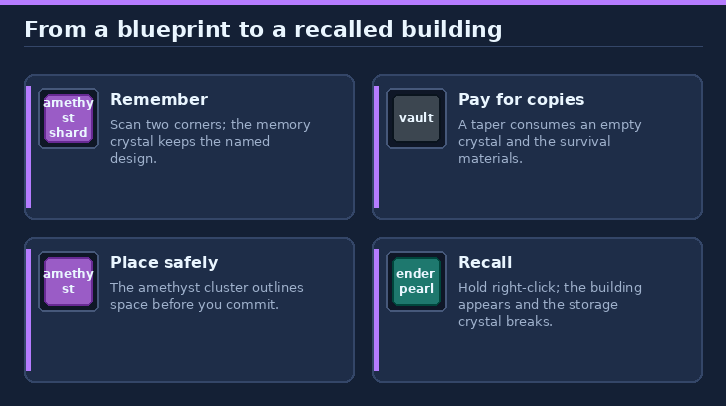
> **In game:** use `/help endercraftbuildings` for the step-by-step guide. This plugin has no commands or permissions; the guide ends with clickable GitHub and issue links.
## Contents
- [Quick start](#quick-start)
- [Crafting](#crafting)
- [Scanning a building](#scanning-a-building)
- [Imprinting a storage crystal](#imprinting-a-storage-crystal)
- [Placing and recalling](#placing-and-recalling)
- [What is copied and material costs](#what-is-copied-and-material-costs)
- [Endermites and configuration](#endermites-and-configuration)
- [Commands and permissions](#commands-and-permissions)
- [Install](#install)
- [Build from source and publish](#build-from-source-and-publish)
- [Links and support](#links-and-support)
## Quick start
Think of the plugin as **a reusable building blueprint plus a material-paid building kit**. Build your original structure normally, remember it in a memory storage crystal, then use that design to prepare portable copies. Scanning **does not remove or move the original building**, and it does not give you free blocks: in survival, each copy must be paid for with its building materials. You do not need to travel to the End or build anything there; the End-storage idea is the lore behind the crystals.
### Your first building, step by step
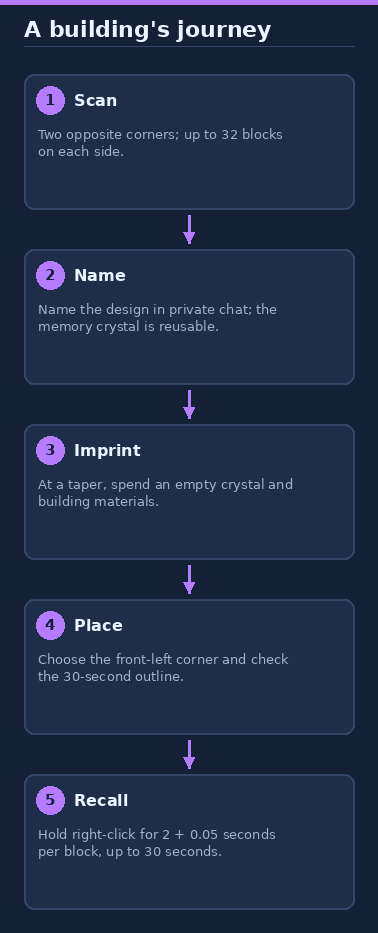
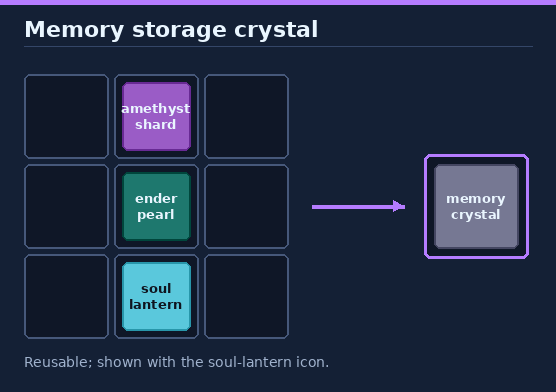
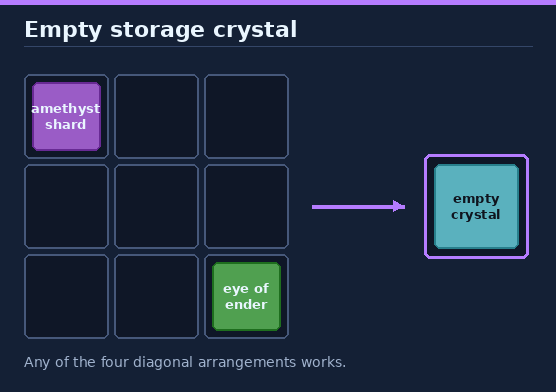
1. **Craft your tools.** Use the recipes below (also in your recipe book) to make a **memory storage crystal**, an **empty storage crystal**, and an **Ender Biconical Taper**. Place the taper somewhere convenient as your imprinting station. The memory crystal looks like a soul lantern; the empty storage crystal looks like an amethyst shard.
2. **Remember a finished building.** Hold the memory storage crystal and right-click two opposite corners enclosing your structure, up to **32 x 32 x 32 blocks**. Watch the purple outline to check your selection. You can aim into open air to select a corner three blocks ahead, so temporary marker blocks are not required. After the second corner, type a name in chat to save the design onto that crystal. The original structure stays untouched.
3. **Pay for a portable copy.** Keep an empty storage crystal and the required plain, unrenamed building materials in your inventory. Hold your named memory crystal and right-click the placed taper. It consumes the empty crystal and materials to give you a **storage crystal containing one ready-to-place copy**. If you are short, chat lists the missing materials and nothing is taken. Your memory crystal is kept for making more copies later.
4. **Choose where the copy will go.** Take the storage crystal to your destination, face the direction the building should face, and right-click to set it down as an amethyst cluster. That cluster anchors the building's **front-left bottom corner**. Check the teal outline before committing; a red outline means the building is obstructed. Clear the required spaces, or break the cluster in survival to pick the crystal back up and try another location.
5. **Recall the building.** Hold right-click on the placed cluster until the action-bar charge finishes. The structure appears and the storage crystal shatters. Charging takes **2 seconds plus 0.05 seconds per block**, capped at 30 seconds. Letting go cancels the charge; it does not spend the crystal.
For example, scan your favourite small cottage once, then keep its named memory crystal at your taper. Whenever you want another cottage, bring another empty crystal and another cottage's worth of materials, imprint a storage crystal, and carry it to the new site. An existing storage crystal can also serve as the source design at a taper without being consumed, but each additional copy still needs its own empty crystal and materials.
**What is copied?** The building's supported block shapes and states, not the contents of containers or other block-entity details such as sign text and banner patterns. This is a way to reproduce structures, not duplicate stocked chests or transport their contents. Placement does not bulldoze existing blocks: the needed spaces must be clear, and normal block-place protection checks must allow the build. The detailed sections below explain scanning, material costs, placement, and cancellation.
### At a glance
```text
Memory storage crystal -> scan a building -> name it
Memory (or storage) crystal + empty storage crystal + materials
-> right-click an Ender Biconical Taper -> storage crystal
Storage crystal -> place it as an amethyst cluster -> check the outline
-> hold right-click on the cluster -> building appears, crystal shatters
```
## Lore
Ender pearls don't really fly. They carry whoever throws them through the empty space of the End and drop them back out where the pearl lands. Endercrafters worked out that the same empty space could hold far more than a traveller, if only something could remember where everything belongs.
- **Memory storage crystal.** The soul lantern gives off a special light that lets amethyst hold onto an image. Light bouncing off a building is caught in the crystal like a hologram, and the ender pearl finds empty End space where the building's materials can later be kept. The memory crystal only remembers; it never sends anything away, so it is never used up.
- **Empty storage crystal.** Amethyst bound to an eye of ender. It has no hologram yet, but the eye is ready to keep track of blocks stored in the End.
- **Ender Biconical Taper.** Two cones of obsidian focus the hologram's light and split the entangled beam in two. One beam carries the materials into empty End space. The other goes into the empty crystal's ender eye, along with a copy of the hologram from the memory or storage crystal. That crystal now knows where the materials are stored and where every block must go.
- **Storage crystal.** When used, it pulls the materials back out of the End, through the hologram and into the world, rebuilding the structure exactly as it was remembered. The crystal can't survive the strain and shatters.
The End doesn't always let go cleanly. Now and then something hitches a ride back with the materials: an endermite, crawling out of the taper or the newly recalled building.
## Crafting
All recipes appear in the recipe book automatically for current and joining players.
| Item | Shaped recipe | Result / notes |
| --- | --- | --- |
| Memory storage crystal | Amethyst shard, ender pearl, soul lantern vertically (`A`, `P`, `L`) | 1; soul-lantern item model, non-stackable, never consumed |
| Empty storage crystal | Amethyst shard + eye of ender on a diagonal in a 2x2 grid | 1; any of four diagonal rotations works; amethyst-shard icon |
| Ender Biconical Taper | `P D` / `O O` / `OOO` (`P` pearl, `D` diamond, `O` obsidian) | 1 placeable vault-shaped station |
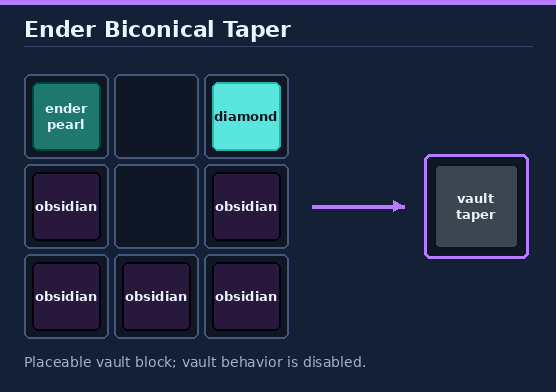
The taper uses a vault block as its model, but vault behavior is disabled: it always shows a floating eye of ender, never opens or reacts when players come near, never cycles items, and trial keys do nothing. Like any vault showing an item, it still gives off faint flames and an occasional ambient hum. Breaking it returns the taper (nothing in creative), and explosions cannot destroy it.
## Scanning a building
1. Hold a memory storage crystal and right-click a block for the first corner.
2. A purple particle box follows the block you look at. It turns red if the selection is larger than **32 x 32 x 32**.
3. Right-click the opposite corner. Sneak + right-click or switching away from the crystal cancels.
4. Type a name in chat (1-32 characters), or `cancel`. The prompt expires after 60 seconds; the naming message is not broadcast.
Corners don't need a block. If you aren't looking at a block within reach, the corner is the empty spot **3 blocks in front of you**, marked with a small purple box, so you can select open space above or beside a building without placing marker blocks.
The building is remembered relative to the direction you faced when you clicked the second corner, from the nearest left corner. Air is ignored. Fluids, bedrock, portals, spawners, command/structure blocks, budding amethyst, infested blocks and other unobtainable blocks are skipped, and chat tells you how many. A scan containing no copyable blocks is discarded. Scanning again replaces the crystal's previous building.
## Imprinting a storage crystal
Right-click a placed taper with a named memory storage crystal or an existing storage crystal. Your inventory must contain:
- one **empty storage crystal**, and
- the building's materials as plain, unrenamed items.
Both the empty crystal and materials are consumed, and you receive one storage crystal. The source crystal is kept, so you can make as many copies as you can afford. If anything is missing, nothing is taken and chat lists what you still need. Creative players still need an empty storage crystal but no materials.
## Placing and recalling
1. Right-click a block with a storage crystal. It sets down as an **amethyst cluster** and marks the building's **front-left bottom corner**. It replaces grass, flowers or a snow layer, otherwise it sits on the face you clicked. The structure faces the direction you were looking.
2. A teal particle box shows exactly where the building will go for **30 seconds**. Right-click the cluster to show it for another 30 seconds. A red outline means the locations are obstructed.
3. Every position the building needs must be air or a dry replaceable plant/snow layer. Water, lava and waterlogged blocks block placement. The action bar says how many blocks are in the way.
4. Hold right-click on the cluster to recall. Charging takes **2 seconds + 0.05 seconds per block**, up to 30 seconds, and shows progress in the action bar. Letting go cancels without spending the crystal.
When the charge finishes, the whole building appears at once and the crystal shatters. Each block is checked with a normal block-place event first, so protection plugins can deny the build (nothing is placed and the crystal is kept). A placed crystal stays until it is used or broken. Breaking it, or knocking it loose by removing the block it sits on, returns the storage crystal outside creative. Explosions, pistons and mobs can't move or destroy it. Sneak + right-click a cluster while holding a block to build against it normally.
## What is copied and material costs
The scan stores supported block shapes and states, not block-entity inventories or text. Waterlogged blocks are copied dry, filled cauldrons become empty cauldrons and pistons are copied retracted. Multi-block pieces such as doors and beds are placed without physics updates. Gravity blocks may fall once something updates them.
| Block shape/state | Material charged at the taper |
| --- | --- |
| Ordinary blocks | One matching placement item per block |
| Doors, beds and tall plants | One item per structure, not one per half |
| Double slabs | Two slabs |
| Candles, sea pickles, turtle eggs and snow layers | One item per piece/layer |
| Farmland and dirt paths | Dirt |
| Waterlogged blocks / filled cauldrons / extended pistons | Dry blocks / empty cauldrons / retracted pistons; fluid and piston state is not charged separately |
Only plain, unrenamed items count toward the cost. Crystals cannot be used as amethyst shards in crafting, crafters or smithing, and cannot be given to allays. Holding right-click with a usable item (food, a bow or a shield) in the other hand can stop the client from repeating the click; use an empty hand or a plain block if charging keeps cancelling.
## Endermites and configuration
There is a **5%** default chance of an endermite when a taper imprints a crystal, and a separate **5%** chance when a building is recalled. Set either probability between `0.0` and `1.0` in `plugins/endercraftbuildings/config.yml`; values are clamped to this range when read. Restart after hand-editing the file.
| Setting | Default | When it applies |
| --- | ---: | --- |
| `endermite-chance.taper` | `0.05` | Successful imprint at a taper |
| `endermite-chance.placement` | `0.05` | Successful building recall |
```yaml
endermite-chance:
taper: 0.05
placement: 0.05
```
## Commands and permissions
| Command / permission | Availability |
| --- | --- |
| `/help endercraftbuildings` | This in-game usage guide and clickable links |
| Other commands | None |
| Permissions | None |
## Install
1. Download `endercraftbuildings-0.3.0.jar` from [Hangar](https://hangar.papermc.io/rewrite123/endercraftbuildings).
2. Put it in the server's `plugins/` folder and restart. The server must run **Paper 26.3** on **Java 25**.
3. Craft a memory crystal and start scanning; no resource pack or configuration is required.
Build from source and publish
```sh
./gradlew build
```
The JAR is written to `build/libs/`. Gradle runs on Java 17+ and downloads the Java 25 toolchain if needed. Tests use MockBukkit and do not replace a server smoke test.
Run the image generator from the repository root with `python3 tools/docs/endercraftbuildings.py`. Images are original diagrams, not game textures or screenshots.
Publishing uses [Hangar's Gradle plugin](https://github.com/HangarMC/hangar-publish-plugin). Set a unique version in `gradle.properties` and supply `HANGAR_API_TOKEN` with `create_version` and `edit_page` permissions. Never commit the token.
```sh
./gradlew build publishPluginPublicationToHangar syncAllPluginPublicationPagesToHangar \
-PhangarChangelog="Building-copying workflow and in-game help guide."
```
The Hangar page is synchronized from this README. Images use absolute raw GitHub URLs for display on GitHub and Hangar.
## Links and support
- **Source and full guide:** [GitHub plugin folder](https://github.com/rewrite123/papermc-plugins/tree/main/endercraftbuildings)
- **Download:** [Hangar](https://hangar.papermc.io/rewrite123/endercraftbuildings)
- **Report a bug or request a feature:** [GitHub issues](https://github.com/rewrite123/papermc-plugins/issues)
Quick facts
- Edition: Minecraft Java
- File type: .jar
- Minecraft version listed: 26.3
- How to install: Install the matching mod loader (Forge, Fabric or NeoForge) for your Minecraft version. → Download the .jar. → Put it in the .minecraft/mods folder and launch that loader profile.
- Where to get it: Opens on Hangar — not every file is mirrored on our own servers.
Install steps are the general flow for this file type — How to install Minecraft Java mods & modpacks walks through it step by step.
endercraftbuildings is a free Minecraft Java mod. Compatible with Minecraft 26.3. Available via Hangar. Download it and open it directly in the game.