
Portals for RP Engine
Java mod listed for Minecraft 26.x. Downloads from the MC Java Mods app on Android.
⬇ Download on Modrinth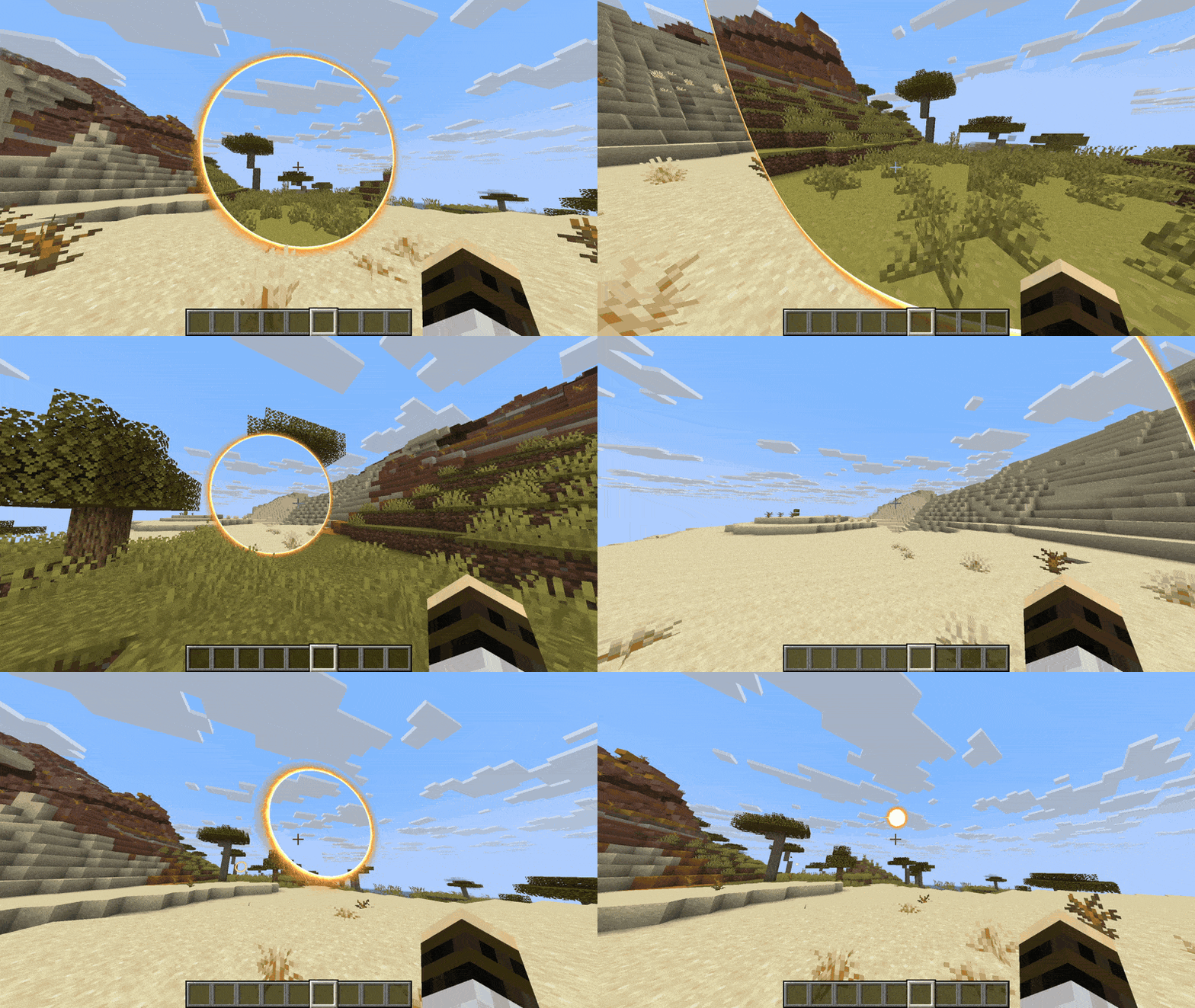
Needs RP Engine (free) · Spigot and Paper 26.2 · No client mods
What is it?
A portal you can see through. A ring of sparks opens in front of you, and through it is the place it leads to: its own blocks, its sky, its clouds and its light, from wherever you stand. Walk into it and you come out of the other ring, still moving the way you were.
It is an addon for RP Engine: drop it in beside the engine and it brings its own content with it. The ring, its sounds and the shaders that draw the window install themselves on first boot. No resource pack to build and no client mods.
Placing portals
- Stand where your portals should lead and run
/portals mark. - Go anywhere else, in the same world or another, and run
/portals place. One ring opens in front of you, the other at your mark. - Walk through.
- ✔ Open and shut: right-click a portal to shut it down to a small glowing ball, and again to open it. Sneak and right-click to take it away.
- ✔ One pair each: placing another pair takes your oldest away (
pairs-per-playerin the config). - ✔ Any size: staff can place rings from 2 to 12 blocks across with
/portals place <size>.
What you see through one
The far side, as it really is: 128 blocks across and 63 deep in full detail, with the real block textures, plants, water, each biome's grass and leaf colours, its light and the game's own ambient occlusion. Past that the land carries on for a few hundred blocks, treetops and all, under the game's own sky colours and the very clouds the far side has. Through a portal to the Nether, you see its fog and its glow.
It shows blocks: players, mobs and dropped items on the far side are not in the window.
Installing
- Install RP Engine 0.2.11 or newer (free) if you have not already.
- Drop
RPE-portals.jarintoplugins/besideRPEngine.jarand start the server. - Its content installs into
plugins/RPEngine/content/portals/and the engine reloads once to pick it up.
Portals runs on Spigot or Paper 26.2 with players on Java 26.2. Bedrock players do not see portals.
Commands and permissions
| Command | What it does | Permission | Default |
|---|---|---|---|
| /portals mark | Your portals lead here | portals.mark | Everyone |
| /portals place | Open a pair in front of you | portals.place | Everyone |
| /portals place [size] | Choose the ring's size | portals.place.size | Operators |
| /portals toggle | Open or shut the portal you are looking at | portals.toggle | Everyone |
| /portals remove [all] | Take that portal away, or all of yours | portals.remove | Everyone |
| /portals list | Your pairs and where they lead | portals.list | Everyone |
| (walk through) | Travel through a portal | portals.travel | Everyone |
| /portals open | A pair at set coordinates, for command blocks | portals.open | Operators |
| /portals closeall | Take away every portal | portals.closeall | Operators |
| /portals reload | Reload the config | portals.reload | Operators |
Other people's portals have their own nodes (portals.toggle.others, portals.remove.others), and so do extra pairs (portals.place.unlimited) and marks in another world (portals.place.otherworld). portals.player and portals.admin hand them out in bulk.
For developers
Open pairs anywhere at any size from your own plugin, shut and open them, and cancel or redirect any open, toggle, removal or crossing with the four events. See the API section of the docs.
What it connects to
- Mojang, once. The window uses the game's own block textures, which a server does not have, so on first start Portals downloads the Minecraft client jar for your server's version from Mojang's own servers, into
plugins/RPEPortals/cache/. Settextures.download: falseto skip it; blocks are then drawn in flat colours. - Nothing else. It has no telemetry of its own. Its name is included in RP Engine's anonymous usage count, which RP Engine's
telemetry: enabled: falseturns off.
Worth knowing
- The window is drawn by the game's text shader, which a resource pack can replace only once, so it cannot share a server with other things that replace it too (RP Engine's HUD shader objects, for one).
- A portal costs some frame rate up close. A shut one, or one seen from behind, draws nothing.
Full guide: resourcepack.ai/docs/rp-engine/portals
Support
Ask on Discord or open an issue on GitHub. Please don't post bugs in the reviews; we can't reply there, and we would rather fix it.
Made by ResourcePack AI
Portals is free software under the GPL-3.0 licence. The source is on GitHub, and contributions are welcome. It is built on RP Engine's public API, the same one any plugin can use. RP Engine comes from resourcepack.ai, a web editor for resource packs.
- Edition: Minecraft Java
- File type: .jar
- Minecraft version listed: 26.2
- How to install: Install the matching mod loader (Forge, Fabric or NeoForge) for your Minecraft version. → Download the .jar. → Put it in the .minecraft/mods folder and launch that loader profile.
- Where to get it: Opens on Modrinth — not every file is mirrored on our own servers.
Install steps are the general flow for this file type — How to install Minecraft Java mods & modpacks walks through it step by step.
- Ships as RPE-portals-0.1.2.jar — drop this file into the mods folder
- Download size: 1.2 MB
- Download link checked 26 Oct 2026 — working
These come from our own check of the pack file, not from the source page.