Divine Beams
Bedrock add-on listed for Minecraft 26.x. Download on the author's site.
Vibrant Visuals light beams tinted by stained glass, with custom sunsets, a violet End and fog per biome. Craft the Fog Book (4 dirt) to adjust fog from 0…
⬇ Download on CurseForgeDIVINE BEAMS – Vibrant Visuals Light Beams + Fog Book
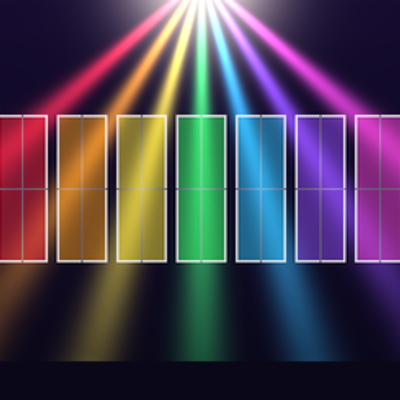
Divine Beams brings strong volumetric light beams ("god rays") to Minecraft Bedrock with Vibrant Visuals. Beams are tinted by stained glass, each biome has its own fog color, and a craftable Fog Book lets you adjust the fog in-game.
REQUIREMENTS
- Minecraft Bedrock 1.21.120 or newer
- Vibrant Visuals enabled
- Both packs active in the world (Resource Pack + Behavior Pack)
- Script/Beta APIs available (@minecraft/server 2.3.0, @minecraft/server-ui 2.0.0)
FEATURES
Lighting and Sky
- Strong sun with warm midday tones and intense red-orange sunsets
- Deep blue moonlight and very low ambient light, so the beams stand out
- Custom day-cycle atmosphere: vivid blue sky by day, pink-peach dawn and dusk, deep blue night
- Large sun glow and a soft horizon blend
- Blocky, pixel-aligned shadows
The End
- Intense violet sky and lighting
- Violet volumetric fog
- PBR textures for end stone, end bricks, purpur, chorus plants and obsidian
Glass Tinting
- All 16 stained glass colors, plus silver, tint the light beams
- Glass pane tops included
Biome Fog
- 13 biome groups, each with its own fog color: Plains, Oak Forest, Birch Forest, Dark Forest / Pale Garden, Taiga, Jungle / Bamboo, Swamp / Mangrove, Cherry Grove, Desert / Savanna / Mesa, Mountains, Snow / Ice, Caves and The End
- 87 biomes covered
- 11 fog levels per group (0 = no fog, 10 = maximum)
- Fog changes automatically as you move between biomes
FOG BOOK
- Craft it with 4 dirt (shapeless recipe, crafting table)
- Right-click to open the menu
- Pick a biome group and set its fog with a 0–10 slider
- Changes apply instantly and are saved per player
- Languages: English, Português (Brasil), Español (switch with the globe button in the menu)
Default fog levels:
Plains 1 | Oak 3 | Birch 3 | Dark Forest 4 | Taiga 3 | Jungle 4 | Swamp 3 | Cherry 3 | Desert 1 | Mountains 1 | Snow 2 | Caves 2 | The End 3
HOW TO USE
1. Install the .mcaddon file.
2. Enable both packs in your world.
3. Turn on Vibrant Visuals in Video Settings.
4. Craft the Fog Book (4 dirt) and adjust the fog per biome.
NOTES
- Fog is applied per player.
- The Nether has no fog preset.
- Without Vibrant Visuals, the light beams will not appear.
Languages: English, Português (Brasil), Español
- Edition: Minecraft Bedrock
- File type: .mcpack or .mcaddon
- Minecraft versions listed: 26.40, 26.50
- How to install: Download the .mcpack or .mcaddon file. → Open it — Minecraft imports it. → In your world: Behavior Packs → Available → Activate, then the same under Resource Packs.
- Where to get it: Opens on CurseForge — not every file is mirrored on our own servers.
Install steps are the general flow for this file type — How to install Minecraft Bedrock addons & mods walks through it step by step.
Divine Beams is a free Minecraft Bedrock addon. Compatible with Minecraft 26.40, 26.50. Downloaded 21 times (via CurseForge). Download it and open it directly in the game.