
AddonsBedrock
Health Bars | Damage Indicators
Bedrock add-on listed for Minecraft 1.21–26.x (behavior + resource pack). File opened and checked on 29 Oct 2026; installs from the MC Bedrock Mods app on Android.
See a mob’s exact health just by looking at it. A heart icon appears above the mob with its health (31/40), and floating numbers show every hit and heal.
⬇ Download on CurseForge


Never guess a mob’s health again. Look at any mob and its exact health appears above it with a heart icon, while floating numbers pop up for every hit you land and every heal it gets.

✨ •Features•
- Exact health shown above any mob you look at
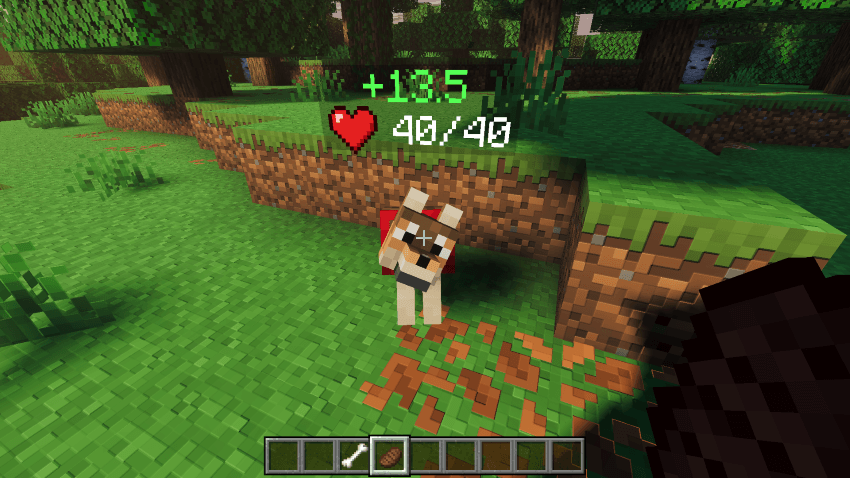
- Floating red -damage numbers on every hit
- Floating green +heal numbers when a mob recovers
- Health stays visible for a few seconds after a hit
- Works from up to 24 blocks away
- Custom heart icon
- Works for each player in multiplayer
📋 •Requirements•
- Minecraft Bedrock Edition 1.21.80 or newer
- Both packs must be imported (the Resource Pack is linked to the Behavior Pack and activates with it)
📥 •Installation•
- Download and import both packs into Minecraft
- Create a new world or edit an existing one
- Activate Health Bars | Damage Indicators under Behavior Packs
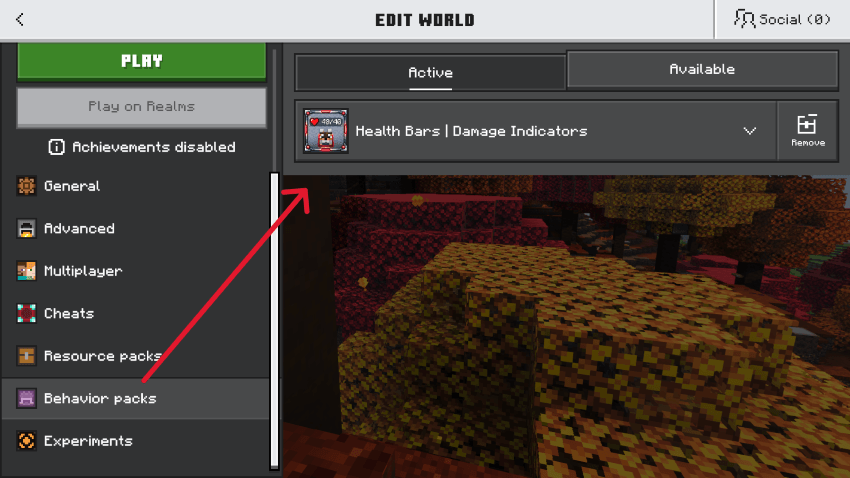
- Load into your world and look at any mob
Quick facts
- Edition: Minecraft Bedrock
- File type: .mcpack or .mcaddon
- Minecraft versions listed: 1.21.82, 1.21.43, 1.21.94
- How to install: Download the .mcpack or .mcaddon file. → Open it — Minecraft imports it. → In your world: Behavior Packs → Available → Activate, then the same under Resource Packs.
- Where to get it: Opens on CurseForge — not every file is mirrored on our own servers.
Install steps are the general flow for this file type — How to install Minecraft Bedrock addons & mods walks through it step by step.
File checked by MCModsHub
- Pack type: .mcaddon — behaviour and resource pack in one file
- Manifest requires Minecraft 1.21.80 or newer
- Complete pack — everything it depends on is inside the file
- Download size: 2.3 MB
- Download link checked 29 Oct 2026 — working
These come from our own check of the pack file, not from the source page.