
AddonsBedrock
Better Render Dragon (1.26+) – Add Shaders Back To Minecraft
Bedrock add-on listed for Minecraft 26.x. Download on the author's site.
⬇ DownloadBetter Render Dragon is an enhancement mod for the RenderDragon engine in Minecraft Bedrock Edition.
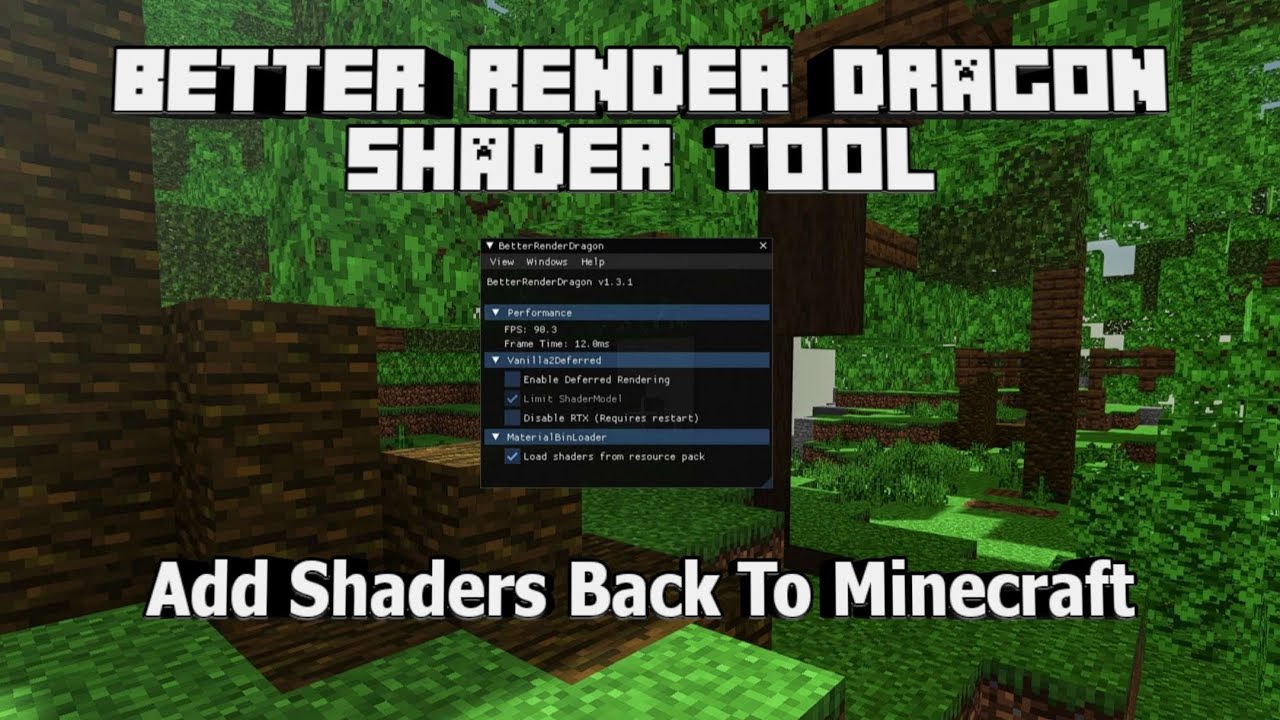
Features:
- Enable Deferred Rendering: Allows for better lighting and shading effects in the game.
- Disable Raytracing: Improves performance by turning off raytracing, which can be resource-intensive.
- Load RenderDragon Shaders from Resource Pack: Supports custom shaders, enhancing the visual experience.
- Configurable ImGui Support: Provides a customizable interface for easier access to features and settings.
- Compatibility: The current build targets Minecraft Bedrock 1.26.2x. If you’re on an older release, check the download section below – it still keeps working builds for several earlier version ranges.
Changelog:
- Supports Minecraft 1.21 – 1.26
- Even on servers like The Hive and CubeCraft, you can still enable the VV effect in the settings.
- Added “Force Enable Vibrant Visuals” option
- Supports activating Vibrant Visuals with Marketplace packs
- Added
DeferredShadingParametersDebugGUIandRayTracingDebugGUI
Setting It Up:
Better RenderDragon doesn’t work like a normal resource pack – you can’t just drop the file into a folder and expect it to show up in-game. It’s a small program that has to be loaded into Minecraft while the game is actually running, since Mojang never built official support for outside shaders into RenderDragon. Here’s the general process:- Match your Minecraft Bedrock version to one of the builds in the download section below, and grab it along with the DLL injector listed in the same place.
- Launch Minecraft first and get to the main menu. The mod attaches to a game process that’s already open, so running the injector before Minecraft is up won’t do anything.
- Open the injector, browse to the Better RenderDragon file you just downloaded, and run the injection. Most injectors just need you to point at the file and press one button.
- Once it’s injected, press F6 in-game to bring up Better RenderDragon’s own overlay. This is where you can force Vibrant Visuals on (useful on servers like The Hive or CubeCraft that don’t normally let you enable it), turn off raytracing if it’s hurting your frame rate, and hot-reload a shader you’re testing without closing the whole game.
- To actually see a shader in action, import its resource pack the normal way and turn it on under Global Resources – Better RenderDragon reads whatever shader is active there once it’s running.
Better Render Dragon Download Links
For Minecraft PE 1.21 – 1.26 Legacy
Show MoreFor Minecraft PE 1.26 only
DLL & SO: Download from server 1 – Download from server 2
For Minecraft PE 1.21.60+
DLL & SO: Download from server 1 – Download from server 2
For Minecraft PE 1.21.120 only
DLL & SO: Download from server 1 – Download from server 2
For Minecraft PE from 1.21.120 to 1.21.30
DLL & SO: Download from server 1 – Download from server 2
Download MCBE.DLL Injector
Injector: Download from server 1 – Download from server 2
For Minecraft PE 26.x
DLL (no-imgui): Download from server 1 – Download from server 2
Quick facts
- Edition: Minecraft Bedrock
- File type: .mcpack or .mcaddon
- Minecraft version listed: 1.26
- How to install: Download the .mcpack or .mcaddon file. → Open it — Minecraft imports it. → In your world: Behavior Packs → Available → Activate, then the same under Resource Packs.
- Where to get it: Opens on the file's original source — not every file is mirrored on our own servers.
Install steps are the general flow for this file type — How to install Minecraft Bedrock addons & mods walks through it step by step.
Better Render Dragon (1.26+) – Add Shaders Back To Minecraft is a free Minecraft Bedrock addon. Compatible with Minecraft 1.26. Download it and open it directly in the game.