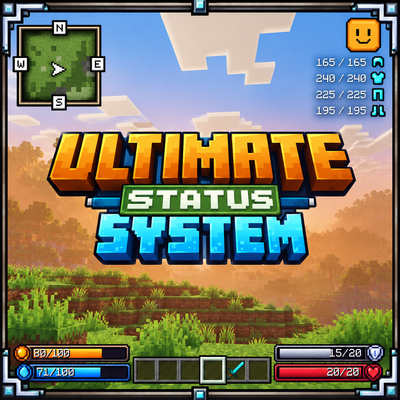
Ultimate Status System
Bedrock add-on listed for Minecraft 1.21–26.x (behavior + resource pack). File opened and checked on 1 Nov 2026; installs from the MC Bedrock Mods app on Android.
A full survival HUD for Minecraft Bedrock: food and water bars, health and armor bars, a live minimap, a health-reactive face icon, armor durability…
⬇ Download on CurseForge
Ultimate Status System replaces the vanilla hunger and status area with a custom HUD, and adds a thirst system, a minimap and mob health tags. It comes as two packs that work together. The Behavior Pack runs the survival logic and the Resource Pack draws the interface. Enable both packs in the same world.
🍖 Food & Water Survival System

- Food and Water• Two separate stats from 0 to 100, shown as an orange food bar and a blue water bar with exact numbers (like
25/100) in the bottom-left, level with the hotbar. - Natural Drain• Food lasts about 37 minutes and water about 26 minutes from full when you stand still.
- Activity Matters• Sprinting drains both stats 2.2× faster and swimming 1.4× faster. Water drains an extra 1.6× in the Nether.
- Starvation and Dehydration• At 0 food or 0 water you take 1 damage every 5 seconds until you eat or drink.
- Fresh Start• Food and water reset to 100 when you respawn. Your values are saved per player, so they carry over between sessions.
🥩 Eating & Drinking
- 40+ Foods Supported• Each item restores its own food and water amounts. Cooked meat fills the most food, and juicy items also give water: melon slice, sweet berries, glow berries, stews, honey bottle and golden apples.
- Dedicated Drinks• Potions (including water bottles) restore 25 water. Milk buckets restore 30.
- Nothing to Learn• Eat and drink normally. The bars update as soon as you finish using the item.
❤️ Health & Armor Bars

- Health Bar• A red bar with a heart icon in the bottom-right, showing current and max health (
15/20). It supports extended max health from effects and add-ons, up to 999. - Armor Bar• A grey bar with a shield icon that counts the points of your equipped armor, from leather to netherite. The turtle helmet counts too.
- Hotbar Aligned• Both groups of bars sit level with your hotbar. The hotbar stays vanilla, and the vanilla hearts, armor and hunger icons are hidden so nothing is doubled up.
🙂 Face Indicator
A face icon in the top-right changes with your health:
- Happy• above 60% health

- Normal• 30–60% health

- Weak• below 30% health

🛡️ Armor Durability Readout
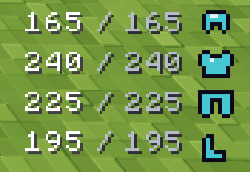
Small current/max durability numbers (212/363) show for each equipped piece, with a helmet, chestplate, leggings and boots icon. Empty slots stay hidden, so you can check your gear without opening your inventory.
🗺️ Realistic Minimap & Compass
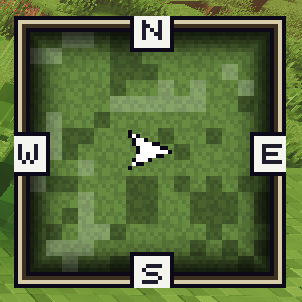
- Live Terrain Map• A 15×15 map of the area around you (about 45×45 blocks), always north-up and refreshed about once a second.
- Realistic Look• The map reads each block’s material and colors it: grass, foliage, sand, red sand and terracotta, dirt and wood, stone, deepslate and obsidian, snow and ice, and Nether terrain.
- Height Shading• Slopes and cliffs get light and dark shading, so hills and valleys stand out.
- Water and Lava• Shallow and deep water are shown separately, and lava is marked.
- Direction Frame• An N/E/S/W frame surrounds the map, with an arrow showing which of 8 directions you’re facing.
👾 Mob Health Display
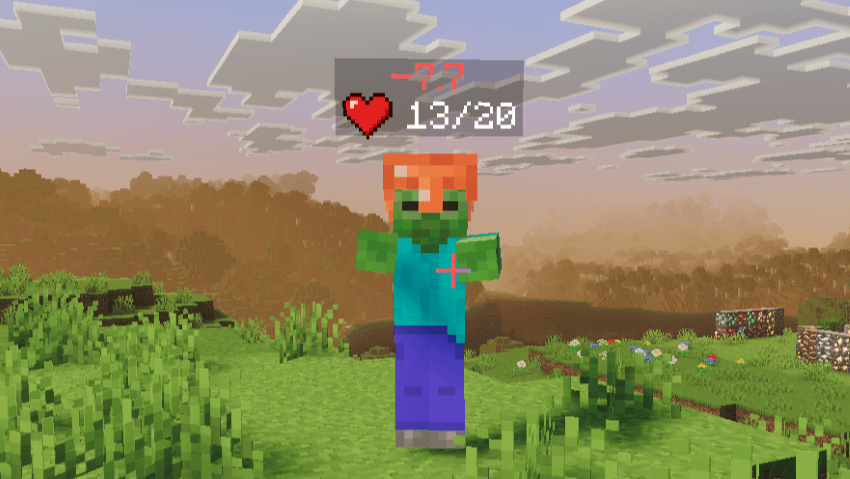
- Heart + Number• Look at any mob (up to 24 blocks away) to see a heart icon with its exact health above it (
♥ 31/40). - Damage and Heal Numbers• A red
-5or green+4floats briefly above the mob when its health changes. - Stays After a Hit• Health stays visible for about 3 seconds after you hit a mob, so you can follow a fight.
- Clean Tags• The mob’s original name tag is restored when you look away, and armor stands and other players are skipped by default.
⚙️ How It Works
The Behavior Pack uses the Script API to track each player’s food, water, health, armor and surroundings, and sends that data to the Resource Pack’s custom HUD screen, which draws every bar, icon and minimap cell. Stats are saved per player with the world, and the Behavior Pack lists the Resource Pack as a dependency so both activate together.
✅ Installation
- Import both packs: Ultimate Status System (Resource Pack) and Ultimate Status System BP (Behavior Pack).
- Activate both in your world.
- Join the world and the HUD appears.
Requirements: Minecraft Bedrock 1.21.0 or newer. Other packs that rewrite hud_screen.json may conflict with the custom HUD.
- Edition: Minecraft Bedrock
- File type: .mcpack or .mcaddon
- Minecraft versions listed: 1.21.51, 1.21.94, 1.21.61
- How to install: Download the .mcpack or .mcaddon file. → Open it — Minecraft imports it. → In your world: Behavior Packs → Available → Activate, then the same under Resource Packs.
- Where to get it: Opens on CurseForge — not every file is mirrored on our own servers.
Install steps are the general flow for this file type — How to install Minecraft Bedrock addons & mods walks through it step by step.
- Pack type: .mcaddon — behaviour and resource pack in one file
- Manifest requires Minecraft 1.21.0 or newer
- Complete pack — everything it depends on is inside the file
- Download size: 3.5 MB
- Download link checked 1 Nov 2026 — working
These come from our own check of the pack file, not from the source page.