
Customizable Skin Effects
Java resource pack listed for Minecraft 26.x. Downloads from the MC Java Mods app on Android.
Add blinking eyes, custom damage flashes, rainbow colors, and glowing pixels to your skin in vanilla Minecraft.
⬇ Download on Modrinth


Enhance your Minecraft Skin with bilking eyes animation, glow effects, and custom color effects.
No mods or client loaders (Forge, Fabric, Quilt) required!
This is just a standard Vanilla Resource Pack that uses Minecraft's own built in shaders. It comes with a small web editor (HTML) inside of the zip-file, so you don't have to worry about manually editing the confusing data pixels which this shader relies on.
Images of the effects in action


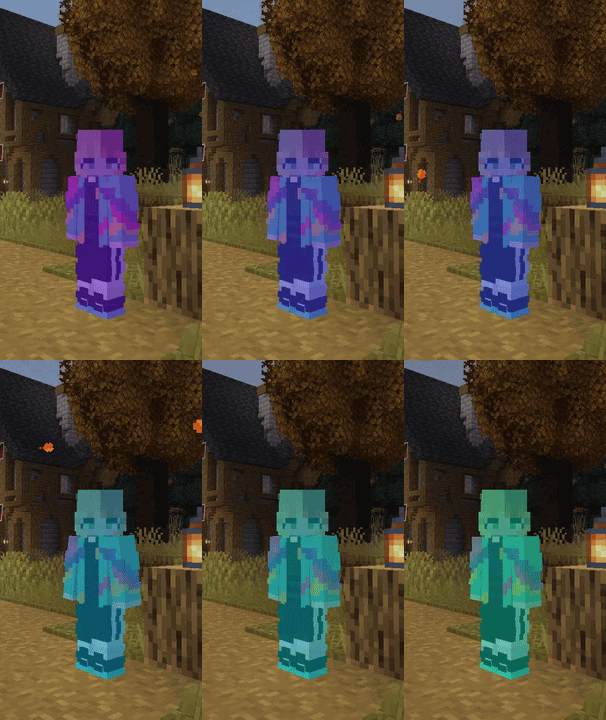
Custom Hurt Flashes Emissive Glowing Parts Eye blinking animation Rainbow/Jeb_ full tint
All the Features
Blinking Eyes: Give your Minecraft skin a natural eye-blink animation with adjustable delay.
Rainbow Effect (Jeb_): Cycles smooth thru the rainbow colors across your entire skin, or just your inner or outer layer.
Custom Hurt Flashes: Swap out the standard red damage flash for whatever color you want when taking damage.
Glowing Pixels: Pick specific pixels on your skin (like eyes, magic runes, or clothing parts) that will stay bright in pitch-black caves, with customizable glow strength. (It does not emmit lights to brighten your surroundings)
Install and usage guide
Unzip the Download: Open the downloaded zip folder.
Open the Web Editor: Double-click the included skin-editor.html file to open the skin editor right in your web browser. (This allows you to add or edit this shaders specific features to your skin texture file)
Pick Your Effects: Pick your skin file at step 1 in the editor, turn on the features you want, and download your updated skin image.
Upload Your Skin: Upload the saved PNG file on Minecraft.net or in the official Minecraft Launcher like you always do.
Turn On the Pack: Copy the resource pack in your game's resource pack folder, activate it in-game, and you're good to go! (The HTML can stay in the folder, for later adjustments)
Additional Infos
No Glitches for Others: If another player isn't using this resource pack, your skin will still look completely normal to them without any weird or broken pixels showing up.
Standard Java Compatibility: Works on unmodded, pure Vanilla Minecraft Java Edition.
Visible to Other Pack Users: Anyone else using this resource pack will see your custom skin effects exactly as you set them up.
Compatibility Issues: Since this is a vanilla shader, Sodium/Iris might overwrites this and renders some effects of it useless. To use core shaders with Iris, there are additional mods to fix that. (not yet tested with OptiFine)
- Edition: Minecraft Java
- File type: .zip (resource pack)
- Minecraft versions listed: 26.1, 26.1.1, 26.1.2
- How to install: Download the .zip resource pack — do not unzip it. → Put it in .minecraft/resourcepacks. → Enable it in Options → Resource Packs.
- Where to get it: Opens on Modrinth — not every file is mirrored on our own servers.
Install steps are the general flow for this file type — How to install Minecraft Java resource packs walks through it step by step.
- Downloads as §eMatzes Custom Skin Shader.zip
- Download size: 10 KB
- Download link checked 2 Nov 2026 — working
These come from our own check of the pack file, not from the source page.