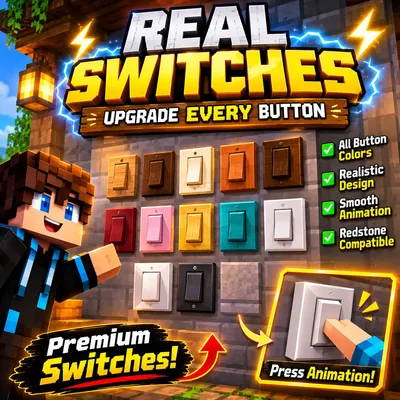
Real Switches
Bedrock add-on listed for Minecraft 1.21–26.x (behavior + resource pack). File opened and checked on 2 Nov 2026; installs from the MC Bedrock Mods app on Android.
Transform Minecraft's ordinary buttons into stylish, realistic electrical rocker switches with unique colors and premium designs!
⬇ Download on CurseForge


⚡ REAL SWITCHES
Upgrade Every Button!
Give your Minecraft builds a modern electrical makeover with beautifully designed modular rocker switches.
✨ Bring Your Walls to Life!
Why settle for ordinary buttons when you can give your builds a stylish, modern look? Real Switches transforms the appearance of vanilla Minecraft buttons into premium electrical switch designs inspired by modern interiors.
🎨 Unique Designs & Colors
- Oak – Natural wooden finish
- Spruce – Deep brown finish
- Birch – Elegant light finish
- Jungle – Tropical wood appearance
- Acacia – Warm orange-brown finish
- Dark Oak – Rich dark wood appearance
- Mangrove – Reddish wood finish
- Cherry – Beautiful pink finish
- Bamboo – Golden natural finish
- Crimson – Deep crimson appearance
- Warped – Stylish turquoise finish
- Stone – Premium white modular switch
- Polished Blackstone – Modern charcoal-black switch
⚡ Features
- Realistic electrical rocker-switch designs
- Different appearances for vanilla button variants
- Modern modular switch aesthetics
- Designed for creative building and interior decoration
- Lightweight and optimized assets
- Vanilla redstone behavior intended to be preserved
🏡 Perfect For
Modern houses, kitchens, bedrooms, offices, luxury interiors, redstone builds and creative architectural projects.
📦 Installation
- Download the addon file.
- Open the downloaded file with Minecraft Bedrock Edition.
- Activate the Resource Pack in your world's settings.
- Enter your world and explore the switch designs.
ℹ️ Compatibility
Target Version: Minecraft Bedrock Edition 1.21.100
Actual supported button variants, animations and redstone compatibility depend on the final tested addon build.
Upgrade Your Builds!
Small details make beautiful worlds. Give every button a brand-new look with Real Switches!
- Edition: Minecraft Bedrock
- File type: .mcpack or .mcaddon
- Minecraft versions listed: 1.21.124, 1.21.130, 1.21.132
- How to install: Download the .mcpack or .mcaddon file. → Open it — Minecraft imports it. → In your world: Behavior Packs → Available → Activate, then the same under Resource Packs.
- Where to get it: Opens on CurseForge — not every file is mirrored on our own servers.
Install steps are the general flow for this file type — How to install Minecraft Bedrock addons & mods walks through it step by step.
- Pack type: .mcaddon — behaviour and resource pack in one file
- Manifest requires Minecraft 1.21.120 or newer
- Complete pack — everything it depends on is inside the file
- Download size: 92 KB
- Download link checked 2 Nov 2026 — working
These come from our own check of the pack file, not from the source page.