
Glyphwork
Java mod listed for Minecraft 26.x. Downloads from the MC Java Mods app on Android.
Clickable pixel GUIs inside vanilla dialogs for Paper - YAML menus for admins, an API for developers. No client mod.
⬇ Download on Modrinth


Clickable, pixel-positioned GUIs inside vanilla Minecraft dialogs — no client mod.
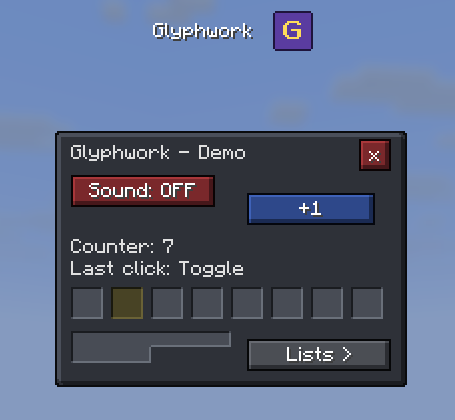
Glyphwork renders whole screens (panels, buttons, lists, grids, text) into the dialog screen that Minecraft has had since 1.21.6. Players only need a resource pack, which Glyphwork generates and sends by itself. Everything is clickable exactly where it is drawn.
For whom
- Server admins: describe menus in YAML files (buttons that run commands, open other menus or ask for input, sliders, checkboxes, choices and forms, PlaceholderAPI, a command per menu, conditions, templates, variables, tabs, scroll panes, cooldowns, lists of online players, worlds, RSS feeds or JSON web APIs, menus that refresh themselves) - no coding. See the menu guide, or build them with the mouse in the menu designer.
- Plugin developers: build screens with the Java API.
# plugins/Glyphwork/menus/warps.yml  ->  /warps
title: "<gold>Warps"
command: warps
elements:
  - type: button
    x: 8
    y: 24
    width: 72
    height: 16
    text: "Spawn"
    tint: "#50E050"
    actions: ["player: spawn", "close"]
Features
- Scene API for plugin developers: panels of any tile shape, labels, buttons, invisible hitboxes, lists and grids with automatic paging, tooltips, colors, per-player state, navigation (open / back / reopen / close), tabs, scroll panes, progress bars, own pictures, big player heads, text with bold / italics / underline, sliders, checkboxes and choice buttons drawn from the skin, and text input or whole forms (text, slider, checkbox, choice) through small native dialogs. Stable from 1.0 on: no breaking changes within 1.x.
- Item icons for 1595 items in grids, buttons, lists and menus, drawn from the textures every client already has. Icons follow your server's resource pack: replaced textures are measured, and the pack's own items (
myserver:ruby) work as icons. Player heads as small 8 x 8 icons (head:Steve), e.g. in a list of online players. Stack counts at the icon like in the inventory. - Pixel-exact clicks, also off the 9 px text grid.
- Skins: frames are autotiled from tiny sheets, so any shape joins seamlessly. Three skins are built in (vanilla, dark, parchment); make your own with the browser-based [skin editor] (https://flyingfinger1.github.io/Glyphwork/).
- Menu designer in the browser: place elements with the mouse, edit forms and variables, try the menu out and download the YAML file. With your own client jar loaded it shows the real item icons and font (read only in your browser).
- Example plugin to copy from: a small trader built against the API, attached to every release.
- Resource pack handled for you: generated on start, stable hash (no re-downloads), served by a built-in web server, written to disk for your own web server / CDN, or merged into the pack your server or proxy sends.
- Plain dialog: players who decline the pack, and Bedrock players through Geyser, get a native dialog built from the same screen (or an own plain view of the menu).
- Display mode per player (full / without icons / plain) for players whose own resource pack tears the menus:
/glyphwork display, or controlled by your own system through the API. - English and German messages and commands, picked per player from the game language; edit the texts or add languages in
plugins/Glyphwork/lang/. /glyphwork reloadapplies config and skin changes and sends the new pack to everyone online.
Setup
- Put the jar into
plugins/of a Paper 26.3 server (Java 25) and start it. - In
plugins/Glyphwork/config.ymlsetpack.urlto an address your players can reach (built-in server: openpack-server.port; orpack.hosting: externalwith your own web server). /glyphwork reload, then/glyphwork test(demo) or/glyphwork menu example(example menu;beispielon German servers).
For developers
Scene settings = Scene.builder("myplugin:settings", 176, 96)
    .background()
    .add(Label.of(8, 7, "Settings"))
    .add(Button.of(8, 24, 80, 16)
        .text(v -> soundOn(v.player()) ? "Sound: ON" : "Sound: OFF")
        .onClick(c -> { toggleSound(c.player()); c.reopen(); }))
    .build();
Glyphwork.get().open(player, settings);
depend: [Glyphwork], compile against glyphwork-api from the
GitHub release.
Documentation: API ·
skin format ·
how it works.
Limits
- Paper 26.3 only for now. Parts marked experimental (tabs, scroll panes, web sources, the own plain view, Bedrock behaviour) may still change in a minor version.
- Text and icons are always drawn on top of frames; blocks show one face (no 3D), items drawn by special renderers (chests, beds, banners, shields) have no icon; player heads are 8 x 8 and sit on the 9 px text grid (elements with a head move by up to 4 px).
The technique goes back to a public description by the developer of the HugoSMP server; Glyphwork is an independent, MIT-licensed implementation.
- Edition: Minecraft Java
- File type: .jar
- Minecraft version listed: 26.3
- How to install: Install the matching mod loader (Forge, Fabric or NeoForge) for your Minecraft version. → Download the .jar. → Put it in the .minecraft/mods folder and launch that loader profile.
- Where to get it: Opens on Modrinth — not every file is mirrored on our own servers.
Install steps are the general flow for this file type — How to install Minecraft Java mods & modpacks walks through it step by step.
- Ships as Glyphwork-1.0.0.jar — drop this file into the mods folder
- Download size: 430 KB
- Download link checked 5 Nov 2026 — working
These come from our own check of the pack file, not from the source page.