
Death Outcomes
Java mod listed for Minecraft 1.21. Downloads from the MC Java Mods app on Android.
⬇ Download on Modrinth





Trophies, tracking compasses, and meaningful consequences for player deaths in Minecraft.
Overview
Death Outcomes is a lightweight, server-friendly Minecraft mod that introduces meaningful rewards, trophies, and tracking mechanics when players die:
- Player Head Drops - Slain players drop authentic player heads preserving their exact skins, usernames, and 3D hat layers.
- Smart PvP Validation - Detects both direct melee combat and indirect projectile/potion kills while filtering out accidental environmental deaths and self-damage.
- Player's Compass - Craft an enchanted compass bound to any player head that tracks the target player live across the world, even retaining their coordinates when offline.
- 100% Server-Side - Only required on the server. Players can join using standard vanilla Minecraft clients without installing any client-side mod or resource pack.
Features
1. Player Head Trophies
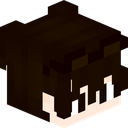 Player Head |
- Authentic Profile Resolution: Heads store the player's profile data via Minecraft's Data Component system, ensuring the head renders identically to the fallen player's actual skin.
- Combat Validation:
- Direct Kills: Swords, axes, fists, and direct melee weapon strikes.
- Indirect Kills: Bows, crossbows, tridents, lingering potions, splash potions, thrown projectiles, fireworks, or indirect magical damage originating from another player.
- Suicide and Environment Protection: Self-inflicted deaths (such as falling, drowning, or harming yourself with an arrow or firework) will not drop heads when PvP restriction is active.
- One-Time Head Drop Option: Can be configured so each player's head can only drop once ever in the world's lifetime, turning heads into ultra-rare bounty trophies.
2. Player's Compass (Tracking Compass)
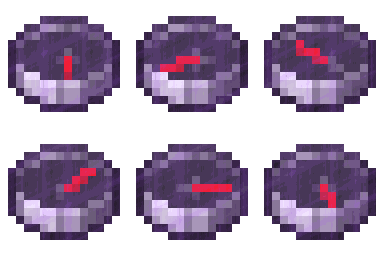
Player's Compass
Epic Rarity - Enchanted Glint - Real-time Target Tracking
Combine a standard Compass with any Player Head in any 2x2 or 3x3 crafting grid to craft a Player's Compass:
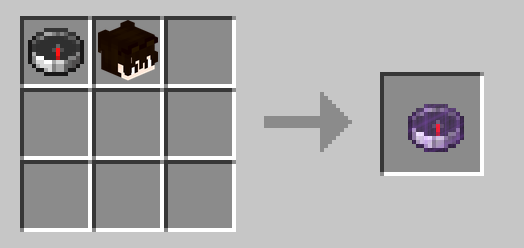
Crafting Recipe: Compass + Player Head = Player's Compass
- Live Position Tracking: Points continuously toward the target player's current location in real-time.
- Offline Location Persistence: If the tracked player disconnects from the server, the compass seamlessly retains their last-known position and dimension.
- Cross-Dimension Handling: If the tracked player is in a different dimension, the needle spins randomly until they return or you enter the same dimension.
- Head Recovery / Dismantling (Optional): When enabled in server settings, placing a Player's Compass alone into any crafting grid dismantles it and returns the original player head:
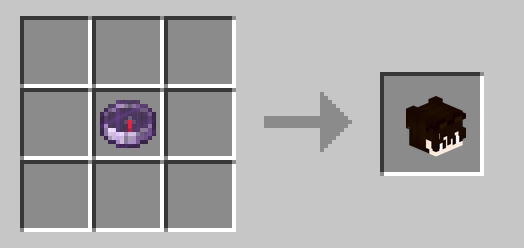
Dismantle Recipe: Player's Compass = Player Head
Configuration
Settings are saved per world at:
<world_directory>/serverconfig/death_outcomes-server.toml
[player_head_drops]
    # Whether players should drop their head upon death.
    # Default: true
    dropPlayerHeadOnDeath = true

    # Whether player heads should only drop if the death was caused directly or indirectly by another player.
    # If false (and dropPlayerHeadOnDeath is true), heads will drop on any death.
    # Default: true
    dropPlayerHeadOnlyWhenKilledByPlayer = true

    # Whether a player's head should only ever drop once. Once dropped, subsequent deaths will not drop their head.
    # Default: false
    dropPlayerHeadOnlyOnceEver = false

[tracking_compass]
    # Whether crafting a tracking compass by combining a compass and player head is enabled.
    # Default: true
    enablePlayerTrackingCompassRecipe = true

    # Whether placing a Player's Compass in a crafting grid dismantles/recovers the player's head back.
    # Default: false
    enablePlayerCompassDismantleRecipe = false
Links and Community
- Documentation & Wiki: https://github.com/yigit-guven/Death-Outcomes/wiki
- Discord Community: https://discord.gg/aPk7Qs5d4H
- Issue Tracker: https://github.com/yigit-guven/Death-Outcomes/issues
License
This project is licensed under the GNU Lesser General Public License v3.0 (LGPL-3.0-only).
- Edition: Minecraft Java
- File type: .jar
- Minecraft version listed: 1.21.1
- How to install: Install the matching mod loader (Forge, Fabric or NeoForge) for your Minecraft version. → Download the .jar. → Put it in the .minecraft/mods folder and launch that loader profile.
- Where to get it: Opens on Modrinth — not every file is mirrored on our own servers.
Install steps are the general flow for this file type — How to install Minecraft Java mods & modpacks walks through it step by step.
- Ships as death_outcomes-1.0.1.jar — drop this file into the mods folder
- Download size: 145 KB
- Download link checked 11 Nov 2026 — working
These come from our own check of the pack file, not from the source page.