
ModsJava
Toggle Item Frame
Java mod listed for Minecraft 26.x. Downloads from the MC Java Mods app on Android.
⬇ Download on Modrinth

Toggle Item Frame is a client mod that lets you hide item frames while still showing the items in the frame and allows you to click through them!
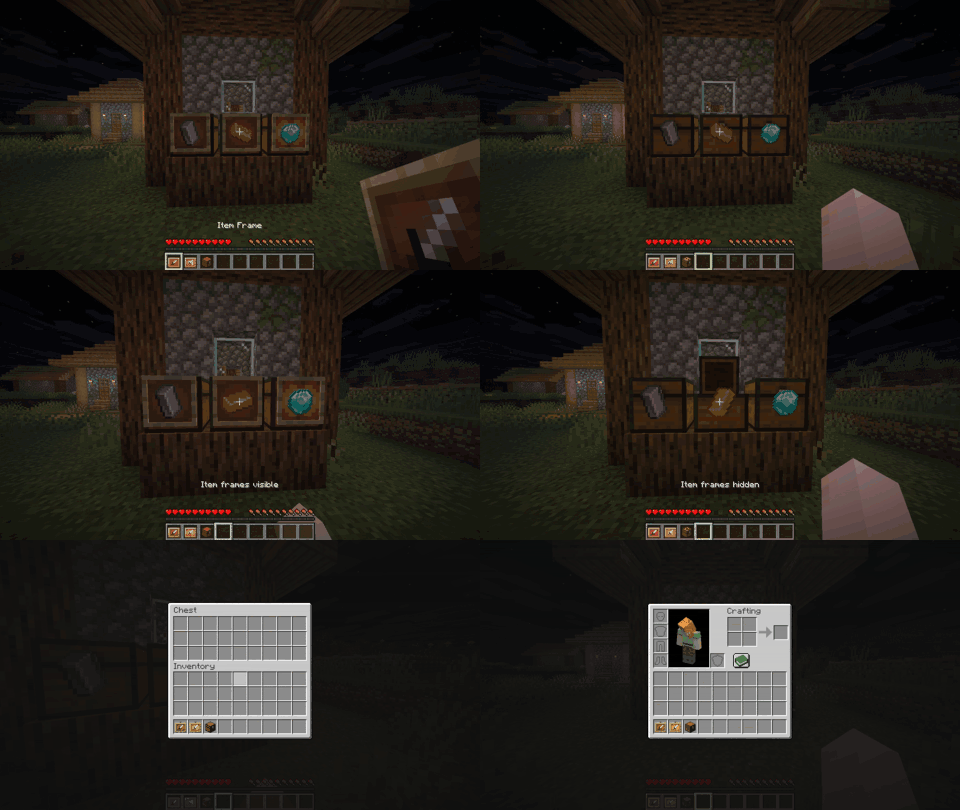

General
- Enable Mod Toggle the mod on/off
- Show When Holding an Item Frame Displays item frames while holding an item frame or glow item frame is in either hand
- Ignore Frame Hitbox When Right Clicking Allows for right clicks to ignore item frames; visible frames still use normal vanilla interaction
Keybinds
- Toggle Visibility:
H - Open Mod Settings:
I
Note: These are the default keybinds. You can change them in Options > Controls > Key Binds, or in the mod's Key Binds settings page.
Dependencies
Quick facts
- Edition: Minecraft Java
- File type: .jar
- Minecraft version listed: 26.3
- How to install: Install the matching mod loader (Forge, Fabric or NeoForge) for your Minecraft version. → Download the .jar. → Put it in the .minecraft/mods folder and launch that loader profile.
- Where to get it: Opens on Modrinth — not every file is mirrored on our own servers.
Install steps are the general flow for this file type — How to install Minecraft Java mods & modpacks walks through it step by step.
File checked by MCModsHub
- Ships as toggle_item_frame-fabric-26.3-1.0.0.jar — drop this file into the mods folder
- Download size: 299 KB
- Download link checked 11 Nov 2026 — working
These come from our own check of the pack file, not from the source page.