
ModsJava
Horizon Gear Wheel Mod (26.3, 1.20.1) – Switch Weapons and Armor Instantly
Java mod listed for Minecraft 1.20–26.x. Downloads from the MC Java Mods app on Android.
⬇ Download
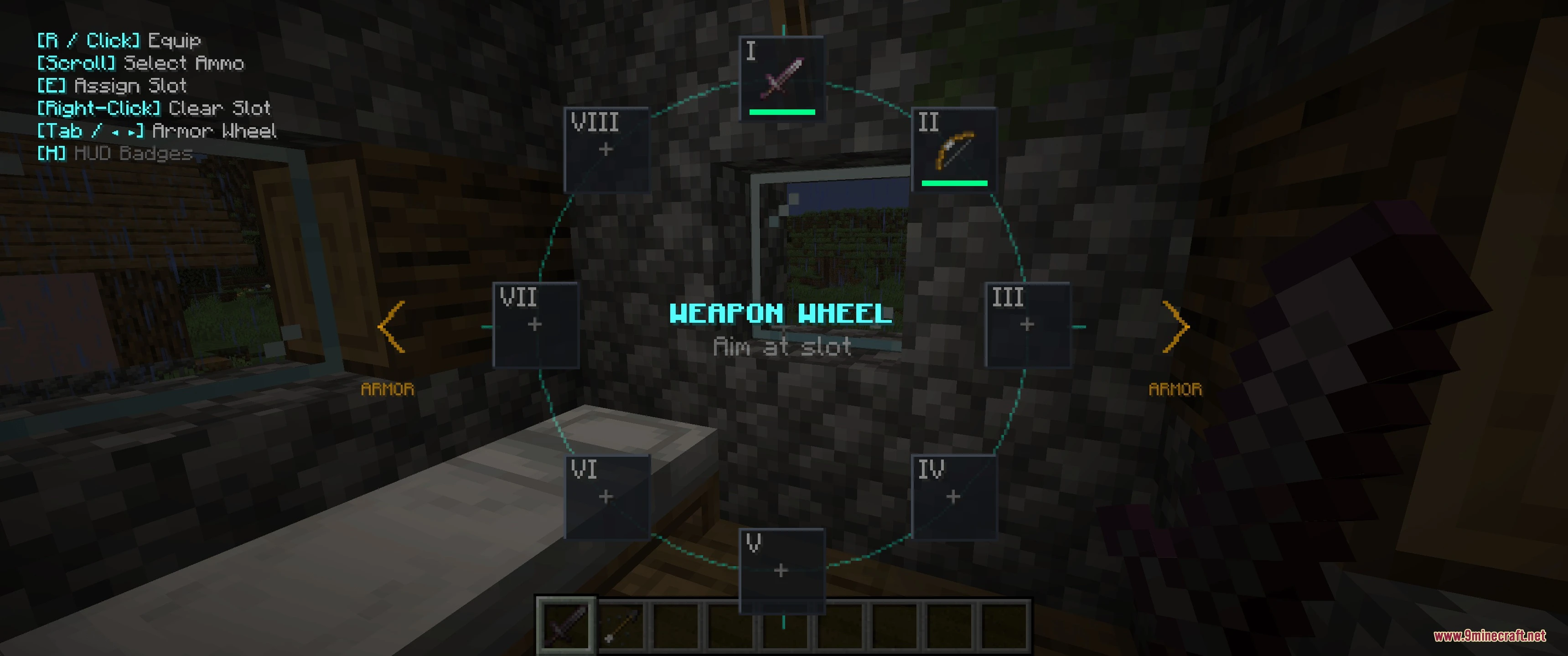


Horizon Gear Wheel Mod brings a tactical radial menu to the game for fast weapon and armor switching. Inspired by Horizon Forbidden West, this mod adds circular selection wheels that let you change items during combat without opening your inventory. It helps you manage your gear quickly when fights start.
Features:
- Dual radial wheels give you eight slots for weapons and eight slots for armor.
- Weapon wheel equips your chosen item to hotbar slot one and matching ammo to slot two.
- Armor wheel equips helmets, chestplates, leggings, boots, shields, and totems directly into equipment slots.
- Smart arrow cycling lets you hover over any bow or crossbow to view and switch between all inventory arrows and fireworks.
- Instant elytra quick-swap lets you press B to trade your chestplate for wings mid-air or before battle.
- Tactical slow-motion slows down time in singleplayer when the wheel is open and stays fully compatible with multiplayer servers.
- Minimalist HUD badges show active weapons and ammo above the hotbar and toggle on or off with H.
- Multilingual support includes full English and German options.
How to Use:
- Hold R to open the weapon selection wheel.
- Hold G to open the armor selection wheel.
- Press B to instantly swap your chestplate and elytra.
- Press H to toggle the on-screen HUD badges.
- Press Tab or click the arrows in the GUI to switch wheel modes.
- Hover over a slot and press E or click an empty slot to assign an item from your inventory.
- Right-click on any slot to clear it.
Screenshots:
Horizon Gear Wheel Mod Download Links
Quick facts
- Edition: Minecraft Java
- File type: .jar
- Minecraft versions listed: 26.3, 1.20.1
- How to install: Install the matching mod loader (Forge, Fabric or NeoForge) for your Minecraft version. → Download the .jar. → Put it in the .minecraft/mods folder and launch that loader profile.
- Where to get it: In MC Java Mods, or directly above on this page.
Install steps are the general flow for this file type — How to install Minecraft Java mods & modpacks walks through it step by step.
File checked by MCModsHub
- Downloads as 547553.mcaddon
- Download size: 531 KB
- Download link checked 14 Nov 2026 — working
- Mirrored on our own servers — the download does not depend on the original host
These come from our own check of the pack file, not from the source page.