
ERYDON Metrakron
Java mod listed for Minecraft 1.18–26.x. Downloads from the MC Java Mods app on Android.
Independent startup and singleplayer loading timers that learn from your recent loads, with Quick Play support and a customisable stone and metal display.
⬇ Download on Modrinth



A loading timer that learns your Minecraft
ERYDON Metrakron measures Minecraft startup and singleplayer world loading, then learns from your recent completed loads to estimate the wait next time.
Its customisable display combines a clear timer with ERYDON stone backgrounds, three fonts and Bronze or Silver inlay.
Metrakron is a standalone, client-side Fabric mod.
A countdown based on your own loading times
Your first load displays LEARNING and counts elapsed time upwards.
Later loads count down from the average of your latest three completed measurements. Startup, individual worlds and launcher Quick Play keep their own relevant histories.
If loading exceeds the learned average, the display switches to RELEARNING LOAD TIME and shows the extra time elapsed. Cancelled and incomplete loads are excluded from future estimates.
Metrakron measures time independently of Minecraft’s progress bars and percentages. Its countdown is an estimate based on your own previous loads.
What it measures
- Startup: from the first visible Mojang loading screen until a usable menu or initial screen is ready.
- Singleplayer worlds: from opening a world until gameplay is ready.
- Launcher Quick Play: one continuous timer from startup into a singleplayer world when launched through a supported world shortcut, including CurseForge and Modrinth.
Quick Play keeps separate history for each save, so launching directly into a world does not distort your normal startup or world-opening estimates.
A world that finishes loading behind the pause menu counts as ready. Leaving Minecraft in the background therefore does not add your waiting time to later estimates.
Make it your own
With the matching Mod Menu installed, open:
Mods → ERYDON Metrakron → Configure
Choose from:
- 27 ERYDON stone backgrounds, with pale Glacium as the default.
- Three fonts: classical Cinzel, clean Lato or monospaced Space Mono.
- Bronze or Silver inlay.
- Eight positions: any corner or the centre of any window edge.
The preview updates immediately. Save remembers your choices, Cancel discards edits and Reset restores the defaults.
Text colour and a contrasting shadow adapt automatically for readability. Timer digits stay in fixed-width positions, and the countdown bar follows Metrakron’s own learned estimate.
Mod Menu is optional; the timer works without it.
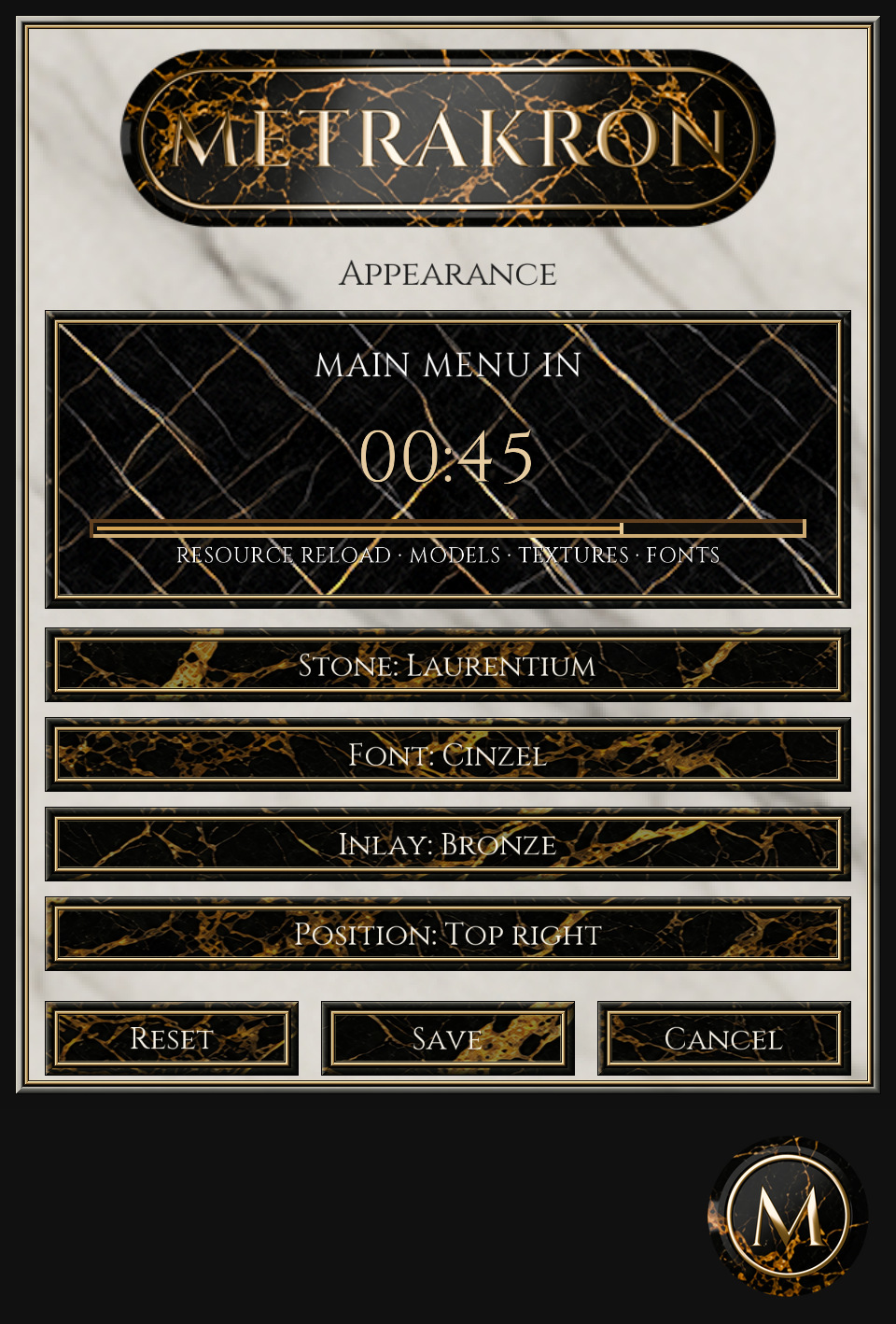
The appearance menu with Laurentium, Cinzel and bronze. The countdown shown is a menu preview.
A timer that can keep moving during freezes
On supported Windows, macOS and Linux/X11 desktops, a lightweight companion window keeps the visible clock moving when Minecraft’s window stops responding.
It starts and exits with Minecraft and follows your selected position as the game window moves or resizes.
Linux/Wayland and desktops without the required window support use the in-game display instead. Measurement continues, although that display can only update when Minecraft renders another frame.
One universal download
Install the complete universal JAR and the matching Fabric API. Fabric selects the adapter for your Minecraft version automatically.
| Minecraft version | Java | Minimum Fabric Loader |
|---|---|---|
| 1.18.2, 1.19.2, 1.19.4, 1.20.1, 1.20.4 | 17 | 0.16.10 |
| 1.20.6, 1.21.1, 1.21.4 | 21 | 0.16.10 |
| 1.21.8 | 21 | 0.16.13 |
| 1.21.11 | 21 | 0.17.3 |
| 26.1.2 | 25 | 0.18.4 |
| 26.2 | 25 | 0.19.3 |
Support applies to these exact releases.
Installation
- Install Fabric Loader and Fabric API for your Minecraft version.
- Place the universal Metrakron JAR in your client’s mods folder.
- Optionally install Mod Menu to customise the display.
- Keep the universal JAR intact; its internal adapters are not separate downloads.
Metrakron works independently of ERYDON, Themelios, Daedalon and their resource packs.
Local timing history
Timing history is stored locally in the game instance.
Startup measurements carry across changes within the same instance. World and Quick Play histories remain separate for each save, with only the latest three completed runs retained for each loading route.
Multiple clients sharing an instance preserve one another’s completed measurements.
Links and licence
- Source code
- Report an issue
- Oliver’s Minecraft Mods Restricted License 1.0
- Licensing notes and earlier grants
- Third-party notices
Earlier MIT and CC BY-SA permissions remain intact for material already supplied under those terms. Cinzel, Lato and Space Mono retain their separate font licences.
- Edition: Minecraft Java
- File type: .jar
- Minecraft versions listed: 1.18.2, 1.19.2, 1.19.4
- How to install: Install the matching mod loader (Forge, Fabric or NeoForge) for your Minecraft version. → Download the .jar. → Put it in the .minecraft/mods folder and launch that loader profile.
- Where to get it: Opens on Modrinth — not every file is mirrored on our own servers.
Install steps are the general flow for this file type — How to install Minecraft Java mods & modpacks walks through it step by step.
- Ships as metrakron-fabric-universal-1.1.0.jar — drop this file into the mods folder
- Download size: 44.4 MB
- Download link checked 19 Nov 2026 — working
These come from our own check of the pack file, not from the source page.