
AddonsBedrock
Better Faction Script (1.20) – MCPE/Bedrock Addon
Bedrock add-on listed for Minecraft 1.20 (behavior pack only). Needs Beta APIs. File opened and checked on 22 Sep 2026; installs from the MC Bedrock Mods app on Android.
⬇ Download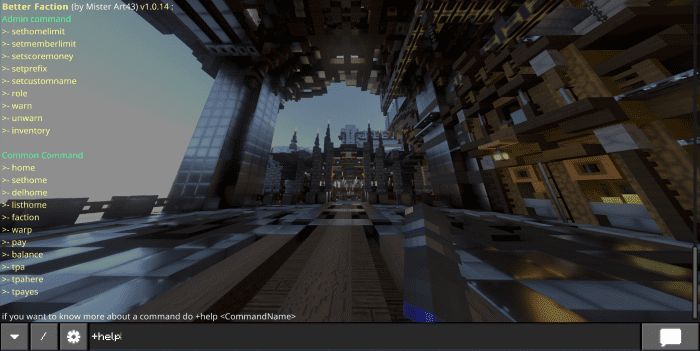



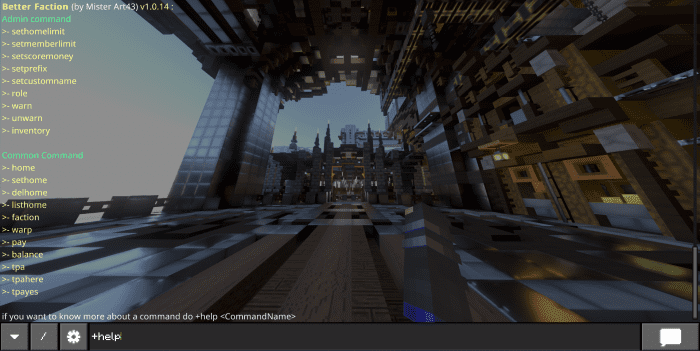
Better Faction Script is a powerful script that enhances the PVP faction server experience. It adds custom chat commands for setting homes, warps, factions, and more. It also allows you to customize the display, create private chat groups, and choose from different languages. To use this pack, you need to enable the API BETA Experimental feature. (Please note that this is still in development) Enjoy! This mod works on Xbox, PS4, w10, and pocket edition.


 Custom Chat : (ADMIN COMMAND)
Alias: role
Custom Chat : (ADMIN COMMAND)
Alias: role
 tags parameter: you can customize the color of the player name and his message by giving him a tag :
Features:
Command-List:
- do /tag @s add Admin
- tips: when you need to enter a playerName use @
ADMIN COMMAND
Setting command: Alias: sethl, sethomelimit+sethomelimit <number>define the default home limit a player has when he joins the map for the first time
+sethomelimit <playerName> <number>define the home limit of a specific player Alias : setml, setmemberlimit
+setmemberlimit <number>define the default member limit a faction has when it will be created
+setmemberlimit <factionName> <number>define the member limit of a specific faction. Alias: sets cm, sets money, setscoremoney
+setscoremoney <ScoreName>define the default money scoreboard (synchronize btw script and scoreboard) Alias : setpf, setprefix
+setprefix <prefix>define the default prefix when you use the command with the mod (NEVER ENTER a “/” !!!) Alias: section, set a custom name
+setsnswitch btw on and off the custom name feature (Warning: with the custom name you can’t do a command like always, here is an example: /tag “mister art43” add Admin for example if I create a faction named “fac” so my name will change and the valid command would be /tag “§6-Fac- §rmister art43” add Admin Alias: Seth, set home, setfactionhome
+setfh +setfh <factionName>define if the faction can use faction home (default on false). Alias : settpadelay, settd
+settd <number>edit the delay before a tpa request expired (in seconds) (default on 60 seconds)
Player Command
Alias: set home, sh+sethome <homeName>set a new home point at your current position (work in a different dimension) Alias: home, h
+home <homeName>teleport to your home Alias: del home, dh
+delhome <homeName>remove a home you have Alias: list home, homeliest, lh
+listhomelist all homes you have
+paylaunch the pay ui
+pay <playerName>send money to another player Alias: balance, bank
+bankshows how much money you have. Alias: to
+tpa <playerName>ask for a player to teleport to him. Alias: that, there
+tpahere <playerName>ask for a player to teleport him to you. Alias: pays, to accept
+tpayes <playerName>accept all tpa / there request. note: tpa request expire after 60 sec (connected or not) Alias: lang
+lang <yourLang>change the language of better faction note: supported language : en, es, fr, id, vi, pl
+chat allgo to the general chat
+chat f +chat factiongo in a private chat with your faction
+chat a +chat allygo in a private chat with your faction and other faction you have a relation with +f ally…
+chat <password>go in a private chat with every player who put in the same password
Alias: faction, f faction Command: Alias: create
+f create <factionName>create a new faction. Alias: quit, q
+f quitleave the faction. Alias : invite, invit, inv
+f invite <playerName> +f invite clear +f invite listinvite a player to join your faction Case Sensitive !!! (“mister art43” is not the same as “Mister Art43”). Alias: join, j
+f join <FactionName>for joining a faction. Alias: info, i
+f info +f info <factionName>show information about your faction or a specific faction if you enter the name Alias: set home, sh
+f sethomeset the faction home (only the leader can do that, only in the overworld). (if the admin activates this option) Alias: home, h
+f hometeleport you to the faction home (if the admin activates this option) (default coordinates are the location where the owner created the faction (only in the overworld)). Alias: k, kick
+f kick <playerName>kick a player from the faction.
+f list +f list <factionName>list all players + permission inside the faction. Alias: b, bank
+f bank add <number> +f bank remove <number>add or remove money to the faction bank (only the leader and co-leader can remove money). Alias: promote
+f promote <playerName>promote a player inside the faction (can only be used by the leader and co-leader) [visitor > member > co-leader> leader] Alias: demote
+f demote <playerName>demote a player inside the faction (can only be used by the leader and co-leader) [visitor > member > co-leader> leader]
Alias: warp, w Warp Command :
+wlaunch the warp ui (is not the same if you are an admin or not)
+w <WarpName>teleport you to a warp
+w add <WarpName>add a new warp at your current location Alias: list
+w listdisplay all warp (IF THE PLAYER HAVE ACCESS) Alias: close, open
+w close <warpName>turn on or off a warp (so the player won’t be able to use it when it’s off) Alias: message, msg
+w msgturn on or off the message. Alias: message, msg
+w msg <warpName>edit the message it displays when you use this warp Alias: delay
+w delay <warpName> <number>set the delay (seconds) before a player can use the warp again Alias: cmd, command, run command
+w cmd add “<warpName>” “<command>” +w cmd remove “<warpName>” “<command>” +w cmd clear “<warpName>” +w cmd list “<warpName>”add commands which will be executed by the player when he will use the warp Can Throw an error! Alias: access
+w access add allow <warpName> <tag> +w access remove allow <warpName> <tag> +w access add deny <warpName> <tag> +w access remove deny <warpName> <tag> +w access listmanage access on a warp with tag: allow tags: -if the player has the same tag so he is ALLOWED to use this warp deny tags: -if the player has the same tag he CAN’T use this warp (note: if there is no allow tag, everyone can use this warp, deny tag take priority on allow tag).
Admin command : note: to be an admin you need to do
/tag @s add Admin(It’s case-sensitive so admin is not the same as Admin) Alias: update
+updateif needed it will update the database (work for an upgrade or a downgrade version starting at 1.0.14) Alias: warn
+warn <playerName>add a warning to a player Alias: unworn
+warn <playerName>remove a warning to a player Alias: inventory
+inventory “<playerName>”show the inventory and the hotbar of a player (only work if the player is connected) Alias: tp
+tp <playerName>teleport you to the player (works with custom name) Alias: back
+backteleport you to the place before a tp (any tp from better faction command) Alias: admin
+admin add <password> “<playerName>” +admin remove <playerName> +admin listpush the player in the Admin database (the password need to be only a character without space) and work with +lock Alias: lock
+lockwill lock the Admin database and will remove anyone who tries to give itself the Admin tag and is not inside the Admin database it also avoid Admin player to be banned Alias: unban
+unban <playerName>unban the current player
Custom Chat : (ADMIN COMMAND)
Alias: role
+role add <roleName> +role remove <roleName>add or remove the role displayed when you talk in the chat.
tags parameter: you can customize the color of the player name and his message by giving him a tag :
/tag “mister art43” add colorName:§b /tag “mister art43” add colorMessage:§e
log tags : /tag @s add logallow you to see some logs from the script and more information on some commands when they are used.
/tag @s add chat_logallow you to see any private discussion in the world adding money thanks to the tags parameter :
/tag “<playerName>” add “money:<number>” /tag “<playerName>” add “setmoney:<number>”
/tag “mister art43” add “money:100”-> will add 100 money to mister art43
/tag “mister art43” add “money:-100”-> will remove 100 money to mister art43
/tag “mister art43” add “setmoney:100”-> will set at 100 money for mister art43 ban tag
/tag “<playerName>” add bankick the player until you unban him /!\the money can overflow and go more than a scoreboard can do (2 147 483 647) (modifié) Display Command: display-parser extension is recommended to consult to use it Alias: display
+display add <title|actionbar> <tag> “<text>” +display remove <id> +display list(+display list shows the id of each display) show a custom “set display” scoreboard for all players who have the tag note that you can switch between different tags to make multiple displays!
Installation Note:
- To upload the pack on realms you need to download the world, put the pack inside (don’t forget to enable Gametest framework) then upload the world with the pack inside.
Better Faction Script Download Links
For Minecraft PE/Bedrock 1.20
mcpack: Download from server 1 – Download from server 2
Quick facts
- Edition: Minecraft Bedrock
- File type: .mcpack or .mcaddon
- Minecraft version listed: 1.20
- How to install: Download the .mcpack or .mcaddon file. → Open it — Minecraft imports it. → In your world: Behavior Packs → Available → Activate, then the same under Resource Packs.
- Where to get it: In MCModsHub, or directly above on this page.
Install steps are the general flow for this file type — How to install Minecraft Bedrock addons & mods walks through it step by step.
File checked by MCModsHub
- Pack type: .mcaddon — behaviour and resource pack in one file
- Manifest requires Minecraft 1.20.0 or newer
- Needs Beta APIs switched on in the world settings
- Complete pack — everything it depends on is inside the file
- Download link checked 17 Jun 2026 — working
- Mirrored on our own servers — the download does not depend on the original host
These come from our own check of the pack file, not from the source page.