Chat-Name Colors + Ranks Addon (1.20) – MCPE/Bedrock Mod
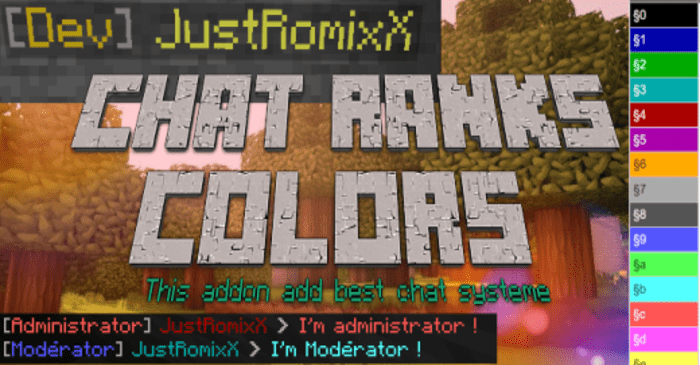
Chat-Name Colors + Ranks Addon is an MCPE mod that enhances the chat system by introducing ranks, chat/player name tag colors and ranks. This add-on is…
⬇ DownloadOpen in MCModsHubGet it on Google Play →Chat-Name Colors + Ranks Addon is an MCPE mod that enhances the chat system by introducing ranks, chat/player name tag colors and ranks. This add-on is suitable for both servers and private worlds.
Features:
One of the key features of this add-on is the introduction of ranks. You can add as many ranks as you want, and these ranks are visible in both the chat and the player’s name tag. This feature can be particularly useful for servers where different players have different roles or levels of authority.
Another significant feature is the ability to change the color of the player’s name tag and chat messages. This can be done by adding a tag starting with ‘nameColor:’ or ‘chatColor:’, followed by the desired color name or Minecraft color code. This feature adds a level of customization to the chat system and allows players to personalize their chat messages and name tags.
Detailed features:
Ranks Examples of chat with ranks and colors :
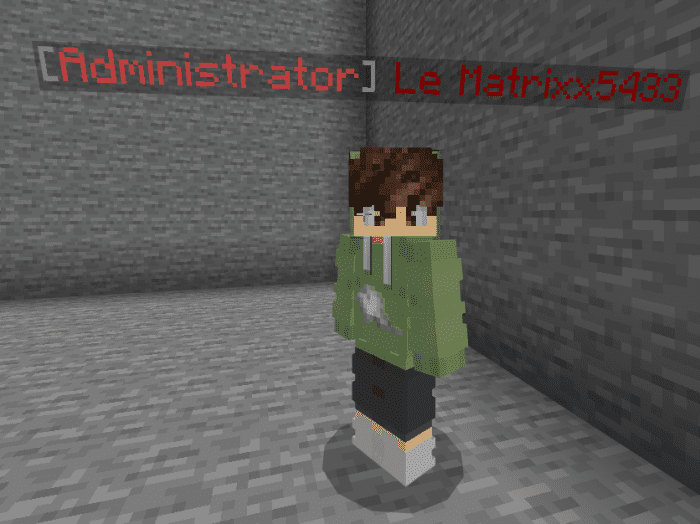
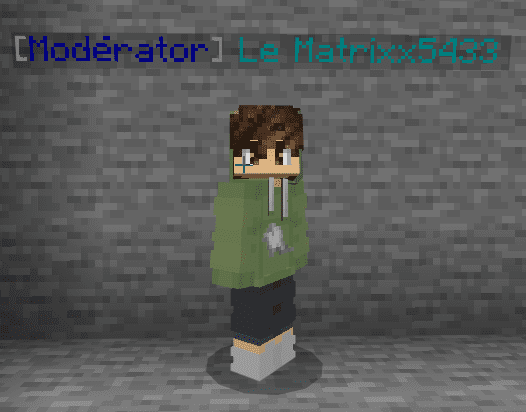
And like we see before, tags have in chat and pseudo :

You can also change the Pseudo Color of the player, with tag name color: red or nameColor:§c your in-chat pseudo, and nameTag(pseudo) will be colored in red
Ranks:
To add the rank you need to add a tag that starts with rank: (put the rank name after) (You can add rank as much as you want )

Name Colors:
To add a name / pseudo color you need to add a tag that starts with the name color: (put color name ex: red …. after or Minecraft color like §c or §1)

Or

Chat Colors:
To add chat message color you need to add a tag that starts with that color: (put color name ex: red …. after or Minecraft color like §c or §1)
(only one chatColor is taken into account)

Or

Mute :
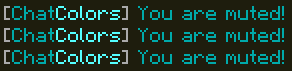
You can mute the player with the tag ‘mute’!

To unMute the player just remove the tag.

when he tries to send a message it’s made that :
CoolDown / ANTI SPAM:
You have an ANTISPAM system in chat!
It’s 0.7 seconds cooldown

COLORS CODES / NAMES :
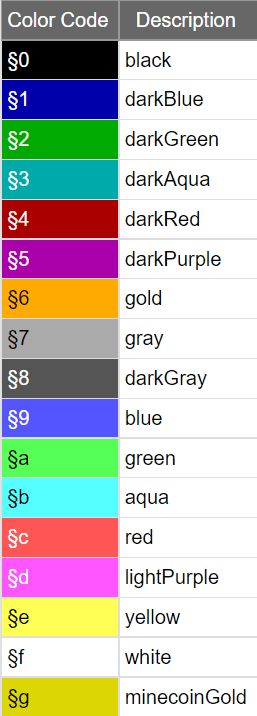
You can put these Color names or color codes for that color: and name color:
Gradients:
You can also put gradients with these names after chatColor: or name color:
For each gradient; we have 2 versions one random and one normal which stay the same everywhere, for the random, in the player nametag, it’s make flashing nametag with a yellow gradient
Yellow Gradient ->
- normal gradient name: name color: yellow gradient or chatColor: yellow gradient
- random gradient name: name color:randomYellowGradient or chatColor:randomYellowGradient
Examples:
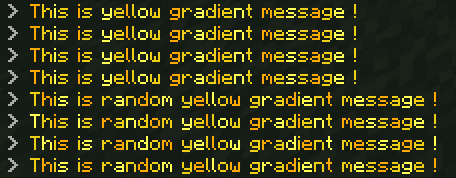
NameTag:


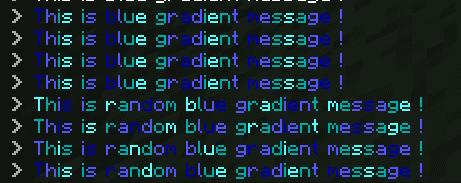
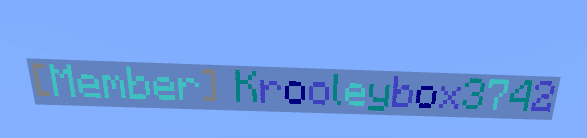
Blue Gradient ->
- normal gradient name: name color: blue gradient or chatColor: blue gradient
- random gradient name: name color:randomBlueGradient or chatColor:randomBlueGradient
Examples:

Black Gradient ->
- normal gradient name: name color: black gradient or that color: black gradient
- random gradient name: name color:randomBlackGradient or chatColor:randomBlackGradient
Examples:
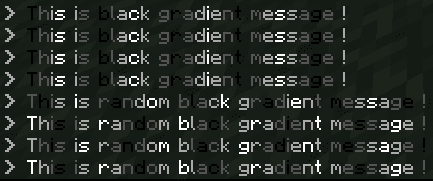


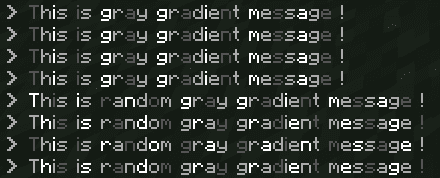
Gray Gradient ->
- normal gradient name: name color: gray gradient or chatColor: gray gradient
- random gradient name: name color:randomGrayGradient or chatColor:randomGrayGradient
Examples:


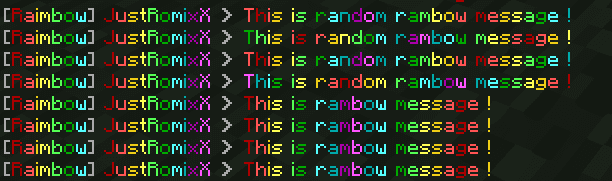
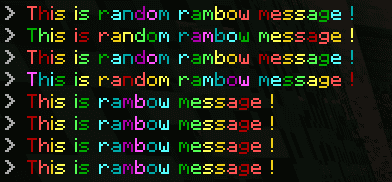
RAINBOW GRADIENT
you can also add a rainbow gradient with the tag :
normal rainbow gradient = name color: rainbow or chatColor: rainbow
random rainbow gradient = name color:randomRaimbow or chatColor:randomRaimbow
OTHER OPTIONS :
You can customize your Pseudo and your chat message with the tags:
Bold :
- name color: bold or nameColor:§l -> set your nameTag in bold type
- what color: bold or chatColor:§l -> Set your chat message in bold type
Italic :
- name color: italic or nameColor:§o -> set your nameTag in italic type
- what color: italic or chatColor:§o -> Set your chat message in italic type
Glitch :
- name color: glitch or nameColor:§k -> set your nameTag in glitch type
- what color: glitch or chatColor:§k -> Set your chat message in glitch type
PLAYER HEALTH :
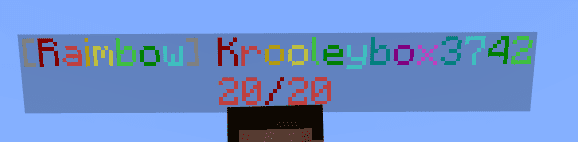
Now we can config the player nameTag with the tag config: health
If the player has this tag, it shows this (20/20 = player health):

PLAYER DIMENSION:
now we can config the player nameTag with the tag config: dimension
if the player has this tag, it shows this (<OverWorld> is the player dimension):

He will be shown on chat too :

Installation Note:
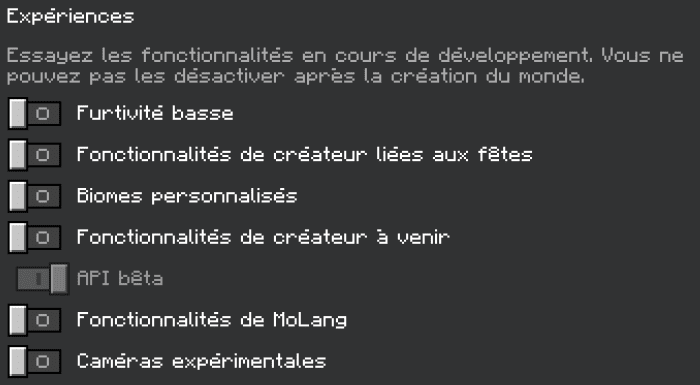
- You need to active API BETA (and allow cheat to add ranks/colors with /tag )
- If you have another custom command pack in your world you must need to put the pack before another script pack that uses chat commands!
Chat-Name Colors + Ranks Addon Download Links
For Minecraft PE/Bedrock 1.20
mcaddon: Download from server 1 – Download from server 2
- Pack type: .mcpack — a single pack
- Manifest requires Minecraft 1.19.0 or newer
- Needs Beta APIs switched on in the world settings
- Complete pack — everything it depends on is inside the file
- Download link checked 17 Jun 2026 — working
- Mirrored on our own servers — the download does not depend on the original host
These come from our own check of the pack file, not from the source page.